
Short answer
For iPhone and iPad, the best sheet music reader app comes down to one question: do you want to look at the page, or hear it? If your music is already PDFs and you need them on a stand, forScore is the pick. If you want the app to read your own printed page, play it, and answer questions about the bars you cannot play, Sheetly is the pick. PlayScore 2 is the closest alternative to Sheetly: faster, offline and on Android, with no coach.
Sheetly is the only iPhone and iPad app we know of where the AI coach has read the actual notes of the page you photographed, so a question about bar 12 gets an answer about your bar 12. It also publishes its accuracy benchmark with the method and a public test set, which no other app in this list does.
- Pages on a stand: forScore or Piascore. They display, organise and annotate PDFs, and that is the whole job.
- Hear your own printed music: Sheetly (iPhone, iPad) or PlayScore 2 (iOS, Android). Both photograph a page and play it.
- Ask about the bars you cannot play: Sheetly is, as far as we know, the only app where a coach has read your scanned page and answers by bar number.
We make Sheetly. We have tried to be fair: the PDF readers are the right tool for a large share of the people who search this phrase, and we say so plainly. Anything we state about another app is taken from that app’s own materials.
Two meanings of “reader”
A “sheet music reader” is either an app that shows you a page, or an app that understands the page. The first kind is a PDF viewer built for musicians: it turns pages, keeps a library and lets you write in fingerings. The second kind performs optical music recognition on a photograph, turns the ink into notes, and can then play, slow down, loop and export the music.
People searching for a reader app are split roughly down this line. A church organist with forty anthems in PDF wants the first kind. A parent whose child brought home a band part, or an adult beginner trying to hear what a bar is supposed to sound like, wants the second. Most comparison lists mix the two together and end up recommending a page-turner to someone who actually wanted a play button, or the reverse.
So the first question is not “which app is best?” but “do you want to look at the page, or hear it?” Once that is settled, the choice inside each category is fairly short.
PDF readers for the stand
If you already have your music as PDFs and need it on a stand, forScore and Piascore are the established iPad and iPhone readers. forScore is a paid library and annotation tool; Piascore is a free reader in the same category. Neither one turns a photograph into playable notes, and neither has an AI coach, because that is not what they are for.
This is the category to pick if your music is already digital and your problem is handling it at a performance: a large library, set lists, fast page turns, annotations that survive, a screen you can read from across a stand. For a working player, those things matter far more than playback. We would not suggest Sheetly as a substitute for forScore at a gig, and we would be suspicious of any page that did.
What these apps do not do is read the notation. A PDF in forScore is a picture of a page. The app does not know which notes are on it, so it cannot play bar 12, change the key, or tell you anything about what is written. If you find yourself wanting to hear the piece, slow it down or ask what a marking means, you have crossed into the second category.
Apps that read the notes
Sheetly and PlayScore 2 both photograph a printed page, recognise the notation and play it back. PlayScore 2 recognises on the device, is instant, works offline and runs on Android. Sheetly recognises on a server, takes a few seconds, runs on iPhone and iPad, and adds looping, take recording and a coach that has read the score.
In Sheetly you photograph a page or import a PDF, the notes come back as a playable score, and from there you can play it on piano, organ, violin, flute and other instruments at any tempo, loop a bar or passage, record your own take against it, and export PDF, MIDI or MusicXML. Already-scanned scores play offline; scanning a new page and asking the coach need a connection. It reads printed and engraved notation only: not handwriting, not guitar tab, not shape notes, and there is no correction editor for fixing a misread note.
PlayScore 2 is the closest alternative. Per its own materials it recognises on the device, works offline, builds a typical PDF at around four pages a second, and offers MusicXML export on a higher tier. We could not find bar looping, take recording or a coach advertised. Sheet Music Scanner is a third option on iOS and Android, paid, with a wide instrument list and MIDI, MusicXML, audio and PDF exports. We have measured none of these closed products in our accuracy harness, so we publish no accuracy numbers for them; our own numbers against open-source systems are on the benchmark page.
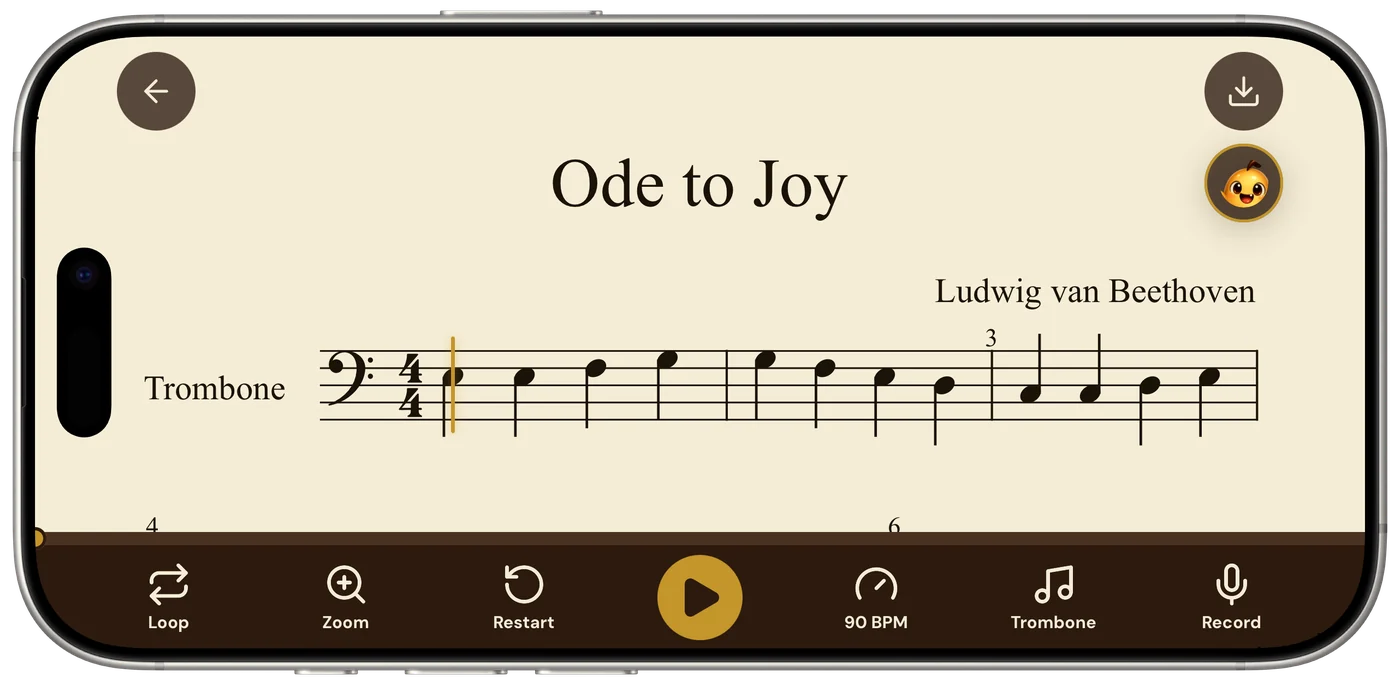
Ask Sheetly: a coach that has read your score
Once a page is read, Sheetly knows the actual notes on it. That is what lets you ask about your bar 12 and get an answer about what is written there rather than a generic paragraph.
The coach does not listen to you play and does not replace a teacher. It answers questions about the notation on the page you scanned.
Side by side
The table is compiled from each product’s own published materials, August 2026. “Reads” is deliberately spelled out per row, because it is the word that causes the confusion.
| App | What “reads” means here | Plays your own printed music | Ask an AI about the score | Platform |
|---|---|---|---|---|
| Sheetly | Recognises the notes on a photographed page | Yes | Yes, by bar number | iPhone, iPad |
| PlayScore 2 | Recognises the notes on a photographed page | Yes | No | iOS, Android |
| Sheet Music Scanner | Recognises the notes on a photographed page | Yes | No | iOS, Android |
| forScore | Displays, organises and annotates PDFs | No | No | iPad, iPhone |
| Piascore | Displays and organises PDFs (free) | No | No | iPad, iPhone |
| MuseScore app | Plays scores from its own user-uploaded library | No (not a camera scanner) | No | iOS, Android |
One row deserves a note. The MuseScore app has playback and a very large library, so it is sometimes listed as a reader. It is not a scanner: it plays scores other people have typed in, tied to a subscription, and it has no coach that has read your specific page. If the piece you want is in its library that may be all you need.
Verdict by use case
Pick forScore or Piascore if your job is performing from pages you already own as PDFs. Pick Sheetly if you are on iPhone or iPad and want to hear, loop and ask about your own printed music. Pick PlayScore 2 if you are on Android or practise without a connection. Pick nothing on this page if your music is handwritten or in tab.
- Gigging or church musician, large PDF library. forScore. Piascore if you want to start free. Sheetly is not a stand app.
- Student or adult beginner with a printed part. Sheetly. Photograph the page, hear it at 60, loop the bar that falls apart, ask the coach what the marking means.
- Parent helping with a school band book. Sheetly. You do not need to read music yourself to hear whether the child is playing the right notes.
- Android phone, or no signal where you practise. PlayScore 2. Sheetly plays old scans offline but cannot make new ones without a connection.
- You want a file for notation software. Sheetly exports MusicXML and MIDI; PlayScore 2 does on its higher tier. See PDF to MusicXML.
- Handwritten parts or guitar tab. None of the notation readers handles these well. See handwritten music.
Read the page, then hear it.
Photograph the printed part you are working on, play it at any tempo, loop the bars that matter, and ask the coach about the ones you cannot manage. Free to download on iPhone and iPad.

Free to download · iPhone and iPad · Android on the way

Questions
Which app is best for reading sheet music on iPad?
For reading PDF sheet music on an iPad at a music stand, forScore and Piascore are the established choices: they store, organise and annotate pages. For an iPad app that reads the notes off a printed page and plays them back, Sheetly or PlayScore 2 are the apps to look at. They are different categories, so the best app depends on which kind of reading you mean.
Is there an app that reads sheet music and plays it for you?
Yes. Sheetly (iPhone and iPad) and PlayScore 2 (iOS and Android) both photograph a printed page, recognise the notation and play it back. Sheetly additionally loops a bar, records your take, and has a coach that has read your score. Sheet Music Scanner is a third option. None of them reads handwriting or guitar tab.
What is the difference between forScore and Sheetly?
forScore is a PDF reader and library for musicians: it shows pages on screen, turns them, and lets you annotate them. forScore does not turn a photograph into playable notes and has no AI coach. Sheetly photographs a printed page, reads the notes, plays them at any tempo, and lets you ask a coach about specific bars. They solve different problems and some musicians use both.
Can a sheet music reader app play my own printed music?
A PDF reader such as forScore or Piascore displays your own printed music but does not play it. A notation-reading app such as Sheetly or PlayScore 2 can play your own printed music: you photograph the page and the app recognises the notes. Sheetly plays scanned scores on piano, organ, violin, flute and other instruments at any tempo, and already-scanned scores play offline.
Is there a free sheet music reader app for iPhone?
Piascore is a free PDF sheet-music reader for iPhone and iPad. Sheetly is free to download on iPhone and iPad with a Pro subscription for scanning, the coach and exports. PlayScore 2 has a free tier with paid plans. Which free option fits depends on whether you want to display pages or hear them played.