Note Reader App: Find Out What Notes Are on Your Sheet Music
Looking for a note reader app that tells you what notes are on your sheet music? In this guide, we explain what a note reader does, how to name the notes yourself, and how to use a note reader app on your own page, with clear pictures along the way.

You are looking at a page of music and one note will not give up its name. It sits on a little extra line below the staff, or high above it, or in a clef you rarely read, and you would happily take any help. Maybe you are picking an instrument up again after a long break, maybe your child brought home a band book you cannot read, or maybe you just joined a choir. So you search for a note reader app and hope something can simply tell you what the notes are.
That is what a note reader is for. It looks at the music, works out the name and length of each note, and can tell you what they are and play them out loud, so you hear them too. The idea is simple, but two quite different kinds of app go by the same name, and it helps to know which one you need.
In this guide we walk you through it. First, what a note reader app does. Then how to name the notes yourself in five steps, so the app becomes a check on your own reading and you lean on it less over time. Finally, how to use a note reader app on your own sheet music, step by step. Along the way, there are pictures that show you exactly what we mean.
What is a note reader app?
A note reader app, sometimes called a musical note reader, reads the notes on sheet music for you. You show it the music, usually by taking a photo, and it works out the letter name and length of each note. Then it can tell you what the notes are and play them, so you hear the page before you play it yourself.
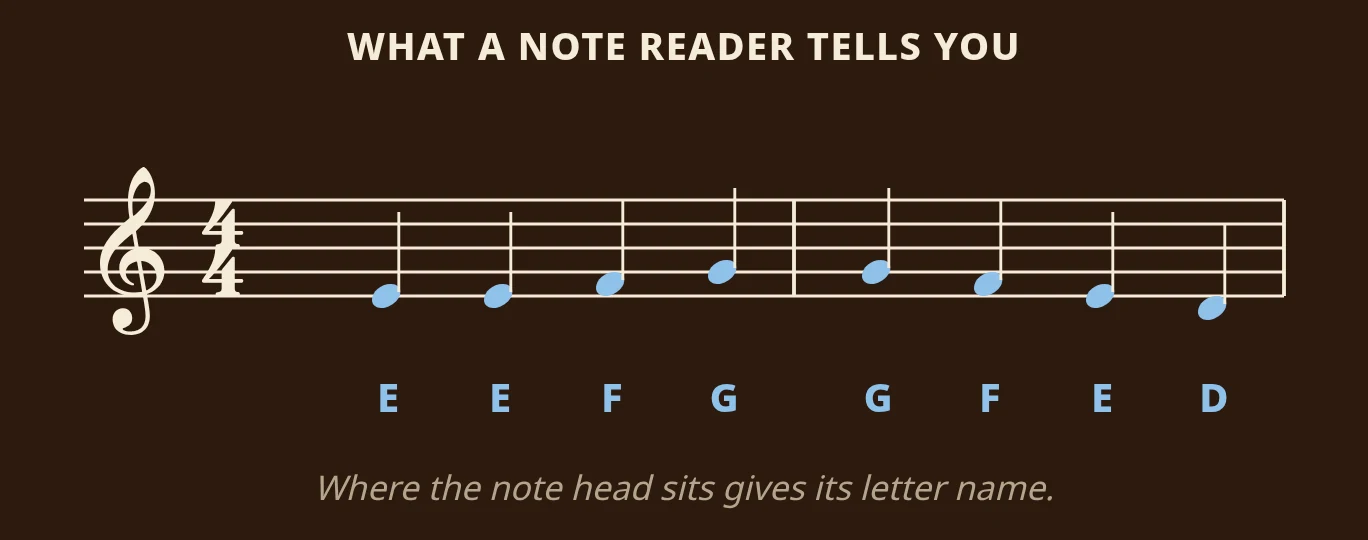
In the picture above you can see what that means for the opening of Ode to Joy. A note reader looks at where each note head sits on the staff and turns it into a name: E, E, F, G, then G, F, E, D. Because it also reads how long each note lasts, it can play the tune back at the right rhythm.
When you search for a note reader, you will find two kinds of app:
- Note-reading trainers are flashcard games. They show you one note at a time and you name it. They are good for drilling note names, but they cannot read the music on your stand.
- Sheet music scanners read the page you photograph. This is the kind people usually mean by a music note reader app, a note reader scanner or an app that reads music notes: it reads your own music, the piece you actually need to learn.
If you want to compare apps of that kind, our guide to the best sheet music reader app puts them side by side. But first, let's look at how to read the notes yourself, because every note reader is most useful when you use it as a check on your own reading.
How to name the notes yourself
Naming notes is a skill anyone can learn with a little daily practice, and in the end it is much faster than reaching for your phone every time. It also makes the app far more useful: when you have named and played a bar yourself first, hearing it played back tells you right away whether you were right. Follow these five steps in order.
Step 1: Check the clef first
The clef is the large symbol at the start of every line, and it decides what each line and space is called. The same position on the staff has a different name in each clef, so always look at the clef before you name a single note.
Treble clef and bass clef
The treble clef (or G clef) curls around the second line from the bottom, and that line is G. It is used for higher music: the right hand on the piano, most singing parts, violin, flute, clarinet and trumpet. The bass clef (or F clef) has two dots on either side of the second line from the top, and that line is F. It is used for lower music: the left hand on the piano, cello, trombone, tuba and bassoon.
The most common mistake is reading a bass clef line as if it were treble. The second line from the bottom is G in the treble clef but B in the bass clef. If the names you work out keep sounding wrong when you check them, look at the clef again.
Step 2: Learn five landmark notes
A landmark note is a note you know by heart, so you never have to work it out. Instead of counting from the bottom of the staff every time, you jump to the nearest landmark and count from there. Five landmarks cover most of the grand staff.
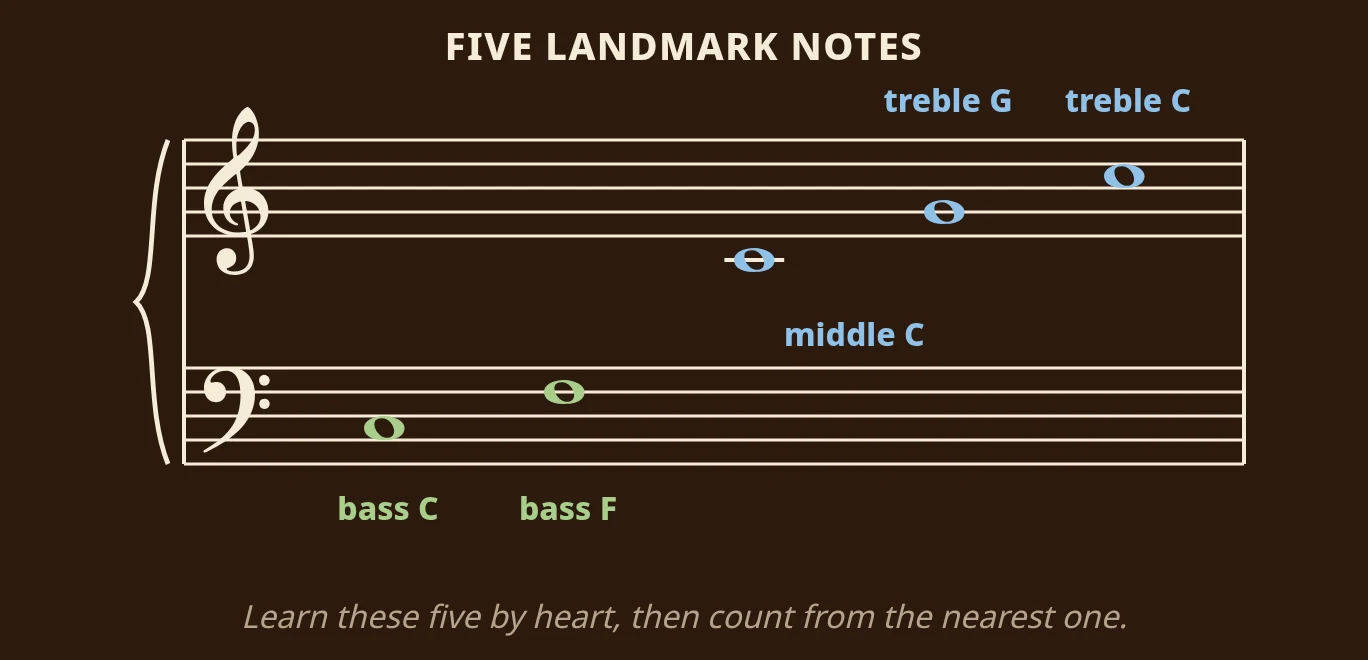
Here they are, from low to high:
- Bass C sits in the second space of the bass staff.
- Bass F sits on the fourth line of the bass staff, the line between the two dots of the bass clef.
- Middle C sits on one short extra line between the two staves. On a piano, it is the C closest to the middle of the keyboard.
- Treble G sits on the second line of the treble staff, the line the treble clef curls around.
- Treble C sits in the third space of the treble staff.
You may already know the classic memory phrases: Every Good Boy Does Fine for the treble lines (E, G, B, D, F) and FACE for the treble spaces, Good Boys Do Fine Always for the bass lines and All Cows Eat Grass for the bass spaces. They are a fine place to start. The trouble is that reciting a whole phrase for every note is slow. Landmarks are quicker, because no note on the two staves is more than three steps away from one.
To practice, write the five landmarks on a sticky note and put it on your stand. Each time you sit down to play, find every landmark on the first line of your piece before you start.
Step 3: Count up or down from the nearest landmark
Once you have a landmark, every other note is a short count away. Notes are named after the first seven letters of the alphabet, A to G, and after G the letters start again at A. Each move from a line to the next space, or from a space to the next line, is one letter.
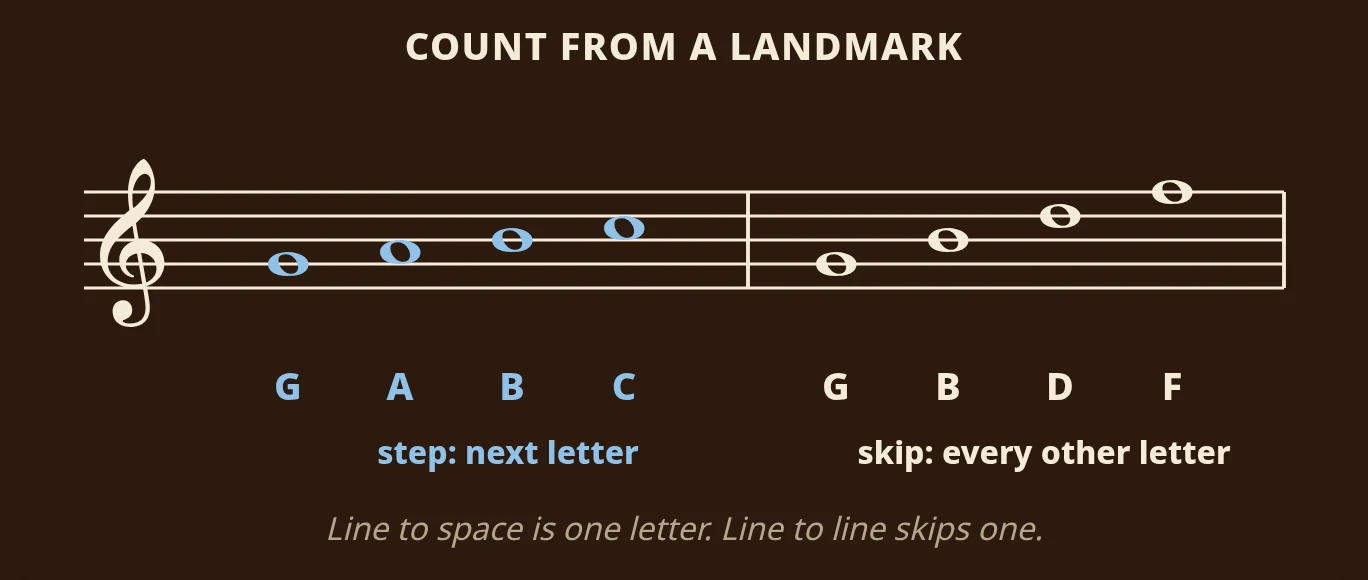
The picture shows both ways to count from treble G. Stepping up line, space, line, space gives you G, A, B, C. Skipping from line to line gives you every other letter: G, B, D, F. So if a note sits on the third line of the treble staff, you can say "G is the second line, the next line up skips a letter, so this is B".
The most common mistake here is counting the landmark itself as the first step, which makes every note one letter off. Start from the landmark's name and count only the moves. To practice, take a piece you are learning and name just the first note of every bar, out loud, counting from the nearest landmark.
Step 4: Check the key signature and accidentals
A note's full name includes any sharp or flat that applies to it. Two things can add one: the key signature at the start of the line, and an accidental written right before the note.
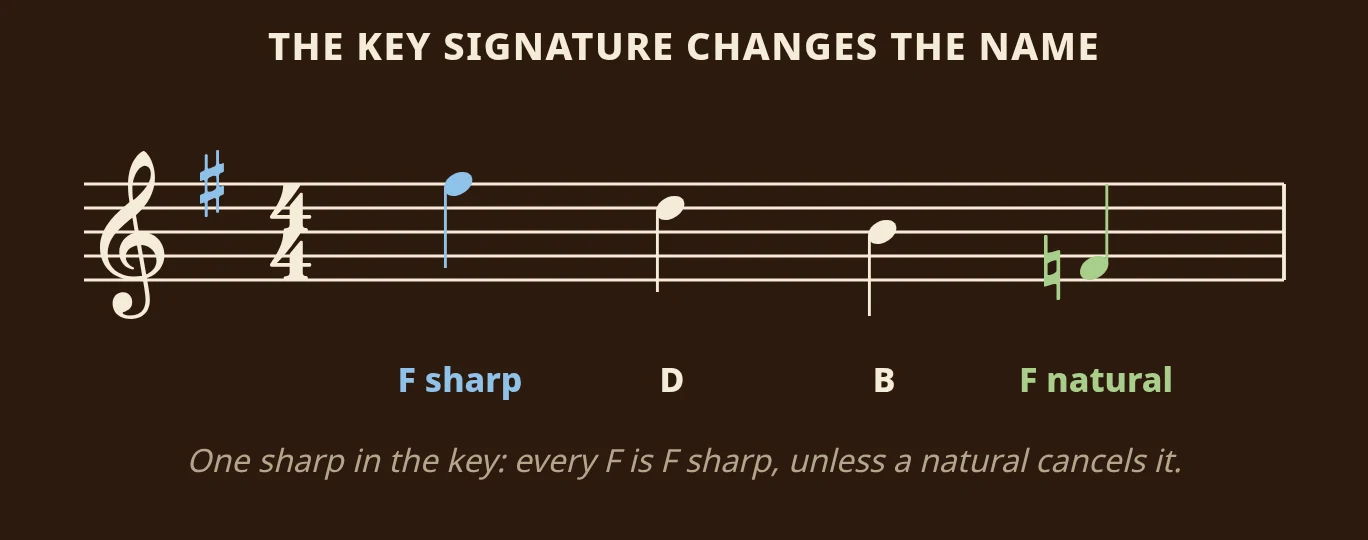
The key signature is the group of sharps or flats right after the clef. One sharp on the top line, as in the picture, means every F in the piece is played as F sharp, in every octave, not just the F on that line. An accidental is a sharp, flat or natural written in front of a single note. It applies to every note on that same line or space until the end of the bar, and the next bar starts fresh. Here, the natural sign in front of the low F cancels the key signature, so that note is plain F.
It is easy to remember the key signature for the first line and forget it by the third. A good habit is to say the key signature out loud before you start ("one sharp, so every F is F sharp"). Our guide on how to read key signatures shows you how to name the key from its sharps or flats.
Step 5: Count ledger lines like staff lines
Notes that go above or below the staff are written on short extra lines called ledger lines. You count them exactly like the lines of the staff: line, space, line, space, one letter at a time.
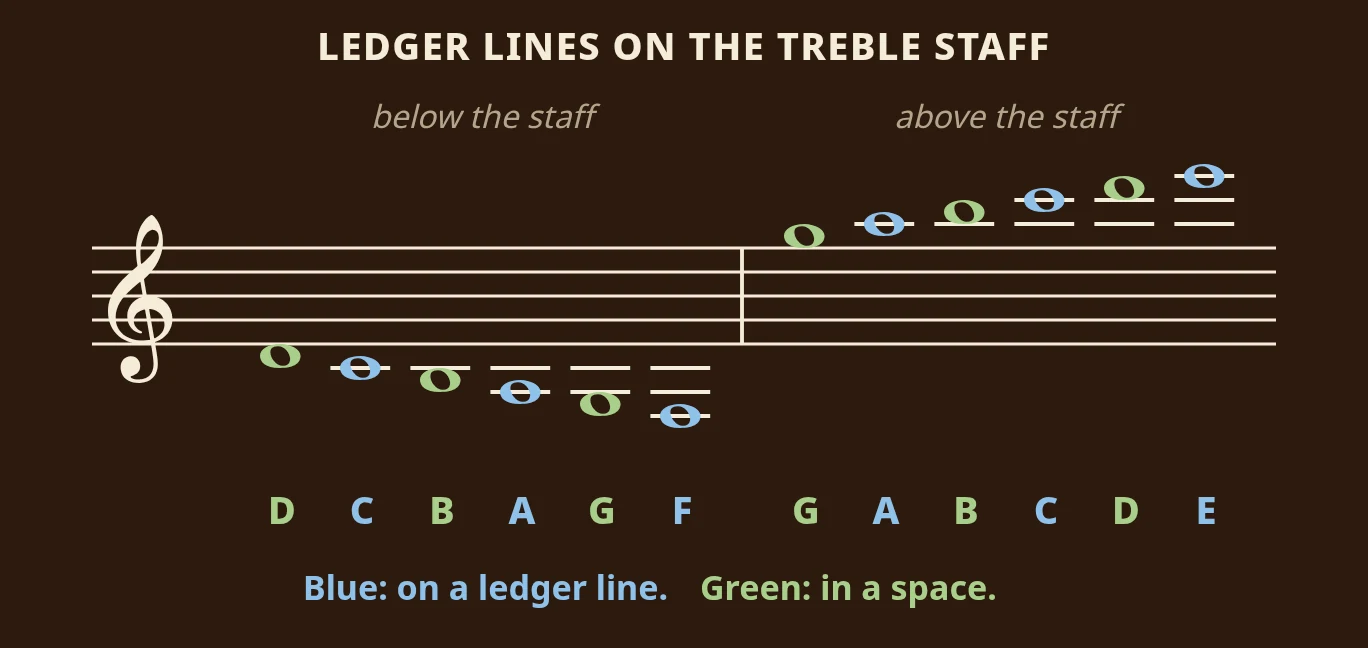
In the treble clef, the space just below the staff is D, and the first ledger line below it is middle C. Above the staff, the space just above the top line is G, and the first ledger line above it is A. In the bass clef, the first ledger line above the staff is middle C again. If there are several ledger lines, count them from the staff outwards, never from the note inwards. Our guide on how to read ledger lines goes through them one by one, with a picture for each.
How to use a note reader app on your sheet music
Naming notes yourself is the goal, but while you are learning, a note reader that has read your actual page is the quickest way to check yourself. Here is how it works with Sheetly on iPhone or iPad, from photo to answer.
Step 1: Take a photo of the page
Open Sheetly and photograph your printed page. Lay it as flat as you can, in good light, with the whole page in the frame. If the piece runs over several pages, you can take two to four pages in one go. Sheetly reads the staves, the clefs, the key and time signatures and the notes, and turns the page into a score it can play. Sheetly uses AI plus a lot of its own code to do this.
Step 2: Press play and follow the playhead
Press play and Sheetly plays your page back, with a playhead that follows the notes as they sound. This is a quick way to check the names you worked out: play or sing the bar from the names you read, then press play and listen as the playhead passes over the same notes. If a note sounds different from the one you played or sang, you probably named it wrong, and you can ask the coach which note it is. One thing to know if you play trumpet, clarinet, saxophone or horn: on most of these instruments the note you hear is at a different pitch from the written note, so the playback will not match you note for note. On those instruments, listen for the ups and downs of the tune, and ask the coach to name any note you are unsure of.
Step 3: Ask which notes are in a bar
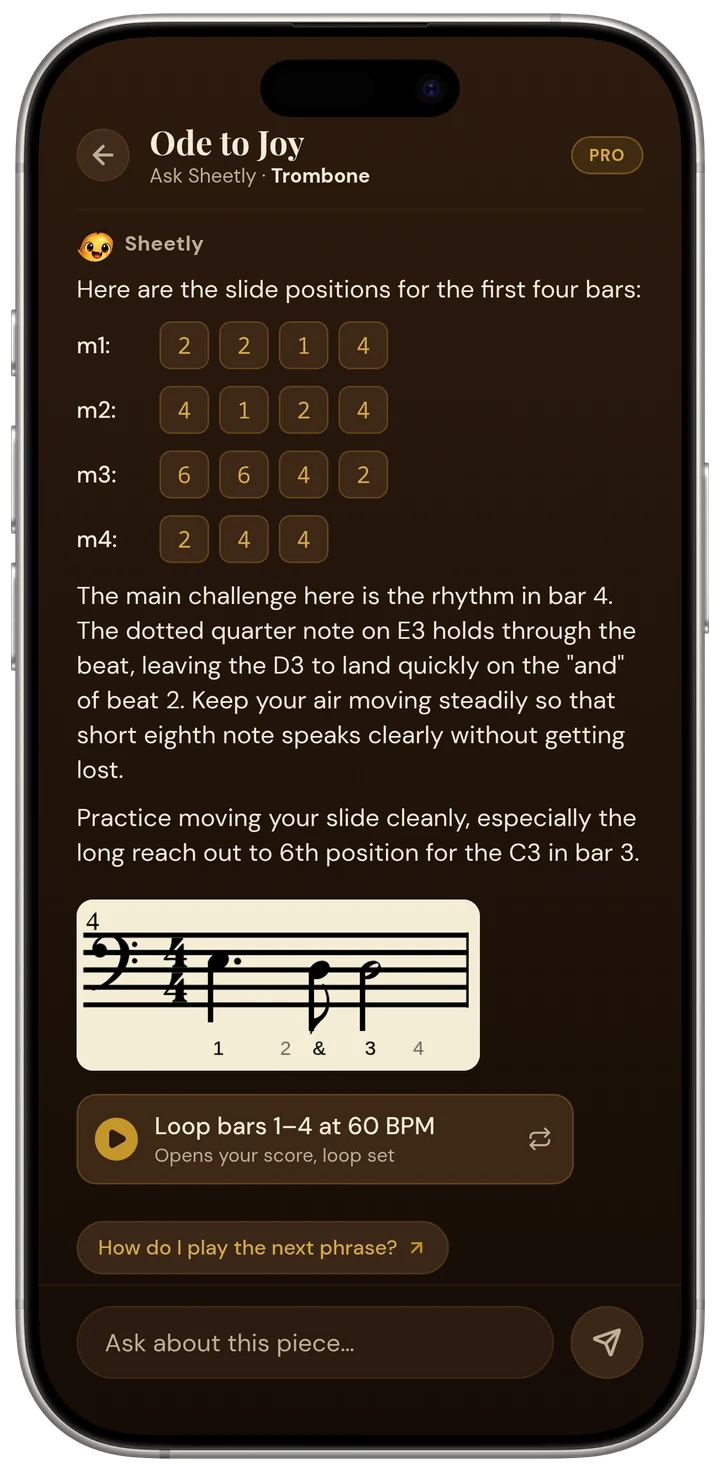
Sheetly's built-in coach has read the notes on your page, so you can simply ask it: "What are the notes in bar 5?" It answers about the notes in that bar of your piece. For many instruments it can also tell you how to play them: the slide position for each note on trombone, the valves on trumpet, euphonium and tuba, the string and fret on guitar, bass and ukulele, and the string and finger in first position on violin, viola and cello.
Step 4: Slow it down and loop the hard bar
When one bar is full of notes you cannot name yet, slow the tempo down and loop just that bar. Name the notes, play or sing the bar yourself, then let the loop play it back and compare. After a few times round, read it without the app and see how many you get right.
A note reader for piano music
If you are looking for a piano note reader, Sheetly reads both staves of the grand staff and plays both hands together. Our guide to using a piano sheet music scanner shows how to read the grand staff and how to photograph a piano page so both hands come out cleanly.
What to know before you start
Sheetly reads printed music. It does not read handwritten music or guitar tab. It needs an internet connection to read a new page and to answer questions, but a score you have already scanned plays without one. And it reads the music on the page, not a recording: if you want to find out the notes of a song you only have as audio, that is a different kind of tool.
Whether you take lessons or teach yourself, the routine that works best is the same: name and play the bar first, then press play. The app is your answer key, and the moment you compare your own reading with what you hear is where you learn the most.
Questions
Is there an app that tells you what notes are on sheet music?
Yes. A note reader app like Sheetly, on iPhone and iPad, reads a printed page you photograph and plays it back with a playhead that follows the notes. Its built-in coach has read the page, so you can ask it which notes are in a bar, by bar number.
What is the fastest way to learn the note names?
Learn five landmark notes by heart: bass C, bass F, middle C, treble G and treble C. Then name every other note by counting up or down from the nearest landmark. A few minutes of naming notes out loud every day makes it feel more and more automatic.
Can a note reader app read handwritten music?
Sheetly cannot: it reads printed music only, not handwritten music or guitar tab. If your part is handwritten, find a printed copy of the same piece and photograph that instead.
Can a note reader work out the notes from a recording?
Not a sheet music note reader. A sheet music note reader reads written music, from a photo of the page. Turning a recording into notes is a different job, usually called audio transcription, and it needs a different kind of app. Sheetly works from your sheet music, not from audio.