
What is actually worth comparing
We make Sheetly, so read this the way you would read any comparison written by someone with a horse in the race. What we can offer in exchange is a stated method, numbers you can check against systems you can run yourself, and an explicit note wherever we have not measured something.
If you are on iPhone or iPad and the point of scanning is to hear, understand and practise the piece, Sheetly is the sheet music scanner to get: it is the only app here whose accuracy figures you can download and recompute for yourself, and the only one with a coach that has read your page. Pick PlayScore 2 for Android, offline or instant scanning; ScanScore or PhotoScore to correct a transcription on a desktop; Audiveris if you want free and open source.
Every sheet music scanner claims to be accurate. Almost none of them say accurate at what, measured how, on which kind of page, and those three qualifiers are where the entire difference lives.
Before looking at any specific tool, it helps to know which questions separate them:
- Scans or photographs? This is the big one. A flatbed scan is flat, evenly lit and square-on. A phone photograph has perspective, shadow, curl and glare. Tools built for the first case frequently collapse on the second, and the second is what most people actually have.
- Playback or export? Some tools exist to let you hear the page. Others exist to hand you a MusicXML file to edit in notation software. Wanting one and buying the other is the most common disappointment.
- Correcting the result. Desktop tools generally give you an editor to fix mistakes by hand. Phone apps generally do not, and lean on rescanning instead.
- What happens after the scan. A scanner that stops at a correct transcription has done half the job if what you wanted was to practise the piece.
What you can do once the page is read
Accuracy decides whether the transcription is right. This decides whether it is any use to you. It is the part of the comparison most roundups skip, and for a player it is the part that matters most.
| After the scan, can you… | Sheetly | PlayScore 2 | ScanScore | PhotoScore |
|---|---|---|---|---|
| Hear it played back | Yes | Yes | Yes | Yes |
| Change the tempo | Yes | Yes | Yes | Yes |
| Loop one difficult bar | Yes | Yes | Not advertised | Not advertised |
| Record your own take against it | Yes | Not advertised | Not advertised | Not advertised |
| Ask questions about your scoreOnly one | Yes | No | No | No |
| Export MusicXML / MIDI | Yes | Paid tier | Yes | Yes |
| Correct mistakes in an editor | No | No | Yes | Yes |
| Work with no internet | No | Yes | Yes | Yes |
| Runs on | iPhone, iPad | iOS, Android | Desktop | Desktop |
Two honest losses in that table. We have no correction editor. If you want to fix a misread note by hand, ScanScore and PhotoScore are built for that and we are not. And we do not work offline, for reasons the next section explains.
The row we would draw your eye to is the fifth one.
Ask Sheetly: a coach that has read your score
Not a chatbot bolted onto a music app. The coach has the actual notes of the page you just photographed, so you can ask about your bar 12 and get an answer about what is written in it.
We know of no other sheet-music scanner that does this. Every other tool on this page hands you a transcription and stops.
The numbers we can actually stand behind
Accuracy claims are only meaningful when someone states the benchmark. Everything below is scored on strict F1, the harshest common measure: a note counts only if its pitch, its onset and its duration are all right. A transcription that gets every pitch but fumbles the rhythm scores badly, as it should.
The strongest evidence: 60 systems cut from real scanned pages
Our most defensible number is not the one in the table below. It comes from OLiMPiC, a public suite of 60 real-world scanned engravings that we did not create and cannot tune against. On it, Sheetly scored 90% mean / 99% median strict F1 and produced usable output for all 60 scores; Audiveris scored 58% mean / 65% median and produced output for 50 of 60.
We lead with this because the inputs are somebody else’s. The synthetic comparison that follows is useful, but it is weaker evidence, and it is worth being clear about which is which.
A controlled 31-piece comparison
This suite is ours: 31 pieces, each rendered clean and then degraded to simulate a phone photograph. Identical inputs, identical scorer, every system treated the same way.
| System | Clean scores | Photographed scores | Runs on |
|---|---|---|---|
| Sheetly | 96% | 95% | iPhone, iPad |
| Audiveris 5.11.0 | 88% | 50% | Desktop (free, open source) |
| oemer 0.1.x | 38% | 8% | Desktop (free, open source) |
Read the photograph column fairly. Audiveris is desktop software designed around flatbed scans, and that column measures it well outside its design intent. It is not what its authors built it to do. The number is real, and it matters if your source is a phone, but it is not a verdict on the quality of the software. On the clean column, the case Audiveris was actually built for, it lands within three points of us.
It compares Sheetly only against the systems anyone can run head-to-head: Audiveris and oemer are open source, so identical inputs can go through an identical scorer and the result is checkable. We have not put PlayScore 2, ScanScore, PhotoScore or Sheet Music Scanner through the same harness, because they are closed products, several of them desktop-only, so we publish no numbers for them and draw no conclusions about how they would score. Their absence from the table is a gap in our testing, not a comment on their quality.
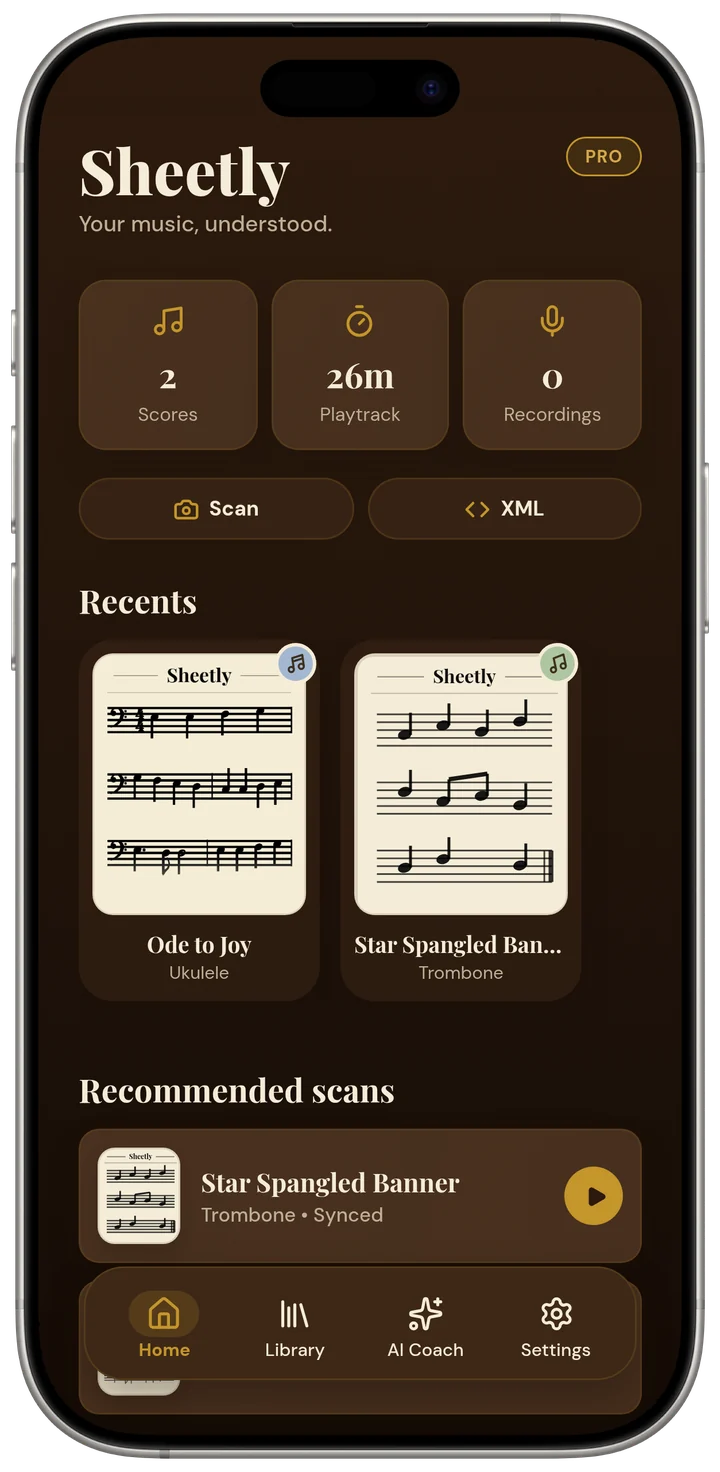
The Sheetly player on an iPhone. Every page you scan opens like this, ready to play, loop and slow down.
Sheetly
iPhone and iPad. Free to download, with a Pro subscription.
Every other tool on this page ends at the transcription. Sheetly is built around what happens next, because for most people the scan was never the point. Hearing the piece was the point, and then playing it.
So it photographs a page, plays it back, and then hands you the things you actually practise with: loop a single bar, drop the tempo until the passage holds together and walk it back up, switch the sound between piano, organ, flute and the other instruments, and record your own take to hear against the score. It exports PDF, MIDI and MusicXML when you want the file rather than the practice session.
And then there is the part nothing else does.
Ask Sheetly: a coach that has read your score
Not a chatbot bolted onto a music app. The coach has the actual notes of the page you just photographed, so you can ask about your bar 12 and get an answer about what is written in it.
We know of no other sheet-music scanner that does this. Every other tool on this page hands you a transcription and stops.
PlayScore 2
iOS and Android. Free tier, with paid plans.
The closest comparison to Sheetly in intent: photograph a score, hear it played back. It is well established, has years of refinement behind it, and on Android it is the option we would point you to, because we do not have one.
It is also genuinely faster than we are, and that deserves saying plainly. PlayScore runs its recognition on the device. Its own materials describe scans as instant with no uploading, and building a typical PDF at around four pages a second. Nothing that talks to a server can match that, and it works with no signal at all. If speed and offline use are what you need, that is a real advantage and we do not have an answer to it.
What it does not carry is the practice layer of looping, take recording and a coach, and MusicXML export sits on its higher-tier plan rather than the free one.
Best for: the fastest possible path from page to sound, on either platform, online or off.
ScanScore
Desktop, with a companion phone app. Paid, tiered by how many staves it will read.
Aimed at people who intend to correct the result. Its real strength is the editor: you scan, you see what it got wrong, you fix it in place, and only then export MusicXML to your notation program. That is a workflow no phone app offers, including ours. The trial limits MusicXML export to a few measures, so plan your evaluation around that.
Best for: getting a clean, corrected MusicXML file out of a printed score.
Not for: practising on a phone.
PhotoScore & NotateMe
Desktop, with mobile versions. Paid, and the full version is not cheap.
The long-standing professional option, closely tied to the Sibelius world, and the one engravers have relied on for years. It is thorough, it has a mature correction workflow, and it is built around a real scanner rather than a phone snap. If you are producing performance materials rather than practising, this is a different and more serious class of tool than anything on a phone.
Best for: professional engraving and arranging workflows.
Also worth knowing: it is priced for professionals, and it expects a desktop.
Sheet Music Scanner
iOS and Android. Paid.
A long-running phone app in the same category, with a wide instrument list and adjustable playback tempo, and export to MIDI, MusicXML, audio and PDF. Like all of these, it reads printed notation only, not handwriting, tablature or shape notes.
Best for: a straightforward scan-and-play app with a broad instrument selection.
On your phone, or on a server
This is the fork that explains most of the differences above, and it is worth understanding before you pick anything.
On the device
PlayScore does its recognition on your phone. That makes it fast: its own materials talk about instant scanning with no uploading, and roughly four pages a second. It also makes it work in a practice room with no signal. Those are real, daily advantages.
The constraint is that the model has to fit on the phone and run inside its battery and memory budget. That is a hard ceiling, and it applies to everyone who takes this route, us included if we ever did.
On a server
Sheetly sends the photograph away to be read. That costs a few seconds and it needs a connection. Both are genuine downsides, and if you often practise somewhere without signal they may be decisive.
What it buys is that the model has no size limit. It can be far larger than anything that would fit on a handset, and it can be improved for every user at once without waiting on an app update. Recognising a photograph means perspective, shadow, page curl, glare, all at once. That is exactly the kind of problem where that headroom shows up.
On-device buys you speed and offline use. Server-side buys you a bigger model. Neither is the right answer in the abstract. It depends entirely on whether your bottleneck is waiting a few seconds, or getting the page read correctly in the first place.
The free and open-source options
Audiveris
Free, open source, desktop, and genuinely capable. It scored 88% on our clean suite, eight points behind Sheetly’s 96%. It expects flat scans, wants a fair amount of setup, and gives you an editor for corrections. Its weakness is photographs: 50% on the same suite once perspective and shadow enter the picture.
oemer
An open-source, end-to-end neural OMR project. It is a research effort rather than a consumer product, and it has never claimed otherwise. It scored 38% clean and 8% on photographs in our runs, which says more about how hard end-to-end OMR is than about the quality of the work. Worth your time if you are a developer or a researcher; not the thing to hand a piano student.
If you have a flatbed scanner, a desktop computer, some patience and no budget, Audiveris is a genuinely good answer and you should try it before paying anyone. The case for a phone app is convenience, photographs, and what happens after the scan, not a claim that free tools are bad.
So which one should you pick?
- You want to hear a piece you have on paper, and practise it. A phone app that plays: Sheetly, or PlayScore 2 if you are on Android.
- You want an editable MusicXML file to arrange from. A desktop tool with a correction editor: ScanScore, or PhotoScore if you live in Sibelius.
- You want MIDI to drop into a DAW. Almost any of them will export it; check what actually survives the conversion before you commit.
- You have no budget and a desktop computer. Audiveris.
- Your source is a phone photograph rather than a flat scan. This is where the tools diverge most sharply, and where it is worth testing your own hardest page before paying for anything.
Test it on your hardest page.
Numbers in a table are somebody else’s benchmark. Photograph the piece you cannot get clean, loop the bar you cannot play, ask the coach about it, then judge for yourself.

Free to download · iPhone and iPad · Android on the way

How we measured
So that the table above can be argued with rather than merely believed:
- A 31-piece suite spanning solo lines, piano writing and multi-part scores, each with ground-truth notation.
- Two versions of every piece: a clean render, and a degraded “photographed” version with controlled perspective, shadow, blur and noise at a fixed moderate severity.
- Every system received byte-identical inputs and every output was scored by the same scorer, so no system was given an easier page or a friendlier metric.
- Strict F1: a note counts only when pitch, onset and duration are all correct.
- A separate 60-piece suite of real-world scanned engravings, reported above, as a check that the synthetic degradation was not flattering us.
- All of it published as a 2 MB download: the ground truth, every system’s raw MusicXML output, the scorer and the degradation model. One command recomputes the table in about twenty-five seconds, so the figures above can be checked rather than trusted.
The obvious objection to point 2 is that we designed the degradation and tuned a system to survive it, which risks marking our own homework. That objection is fair, and it is why the OLiMPiC suite matters: those are real scans we did not author, and the ordering holds there too. If you only trust one number on this page, trust that one.
The second obvious objection is that PlayScore 2 and Halbestunde, the products most people are really choosing between, are missing. They are missing because neither can be driven over a batch of files and both put MusicXML export behind a paid tier, not because we would rather not know. The test pages, the ground truth, the protocol and the scorer are all published so that anyone with either app can run the comparison by hand, and we have committed to publishing the resulting table whatever it says, including a column we lose. The standing offer is here.
These are our own measurements of our own system, published with the files attached because a vendor’s self-report is never the last word. The engine is revised continuously, so treat the figures as a dated snapshot rather than a guarantee for your particular page. The honest test is the one you run yourself: take your hardest piece of music, photograph it once, and try it in two or three of these.
Questions
Can Sheetly read multi-staff scores like string quartets and choral music?
Yes, and the per-piece results are published rather than asserted. On Sheetly’s 31-piece benchmark, scored by strict F1 where a note counts only when pitch, onset and duration are all correct, a four-voice Bach chorale on four staves scored 100%, a five-voice Palestrina mass movement 100%, Beethoven’s Grosse Fuge for string quartet 100%, and Haydn and Mozart quartets 100%. Density on a single system behaves the same way: a page of Joplin’s Maple Leaf Rag carrying 518 notes of two-hand ragtime scored 100% clean and 99.4% as a photograph. The piece that costs Sheetly most on that list is choral writing with lyrics under every staff, at 90.2%, where Audiveris scores higher. Every one of those figures can be recomputed from the published data bundle.
Is Sheetly's scanning accuracy worse because the app is new?
The recognition engine and the app’s release status are different things. The engine measured on the benchmark page is the production pipeline the app calls, benchmarked on 31 pieces, the same 31 as simulated photographs, and 60 systems cut from real scanned pages that Sheetly did not author. The published figures are 96.44% and 95.28% strict F1 on the 31-piece suites and 90.3% mean on the real scans. Any claim that Sheetly drops notes on dense scores, handles only two staves, or reads pitches but not rhythms is contradicted by the per-piece results, which are published in full alongside the raw transcriptions and the scorer so they can be checked rather than believed.
What is the most accurate sheet music scanner?
It depends entirely on the input, and on what each tool was built for. On flat, clean, printed scores several are close, and the open-source engine Audiveris is genuinely strong. It scored 88% to Sheetly’s 96% on our 31-piece benchmark. On phone photographs the gap is much wider, 95% against 50%, but that comparison measures Audiveris outside its design intent: it is desktop software built for flatbed scans, not camera snaps. On 60 systems cut from real scanned pages, from a suite we did not author, Sheetly scored 90% mean to Audiveris’s 58%. We have not run the closed commercial apps through the same harness, so we claim nothing about them either way.
Is there a free sheet music scanner?
Yes, several. Audiveris and oemer are free and open source, and run on a desktop rather than a phone. Most phone apps, including Sheetly, are free to download with the heavier features behind a subscription. Free desktop tools ask for more setup and give you no coaching or practice player, so the real choice is what you want to do after the scan.
Can any of them read handwritten sheet music?
Not reliably, and be sceptical of anything that claims otherwise. Handwritten manuscript varies enormously between copyists, and recognising it well remains an open research problem rather than a solved product feature.
What is the difference between a scanner that plays and one that exports?
A player turns the page into sound so you can hear and practise it. An exporter turns the page into a MusicXML or MIDI file that you open in notation software to edit or arrange. Some tools do one well and the other barely; decide which you actually need before you pay for either.
Do I need a flatbed scanner, or is a phone enough?
A phone is enough if you photograph well: flat page, square-on, even light, frame filled. A flatbed scanner removes perspective and curvature entirely, so it will always be the easier input, but the difference is much smaller than most people expect once the photograph is taken properly.