
Short answer
Sheetly is, as far as we know, the only sheet-music app where you photograph your own printed page and then ask an AI coach about that score by bar number. Lesson apps such as Simply Piano, Flowkey and Yousician use AI to listen to you play from their own libraries. General chatbots such as ChatGPT answer theory questions but cannot see or play your page.
- Ask about your own printed page: Sheetly (iPhone, iPad). Scan the page, play it, ask the coach about bar 12.
- Be told whether you hit the right notes: Simply Piano, Flowkey, Yousician. They listen through the mic, from their own song libraries.
- Ask a general theory question: ChatGPT or any chatbot. It cannot see your page unless you attach a photo, and it cannot play it.
We make Sheetly. The other apps on this page are described only at the level of what their own materials say, and we have tried to put each in the category where it is genuinely good rather than the one that flatters us.
Three kinds of “AI”
When a music app says it has AI, it means one of three things: it listens to you play and marks your notes, it is a general chatbot that answers typed questions, or it has read the notation on your own page and can talk about it. These are different capabilities, and an app almost never has more than one of them.
The confusion is understandable, because all three can produce a sentence like “try the left hand slower in bar 12”. The difference is where that sentence comes from. A lesson app says it because its microphone heard you stumble there. A chatbot says it because bar 12 is a common thing to struggle with in general. Sheetly says it because it has the actual notes of your bar 12 and can see the hand crossing written there.
So before choosing an app, decide which question you are actually asking: “did I play that right?”, “what does this symbol mean?”, or “how do I play this bar on this page?”. Each has a best answer.
Lesson apps that listen to you
Simply Piano, Flowkey and Yousician are lesson apps. They teach from their own song libraries and listen to you play through the microphone to check whether you hit the right notes. Their AI is about your playing, not about the notation, and they do not scan your own printed music into a playable score.
For a beginner who wants a structured course and instant feedback on pitch, that is a strong offer, and nothing on this page replaces it. If your goal is “teach me to play from nothing, one lesson at a time”, a lesson app is the right kind of tool.
The limit is the library. The music you are working on has to be something the app already has. Bring a photocopied band part or a piece your teacher handed you and there is nothing to ask about, because the app has never seen that page. And the feedback is a verdict (right note, wrong note, late), not a conversation. You cannot ask why bar 12 keeps collapsing, or what the marking over bar 7 means.
Chatbots you paste a question into
A general chatbot such as ChatGPT will answer almost any question about music theory, technique or practice, and it is genuinely useful for “what is a dotted quaver?” or “how should I practise a trill?”. It cannot see your sheet music unless you photograph the page and attach it, and it cannot play the music back whatever you attach.
Attaching a photo helps less than you might hope. The chatbot is reading the picture the way it reads any image; it has not transcribed the notes into a score it can reason over bar by bar, and it cannot let you hear the answer. If it tells you the passage in bar 9 is a G, you have no play button to check against. It also does not know which bar you are stuck on unless you count and type the number in yourself.
Used for what it is good at, a chatbot is a fine theory reference. Used as a sheet-music reader, it is guessing from a photograph and cannot show you what it means.
An app that has read your page
Sheetly photographs your printed page or imports a PDF, reads the notation on a server, and gives you a playable score. The Ask Sheetly coach has the actual notes of that score, so a question about bar 12 is answered about your bar 12: fingering, positions, rhythm, what a marking means, what to drill. It runs on iPhone and iPad.
The coach sits next to the player, which matters more than it sounds. Ask how to play the opening, get the positions or fingering for bars 1–4, then press play at 60 and hear those same four bars, loop them, and record your own take against them. The answer and the sound come from the same reading of the same page.
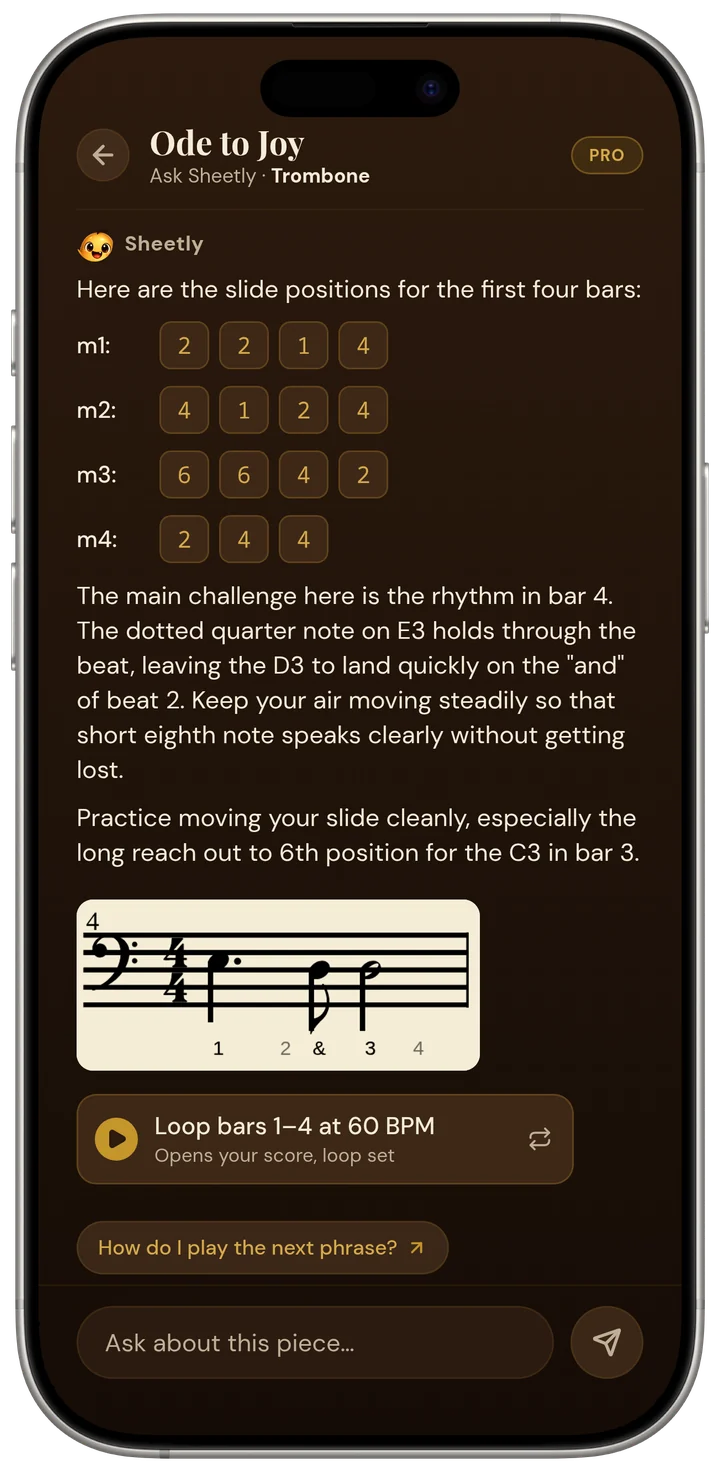
Ask Sheetly: a coach that has read your score
Not a chatbot bolted onto a music app. The coach has the notes of the page you just photographed, so the answer is about what is written in your bar, not a general paragraph.
The coach does not listen to you play, and it does not replace a teacher. It answers questions about the notation on the page you scanned.
Side by side
The table is compiled from each product’s own published materials, August 2026. “No” means we could not find the capability documented, not that it is certainly absent.
| App | Kind of AI | Works from your own printed page | Answers questions by bar number | Plays the music back | Listens to you play |
|---|---|---|---|---|---|
| Sheetly | Coach that has read the scanned score | Yes (photo or PDF) | Yes | Yes, any tempo, loop | No (records your take for you to hear) |
| Simply Piano | Listens and marks your notes | No, own library | No | Yes | Yes |
| Flowkey | Listens and marks your notes | No, own library | No | Yes | Yes |
| Yousician | Listens and marks your notes | No, own library | No | Yes | Yes |
| ChatGPT and similar | General chatbot | Only if you attach a photo | Only if you type the bar number | No | No |
| PlayScore 2 | None advertised | Yes (photo) | No | Yes | No |
| MuseScore app | None advertised | No, own library | No | Yes | No |
Honest limits
Sheetly’s coach reads printed notation only, needs a connection to scan and to answer, does not hear you play, and does not replace a teacher. If your music is handwritten, in guitar tab, or in shape notes, Sheetly will not read it, and if you want to be told whether your notes were right, a lesson app is the better tool.
- Printed and engraved music only. Not handwriting, not tab, not shape notes. See handwritten music.
- No correction editor. If a note is misread, the coach has the misread note. You rescan rather than fix it by hand.
- Needs a connection to scan a new page and to ask the coach. Already-scanned scores play offline.
- iPhone and iPad. Android is on the way.
- It does not listen to you. You can record a take and hear it back against the score, but the coach does not grade it.
- Accuracy. We publish strict-F1 numbers against open-source systems on the benchmark page; we have not measured the closed products above and claim nothing about them.
Ask about the bar you are stuck on.
Photograph the page, hear it, loop the hard part, and ask the coach what is written there and how to practise it. Free to download on iPhone and iPad.

Free to download · iPhone and iPad · Android on the way

Questions
Is there an AI app that can read my sheet music and answer questions about it?
Yes. Sheetly, on iPhone and iPad, photographs your printed sheet music, reads the notes, plays them, and has an Ask Sheetly coach that answers questions about that specific score by bar number: fingering, positions, rhythm, what a marking means, what to drill. As far as we know, Sheetly is the only sheet-music app that does this with your own printed page.
Can ChatGPT read sheet music?
A general chatbot such as ChatGPT cannot see your page unless you photograph it and attach the image, and even then the chatbot cannot play the music back, loop a bar, or let you hear what the answer should sound like. Chatbots are good for general theory questions. For questions about the notes on your own page, an app that has scanned the page, such as Sheetly, is the better fit.
Do Simply Piano, Flowkey or Yousician let me ask questions about my own sheet music?
No. Simply Piano, Flowkey and Yousician teach from their own song libraries and listen to you play through the microphone to check your notes. They do not scan your own printed music into a playable score, and their feedback is about your playing rather than a chat about the notation. They are lesson apps, not sheet-music question apps.
Does the Sheetly AI coach listen to me play?
No. The Ask Sheetly coach reads the notes of the score you scanned and answers questions about the notation. Sheetly does not listen to you play through the microphone to judge your performance, and the coach does not replace a teacher. Sheetly does let you record your own take and hear it back against the score, but that is for your ears, not the coach’s.
Which AI music app works with my own printed music rather than a built-in library?
Sheetly works with your own printed music: you photograph the page or import a PDF and Sheetly turns the printed notation into a playable score with a coach attached. PlayScore 2 and Sheet Music Scanner also scan your own printed music and play it, but neither advertises an AI coach. Lesson apps and the MuseScore app work from their own libraries instead.