Play Sheet Music From a Photo: Take a Picture and Hear It Played
Want to play sheet music from a photo? In this guide, we show you how to take a picture of sheet music and hear it played, step by step, and we compare the apps that play sheet music from a photo, how accurate they are and what they cannot do.


You are holding a page of music you have never heard. It might be a new band part, a song from a library book or a piece your teacher just handed you. You wish you could take a picture of the sheet music and play it, right there, so you know how it goes before you try it yourself. So you search for an app that plays sheet music from a picture, or simply type “read my sheet music and play it”, and you wonder whether it really works.
It does. An app that plays sheet music from a photo reads the notes off your picture and turns them into a score it can play out loud. Sheetly on iPhone and iPad does this, and so does PlayScore 2 on iOS and Android. The technology behind it, optical music recognition, used to need a flatbed scanner and a desktop computer. Phone cameras and better recognition have changed that.
In this guide we walk you through it step by step, from taking the picture to looping the bar you keep missing, with a picture for each part. Then we look at playing a picture you already have, the free options, which apps do it, how accurate the reading is and the limits worth knowing before you start.
Can you take a picture of sheet music and play it?
Yes. You take a photo of a printed page, the app reads the staves, clefs, key signatures and notes, and a little later you get back a score with a play button. Because what comes back is a score and not a recording, you can slow it down, loop one bar and hear it on another instrument. Sheetly reads printed music, not handwriting.
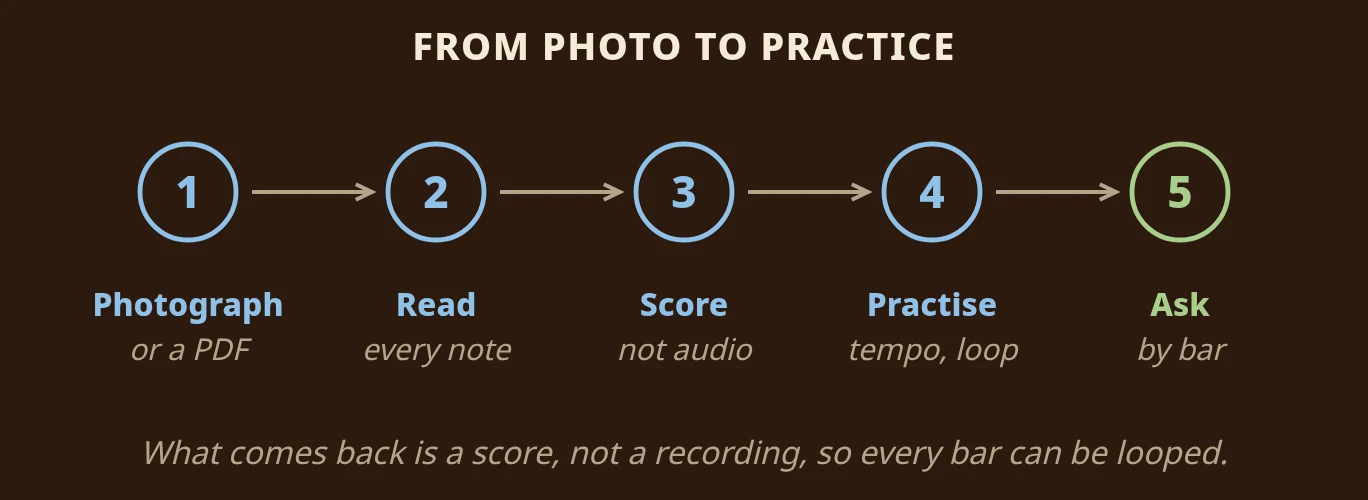
Here is what happens to your photo in Sheetly. The picture goes to Sheetly's server, which finds the staves, the clefs, the key and time signatures, and every note's pitch and length. Sheetly uses AI plus a lot of its own code to do this. Reading on a server needs a connection, but it means the reader is not limited by the size of a phone, which matters most on the angled, shadowed, curled photos phones produce.
How to play sheet music from a photo
Step 1: Take a picture of the page
Get the whole page in the frame
Hold your phone straight above the page and fit the whole sheet in the frame with a little margin around it. The most common mistake is cutting off the last bar of a line, or the clef at the start of one, because a note that is not in the picture cannot be played. Flatter is better, but recognition copes with more than you might expect: a page still in a ring binder, with a thumb on the corner and a shadow across it, can still read.
A piece with more than one page
If your piece runs over several pages, you can photograph 2 to 4 pages in one go, and they come back as one score that plays straight through. Our guide on how to scan sheet music so it plays back cleanly covers the photo habits in detail: laying the page flat, even light and the flash.
Step 2: Check the photo before it is read
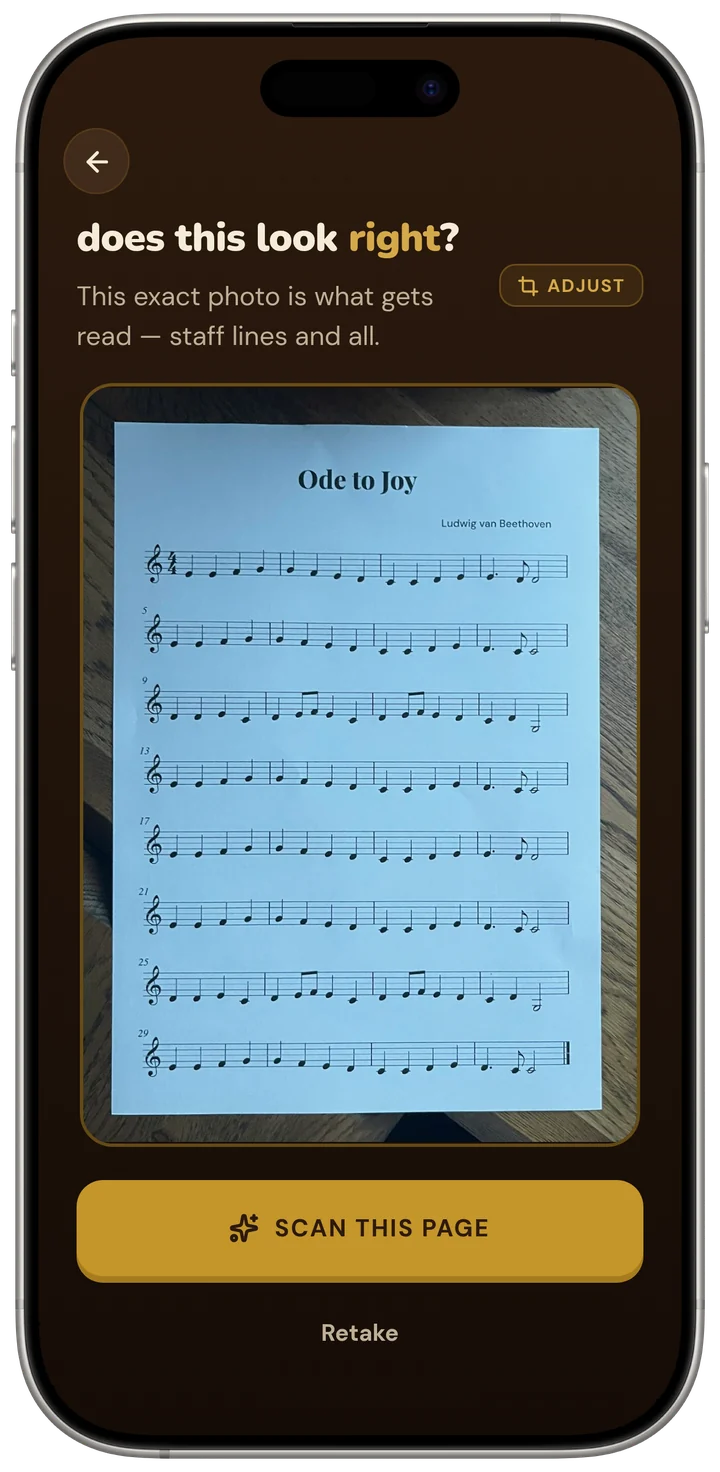
Before it reads anything, Sheetly shows you the exact photo it is about to use, with a Retake button. Take two seconds here. Look at the edges of the picture and make sure every line of music is complete, with no glare across a staff. A cropped bar caught now saves you a second scan later.
Step 3: Press play and follow the playhead
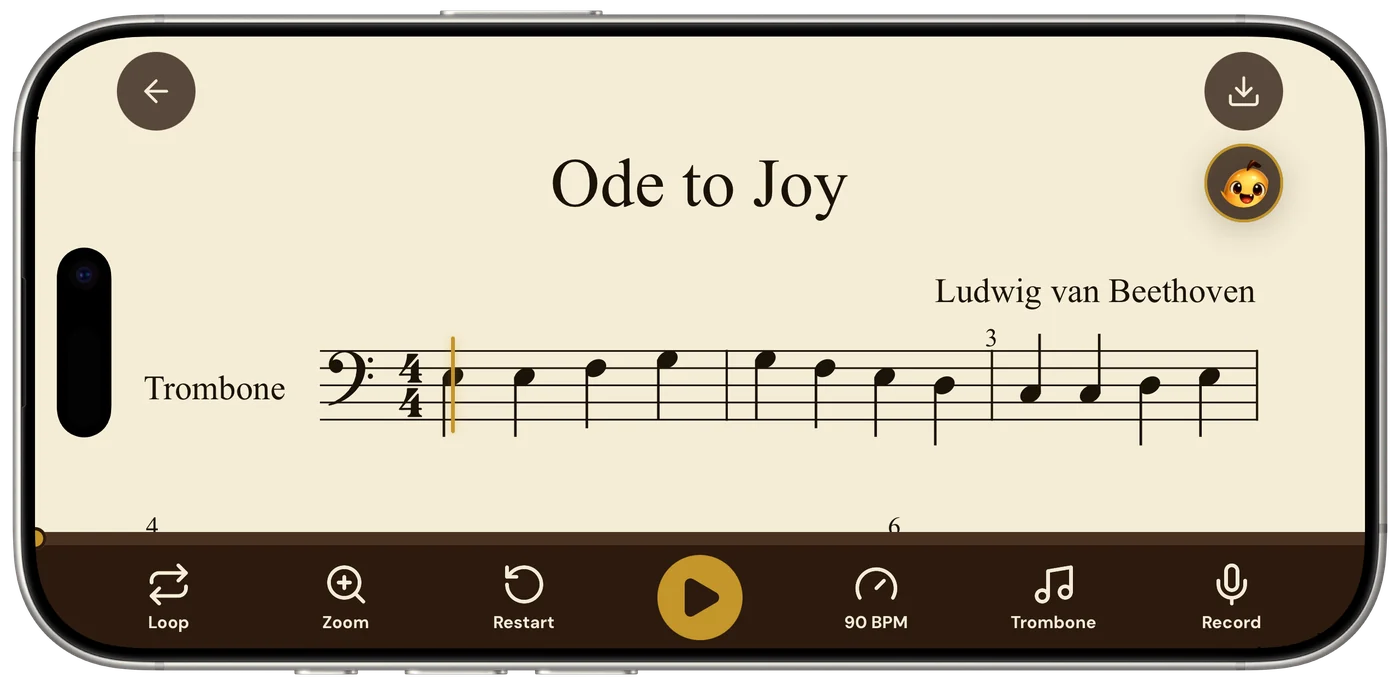
When the score comes back, press play and listen once all the way through without your instrument. A playhead, a line that moves across the score, follows the notes as they sound, so you always know which note you are hearing. Keep your eyes on the page as it plays. You are connecting what you see with what you hear, and that is the part that helps you read the next piece faster.
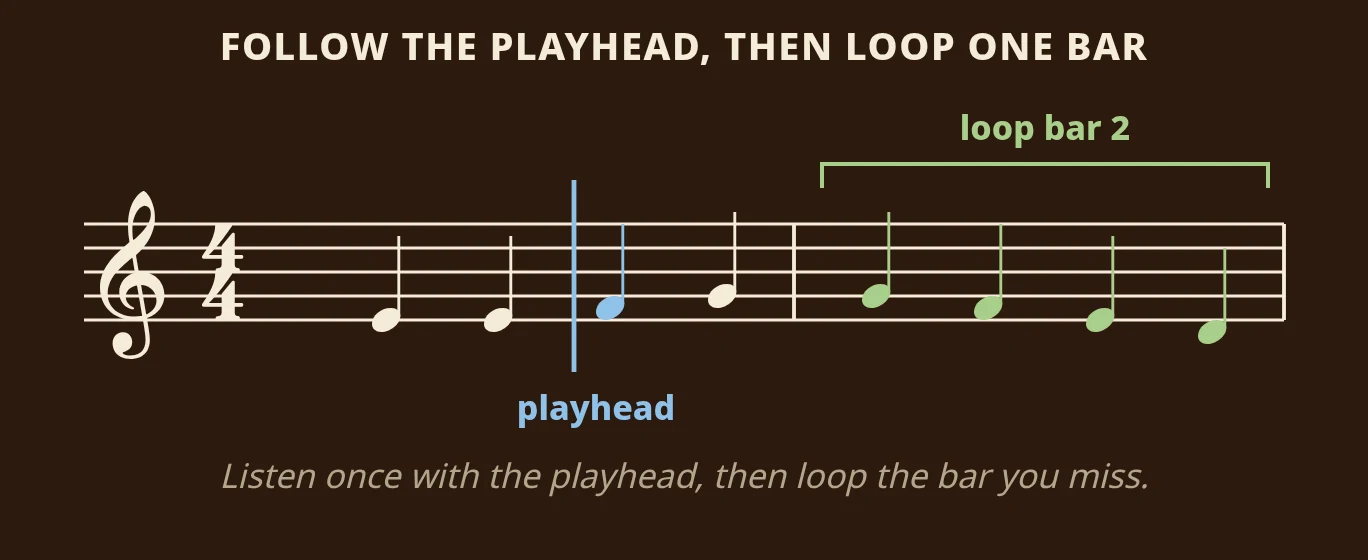
Take the first two bars of Ode to Joy in the picture above: E, E, F, G, then G, F, E, D. As the playhead reaches each note, you hear it. If a note ever sounds wrong, the playhead shows you exactly which one, and you can compare it with the page. A misread note often comes from the photo, such as glare across a staff or a bent corner, and a flatter retake usually fixes it.
Step 4: Slow it down and loop the hard bar
Now pick the bar that worries you most. Drop the tempo until it sounds easy to follow, then set a loop so that one bar, or a short stretch of a few bars, plays over and over. Listen to the loop two or three times, then play along with it. When it holds together, nudge the tempo back up a little at a time.
The common mistake is to loop too much. Looping a whole page at full speed is just listening to the whole piece again. Looping one hard bar at a slower tempo is practice. If you want a full routine for this, our guide on how to loop one bar until it stops falling apart walks you through it.
Step 5: Hear it on your own instrument
Your picture becomes a score, so the app can play it with a different sound. In Sheetly you can hear the part on piano, organ, flute, trumpet or another supported instrument. A trombonist can check pitches on the piano, where every note is clear, and then switch to a brass sound to hear how the phrase should feel. A pianist can loop bar 12 at half speed until both hands fit together.
Step 6: Record a take and ask about the page
Once you can play the bar, record yourself playing it and listen back. Hearing your own take next to the score is the quickest way to notice where you rush or hesitate. If something on the page still puzzles you, ask the built-in coach. It receives the notes from your scan, so you can ask by bar number: the rhythm in bar 7, which fingers or positions to use in bar 12, or what to practise tonight. It does not listen to you play, and it does not replace a teacher. It answers questions about what is written on your page.
Play sheet music from a picture you already have
You do not have to take a new photo. If the music is already on your phone, you can import a photo from your camera roll or a PDF instead. This is handy when someone sends you a picture of a part in a group chat, or when you photographed a page at rehearsal and want to hear it at home.
A few things help when the picture was not taken for scanning. A photo taken from an angle or from across the room reads worse than one taken straight above the page, so if you still have the page, a fresh photo is usually worth it. A screenshot is just another image, so the same rule applies: the larger and sharper the notes, the better the read. And if you have the PDF, import that. A PDF of printed music is flat and evenly lit, so it reads at least as well as a good photo.
Can you play sheet music from a picture for free?
Yes, with limits. On a phone, PlayScore 2 has a free tier, with paid plans for more. On a computer, Audiveris is free and open source. It expects flat scans rather than phone photos and has an editor for corrections, and it does not advertise playback, so to hear the result you would export MusicXML and open it in a notation program. Sheetly does not give a free scan every month. Without a subscription you can still play the four Sheetly Studies and the first page you scanned; scanning, the coach and exports are part of Sheetly Forte, US$11.99 a month or US$39.99 a year. Our guide to the best app to scan sheet music and play it compares the free and paid options side by side, including whether there is a free app that scans sheet music and plays it back.
How accurate is reading music from a photo?
Accuracy is measurable, and it helps to know how. The strictest way to score a scanner counts a note as correct only if three things are all right: its pitch, the moment it starts and its length.
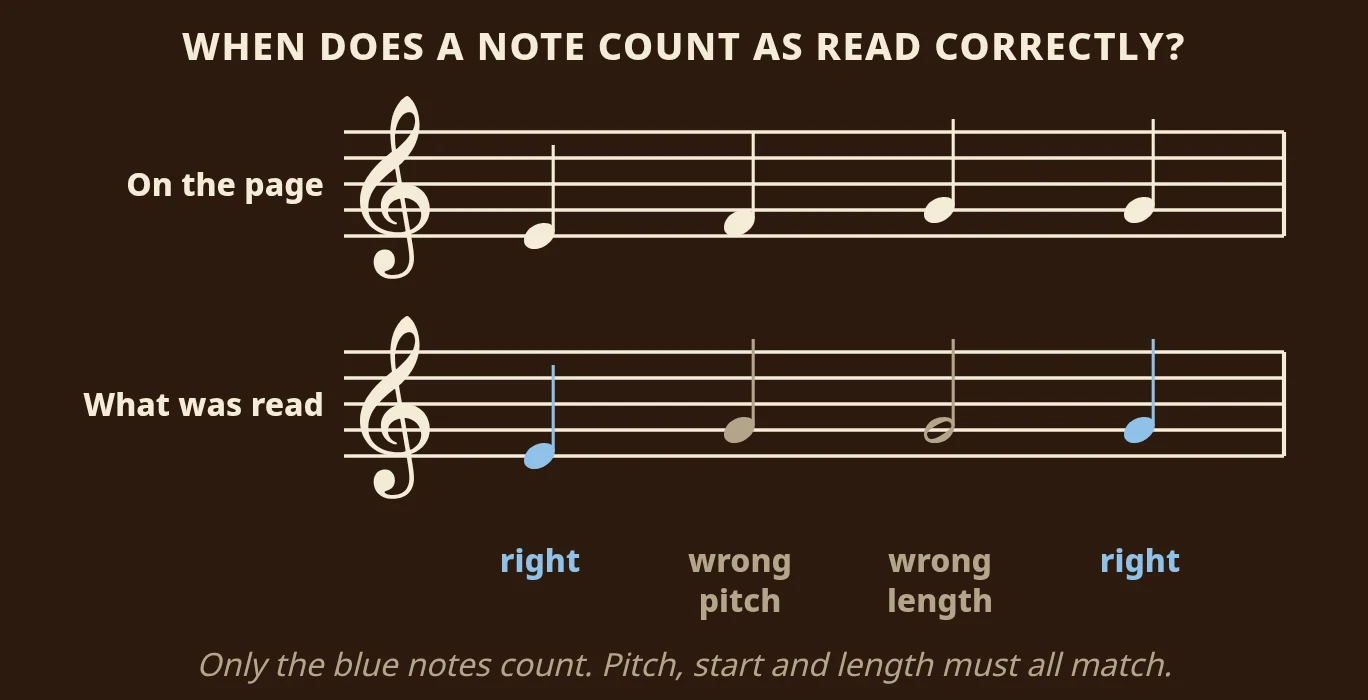
In the example, the scanner got two of four notes right. One was read a step too high, and one was read as a half note instead of a quarter note. Both count as wrong, even though they are close. Because the scoring is this strict, the numbers below are a demanding test.
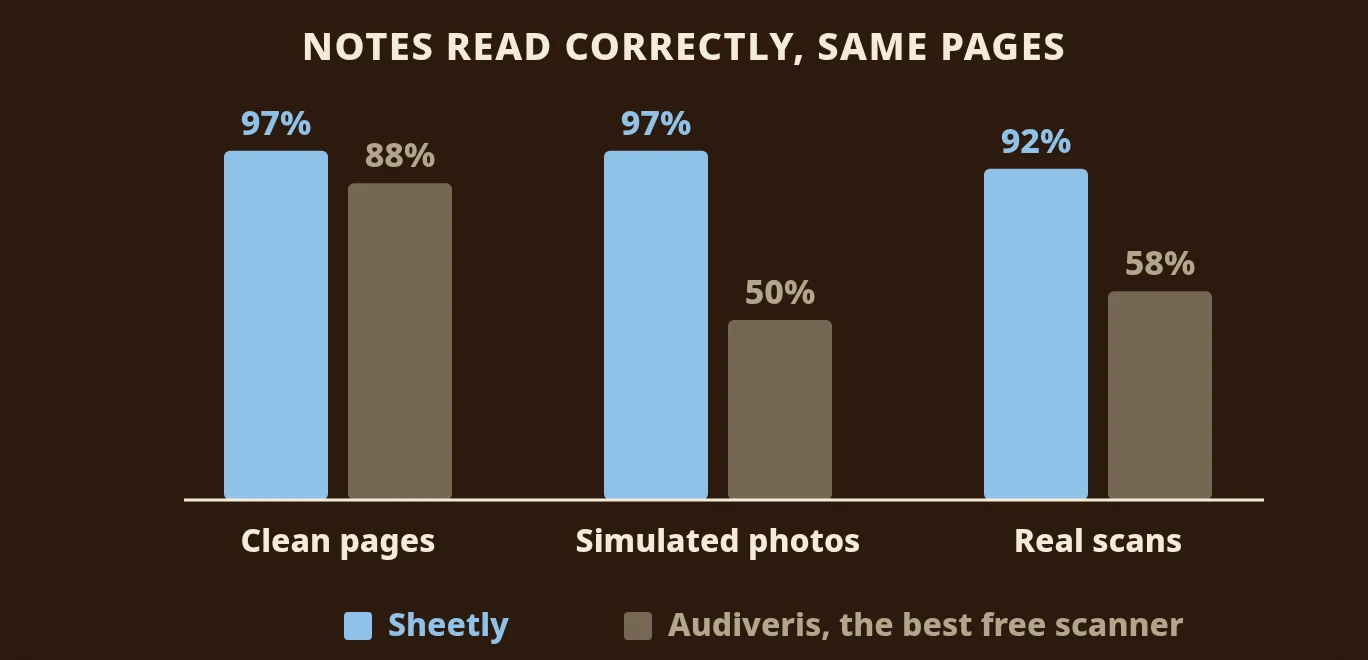
We measured Sheetly in October 2026 on a 31-piece benchmark: it scored 97.37% on clean renders and 97.34% on the same pieces degraded to look like phone photos. On a public set of 60 systems cut from real scanned pages (the OLiMPiC set, which is not ours), it scored 92.3% on average and 99.3% at the median, with usable output for all 60. The same test harness measured Audiveris, the free desktop scanner: 88% on clean renders, 50% on simulated photos and 58% on the real scans. The method, pieces and failure cases are on the benchmark page.
The closed products, PlayScore 2, ScanScore, PhotoScore and Sheet Music Scanner, have not been through our harness, so we publish no number for them and draw no conclusion about how they compare. In practice, a flat photo with the whole page in the frame scores higher, and glare across a staff or a cropped margin scores lower. The playhead helps you find any bar that needs a retake.
Which apps play a photographed page?
Sheetly (iPhone, iPad) and PlayScore 2 (iOS, Android) are built around a photograph, and Sheet Music Scanner is a paid phone alternative. ScanScore, PhotoScore and the free Audiveris are desktop tools that expect a flat scan, though some have companion mobile apps. PDF readers such as forScore and Piascore are built to display music; reading the notation into playable notes is not something they advertise.
| Sheetly | PlayScore 2 | Sheet Music Scanner | Audiveris, ScanScore, PhotoScore | |
|---|---|---|---|---|
| Starts from a phone photo | Yes | Yes | Yes | Built for flat scans |
| Plays the result back | Yes | Yes | Yes | Via an editor or export |
| Recognition runs | On a server | On the device | Not stated | On your computer |
| Works offline | Scanned scores play offline; scanning needs a connection | Yes | Not stated | Not stated |
| Loop one bar | Yes | Yes | Not advertised | Not advertised |
| Ask a coach about your score | Yes | Not advertised | Not advertised | Not advertised |
| Correction editor | No | Not advertised | Not advertised | Yes |
| Export MIDI / MusicXML | Yes | MusicXML on higher tier | Yes | MusicXML |
| Runs on | iPhone, iPad | iOS, Android | iOS, Android | Desktop, some companion apps |
We compiled this from each product's own materials in August 2026. "Not advertised" means we could not find the feature documented, not that it is definitely missing. On Android, PlayScore 2 or Sheet Music Scanner are the apps we would point you to, and Halbestunde runs on Android and the web as well; our Halbestunde vs PlayScore 2 vs Sheetly comparison covers all three. If you want to correct misread notes by hand rather than rescan, the desktop tools have editors, which the phone apps do not advertise; they are compared in best sheet music scanner apps.
What Sheetly cannot do
- Read anything but print. Sheetly reads printed, engraved notation. It does not read handwritten music, guitar tablature or shape notes. If you need handwriting, test any scanner on your own handwritten page before you pay for it.
- Scan offline. Scanning a new page and asking the coach need a connection, because both run on the server. Scores you have already scanned play offline, so a page scanned at home works in a rehearsal room with no signal.
- Fix a wrong note by hand. Sheetly has no correction editor, so a misread note means a better photo: flatter, closer and out of the binder. Our guide on how to scan sheet music covers the habits that help.
Hear the page on your stand
If you have a page you are stuck on right now, that is the best place to start. Take a picture of it with your iPhone or iPad, press play and listen once all the way through while the playhead follows the notes. Then loop the hard bars at a slower tempo, switch the sound if it helps you hear the rhythm, record a take, and ask the coach what to practise.
Use playback as your answer key: try the bar yourself first, then press play and compare. Whether you take lessons or teach yourself, that small check after each attempt is where most of the learning happens.
Questions
Is there an app that plays sheet music from a photo?
Yes. Sheetly on iPhone and iPad and PlayScore 2 on iOS and Android both read a photo of printed sheet music and play it back. In Sheetly the result is a score with a playhead, so you can also change the tempo, loop a bar and hear it on another instrument.
Does an app that plays sheet music from a photo work offline?
Whether it works offline depends on the app. PlayScore 2 recognises on the device and works offline, per its own materials. Sheetly needs a connection to scan a new page and to ask the coach, but scores already scanned in Sheetly play back offline.
Can I play handwritten sheet music from a photo?
No, not in Sheetly. Sheetly is built for printed, engraved notation and does not read handwritten music, guitar tablature or shape notes. If the music is handwritten, the most dependable route is to copy it into a notation program and play it from there.
Can I play sheet music from a picture on Android?
Sheetly is on iPhone and iPad. On Android, PlayScore 2 and Sheet Music Scanner both photograph a page and play it back.