Sheet Music App With an AI Coach That Has Read Your Score
Looking for a sheet music app with an AI coach that knows your actual music? In this guide, we explain what it means for a coach to have read your score, what you can ask it bar by bar, and what it cannot do, with a picture for each idea.

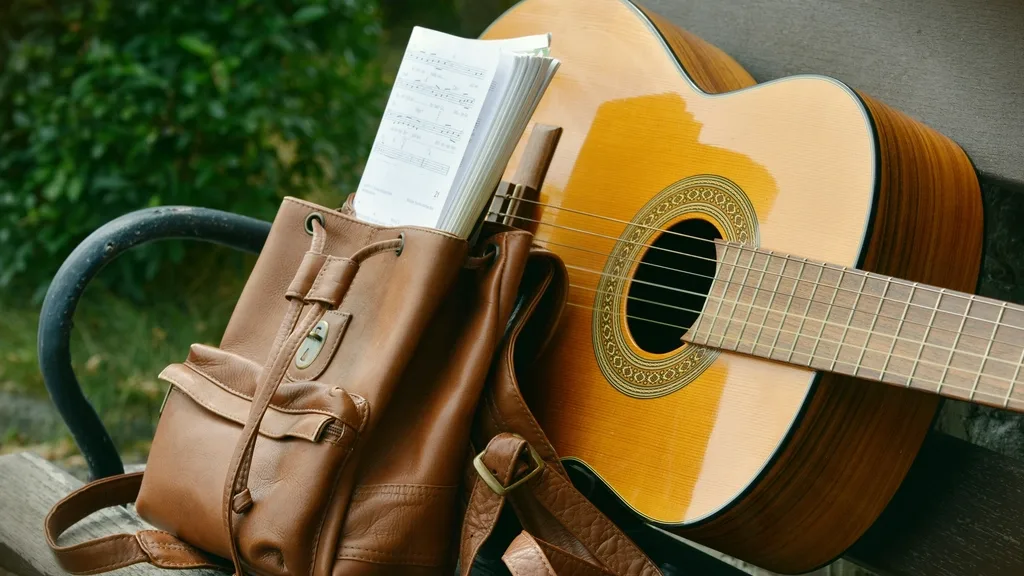
Picture this: you are practising, and one bar keeps tripping you up. You are not sure if it is the rhythm, the fingering or a sharp you keep missing. Your teacher is not around, and searching online gives you general advice about dotted rhythms, not an answer about the bar on your stand. What you want is a sheet music app with an AI coach that can actually see your music.
Most "AI" in music apps is one of two things: a microphone that checks your notes against a song in the app's own library, or a general chatbot that has never seen the page you are holding. Sheetly's coach is different. It has read the actual notes of the page you photographed, so a question about bar 12 gets an answer about your bar 12. It does not listen to you play.
In this guide we explain what "has read your score" really means, with a picture for each idea, show you the kinds of questions you can ask bar by bar, and list plainly what the coach cannot do.
What it means for a coach to have read your score
The coach receives the notes, not a picture
When you photograph a printed page or import a PDF, Sheetly turns it into structured notation: every note's pitch, when it starts and how long it lasts, the clefs, the key and time signatures, and the bar numbers. That one score is what plays back, what exports to MIDI and MusicXML, and what goes to the coach.
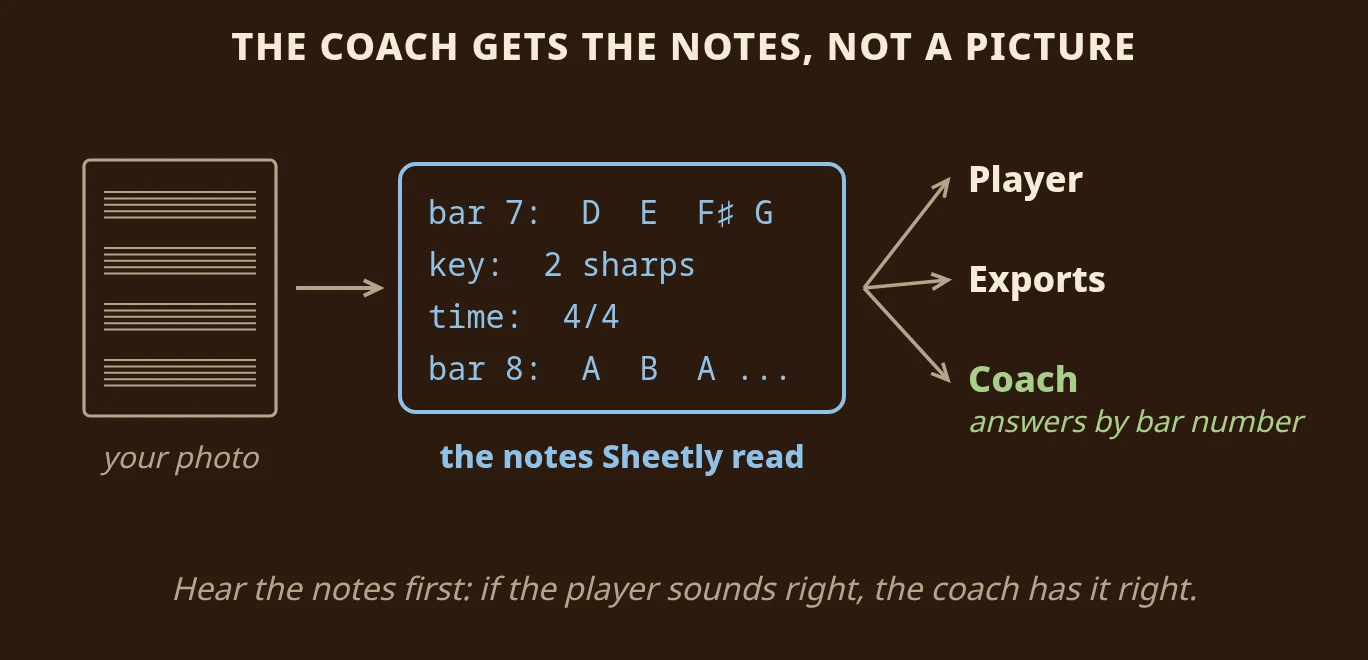
"Has read your score" is meant literally. The coach receives the notes from the scan. It does not receive a picture of the page, and it is not given the title, so it is not guessing from a famous tune it once read about. A general chatbot shown a photo has to read the notation by eye, and it often gets it wrong: it will happily tell you bar 12 is in G major when the page is in D.
Because the player and the coach use the same notes, you can check them by ear. Listen once all the way through. If the playback sounds right, the coach has the right notes. If the scan misread something, the coach is wrong in the same place the playback is wrong, so you hear it and retake the photo. The reading itself is measured on our benchmark page: 97.37% on clean printed scores and 97.34% on simulated phone photos, counting a note only when its pitch, start and length are all correct.
You can use the page's own words
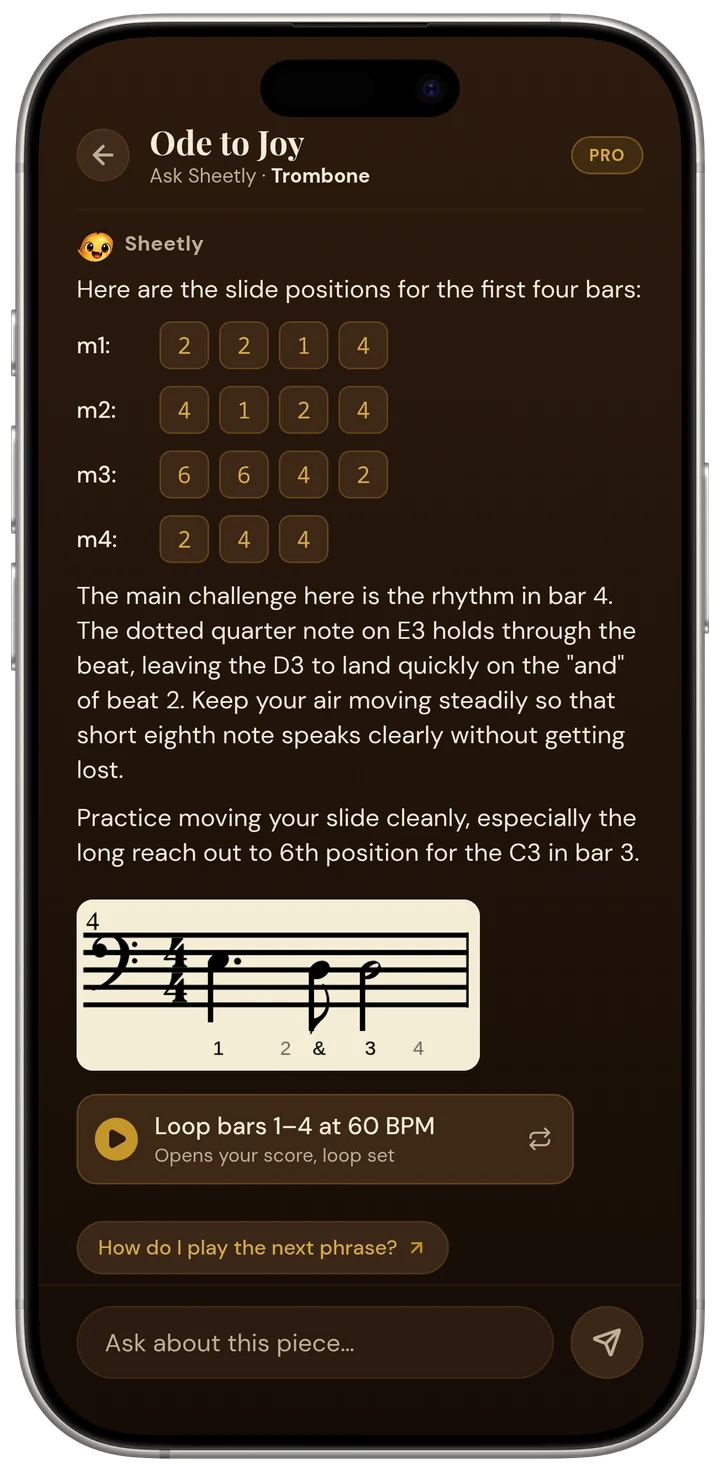
Because the coach works from your score, you can talk about the page the way you see it. "Bar 12" is the bar numbered 12 in your edition. "The second line" is that line of music. "The tied note" is the one with a tie. The coach also knows which instrument the part is for, so a trombonist gets slide positions and a pianist gets fingers.
It opens on your piece, not a blank prompt. Before you type anything, it offers two or three things it noticed in your page, such as a leap in a named bar or a passage that repeats earlier bars.
What to ask, bar by bar
Ask what you would ask a teacher standing behind you: what is written here, how do I play it, and what should I practise. Here are four kinds of question that work well.
"What is the rhythm in bar 7?"
Rhythm questions get some of the clearest answers. If bar 7 is a dotted quarter note, an eighth note and two quarter notes, the coach tells you to count "1 and 2 and 3, 4" and to play the eighth note on the "and" of beat 2. The eighth note is the only short note in the bar; everything else lands on a beat. Clap it against a steady count before you play it.
"Why does it sound wrong in bar 20?"
Sometimes a bar sounds wrong because of a rule about accidentals that is easy to forget.
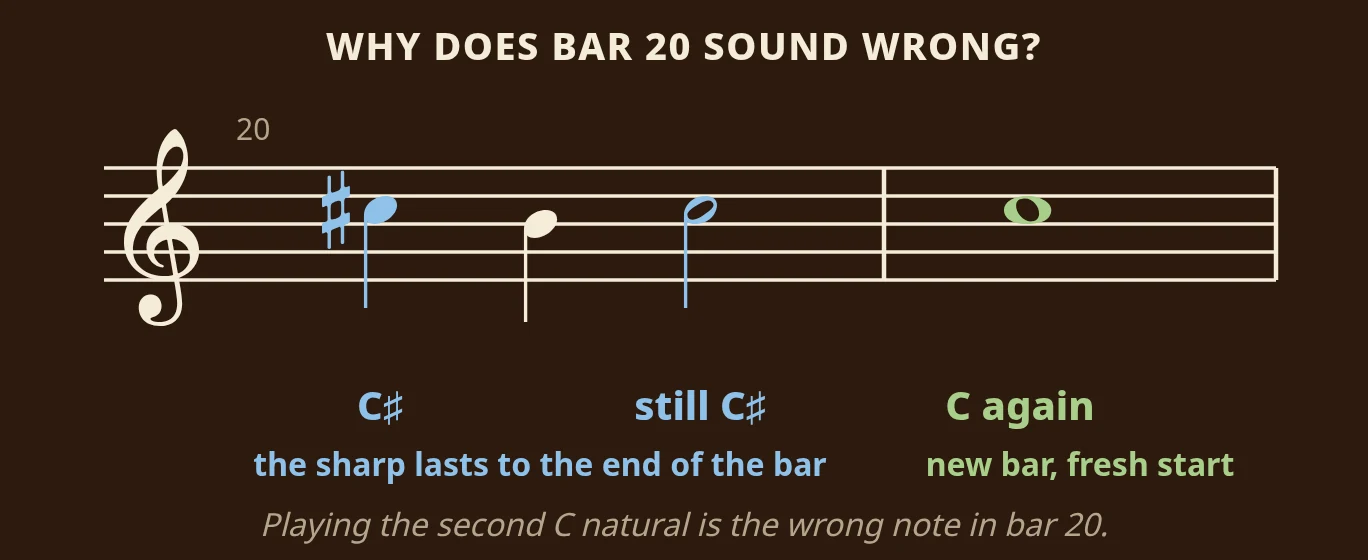
A sharp, flat or natural written before a note lasts until the end of that bar. In bar 20 above, the first C has a sharp, so the second C in the same bar is also C sharp, even though it has no sign of its own. If you play it as C natural, that is the wrong-sounding note. In the next bar, the sharp no longer applies, and C is back to normal. The coach can point at exactly this kind of thing, by bar number.
"Which fingers for bar 12?"
Fingering questions are answered from the pitches in the bar and your instrument. On piano, the coach can suggest where your thumb should pass under so you reach the top note without a stretch. On trombone it gives slide positions, on trumpet valves, and on guitar strings and frets. See supported instruments for what each instrument gets.
"What should I drill tonight?"
The coach compares bars and shows where the texture or rhythm changes. A typical answer names a short stretch, such as bars 12 to 15, suggests practising it hands separately at a slower tempo, and explains that the rest of the page repeats material you already have.
From answer to practice
Each answer leads straight into the player on the same screen. Loop the bars the coach suggested at the tempo it suggested, play along, record a take, and come back with the next question.
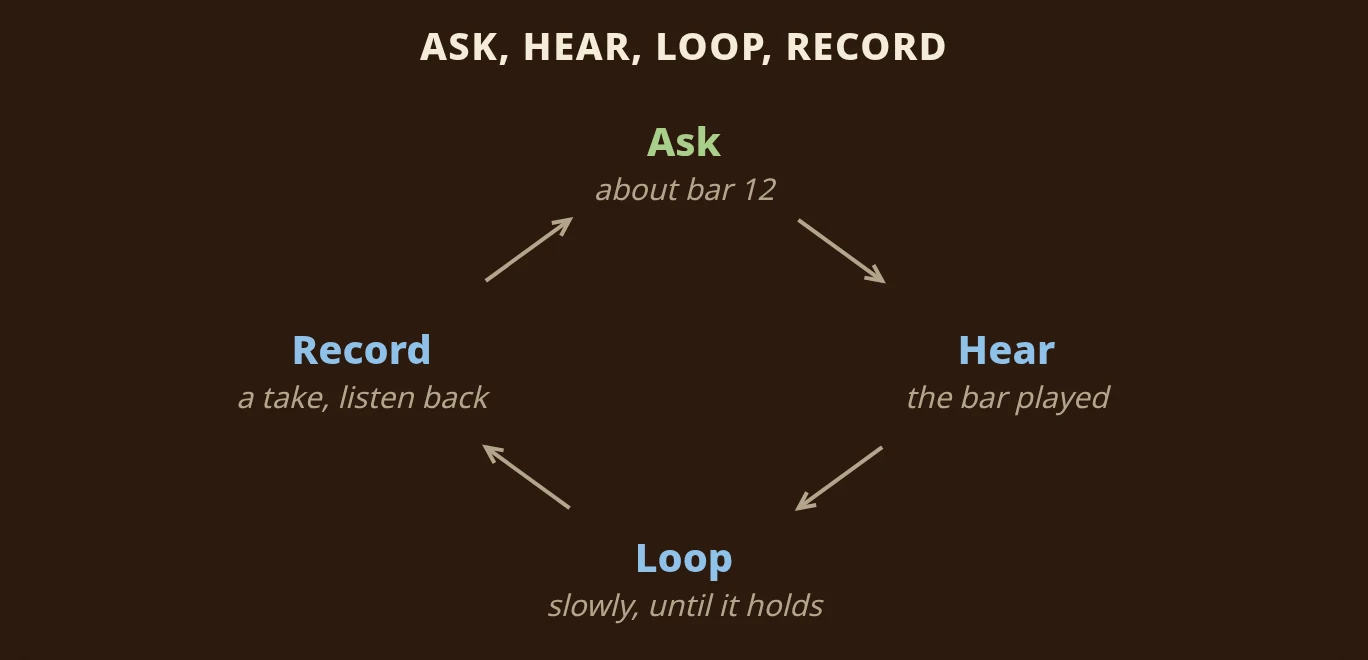
This cycle is what makes the coach useful. Ask about the bar, hear it played correctly, loop it slowly until it holds, record yourself, and then ask again about whatever still does not feel right. You arrive at your next lesson having worked on the right bars, instead of playing the piece from the top ten times.
How this compares with other music apps
Other sheet music apps fall into three groups: lesson apps that listen to you play songs from their own library, readers and libraries with playback but no coach, and scanners that play back a photographed page but stop there. As far as we know, none of them lets you ask a coach about your own photographed page by bar number.
| Can you... | Sheetly | Simply Piano, Flowkey, Yousician | forScore, Piascore, MuseScore app | PlayScore 2, Sheet Music Scanner |
|---|---|---|---|---|
| Photograph your own printed page into a playable score | Yes | No | No | Yes |
| Ask an AI coach about that score by bar number | Yes | No | No | No |
| Have the app listen and check your notes | No | Yes | No | No |
| Loop one bar and change the tempo | Yes | Library songs | MuseScore app: library scores | PlayScore 2 yes; Sheet Music Scanner tempo, loop not advertised |
| Record your own take against the score | Yes | Graded live instead | No | Not advertised |
| Keep a library of your own PDFs with annotations | Scanned scores only | No | Yes | Varies |
We compiled this from each product's own materials in August 2026. "No" means we could not find the feature documented, not that it is definitely absent. forScore and Piascore are excellent PDF readers and annotation tools for iPad; they do not read notation from photos into playable notes. PlayScore 2 and Sheet Music Scanner photograph and play, which is the part Sheetly shares.
What the coach is not
The coach does not listen to you play, grade your performance or replace a teacher. It reads printed notation only, not handwriting, guitar tab or shape notes. If the scan misreads a note, the answer about that bar inherits the mistake, and there is no correction editor, so retake the photo flatter, with the whole page in the frame. Scanning and asking need a connection; scores you have already scanned play back offline.
The coach can give you the rhythm in bar 7 and a fingering for bar 12, but it cannot hear a tense thumb or a shapeless phrase. A teacher can. Whether you take lessons or teach yourself, the coach makes the practice in between more specific.
Ask about the bar you cannot play
That is what we built Sheetly for. Photograph the page with your iPhone or iPad, hear it played back with a playhead that follows the notes, loop it, and ask the coach what is written in bar 12 and how to practise it.
Questions
Does the AI coach listen to me play?
No. Sheetly's coach answers questions about the notes on your page. You can record your own take and hear it back against the score, but the coach does not grade it.
What is a system in sheet music?
A system is one line of music across the page: a single staff for a solo part, or all the staves played together, such as the two staves of a piano part, joined at the left edge.
How long is a dotted crotchet?
A dotted crotchet (dotted quarter note) lasts a crotchet and a half, because a dot adds half the note's own value. When the beat is a crotchet, that is one and a half beats, usually followed by a quaver (eighth note) to complete the second beat.
Can the coach see which piece I scanned?
The coach receives the notes from the scan, with pitches, rhythms, key and bar numbers. It does not receive a picture of the page and is not given the title.