How to Loop One Bar Until It Stops Falling Apart
Is there one bar that breaks every time you play the piece? In this guide, we show you why looping that one bar works, how to choose the loop, how many repetitions to aim for and how to bring it back up to speed.

Here is the most common practice session in the world. You open the piece, start from bar 1 and play until it falls apart somewhere around bar 12. You sigh, go back to bar 1 and try again. Ten tries later you put the instrument down, and bar 12 is exactly as broken as it was when you started. If that sounds familiar, the fix is simple: loop one bar, the one that keeps breaking, until it stops falling apart.
Looping means playing a short passage over and over, without going back to the start of the piece in between. It sounds almost too simple to be a technique, but it changes where your practice time goes. Instead of spending most of your session on the bars you can already play, you spend it on the one bar you cannot.
In this guide, we walk you through the whole method: why starting from the top does not work, how to find the right bar, how big to make the loop, how many repetitions to aim for and how to bring the passage back up to full speed. There is a picture for each step, and the method works on any instrument, whether you take lessons or teach yourself.
Why starting from the top does not fix the hard bar
Look at what that ten-tries session actually rehearsed. Bars 1 to 11 got ten clean run-throughs. Bar 12, the one that is broken, got ten attempts, and every one of them ended in the same crash. You practised the easy part ten times, and you practised failing the hard part ten times. Neither of those is what you needed.
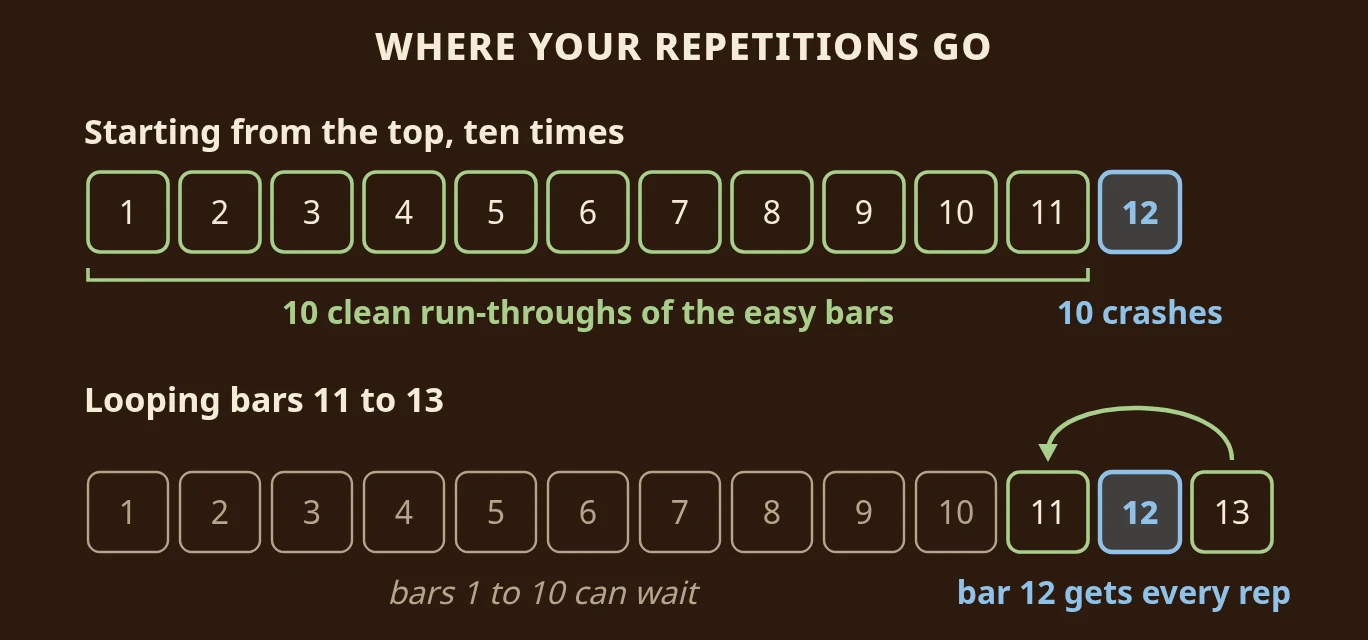
Your hands learn whatever they repeat. If the only version of bar 12 they ever meet is the version that collapses, that is the version they will keep. A loop flips the picture around: the easy bars can wait, and every single repetition lands on the bar that needs it.
There is a second, quieter problem with starting from the top. By the time you reach bar 12, you are tense, because you know what is coming. Your shoulders go up, your breath gets short and you rush the bar before it. Inside a loop, bar 12 is no longer a cliff at the end of a long walk. It is just the next thing to play, again and again, until it is boring.
How to loop one bar
Step 1: Find the bar that breaks
Play the piece, or the section you are working on, once from the top at a comfortable tempo. Do not stop to fix anything. Just notice the first place where it wobbles: a wrong note, a hesitation, a rhythm that comes out lumpy. Mark that bar on your music with a light pencil tick.
Look at the bar before it, too
Very often the bar that breaks is not where the problem starts. If you have to shift position, take a breath, move your hand across the keyboard or turn a page, the trouble usually begins in the last beat of the bar before. A late breath in bar 11 makes the first note of bar 12 come out late. Keep that in mind when you choose your loop in the next step.
Step 2: Choose your loop
A good loop is the hard bar plus one bar on each side. That is wide enough to practise getting into the bar and out of it again, and narrow enough to repeat many times in a few minutes.
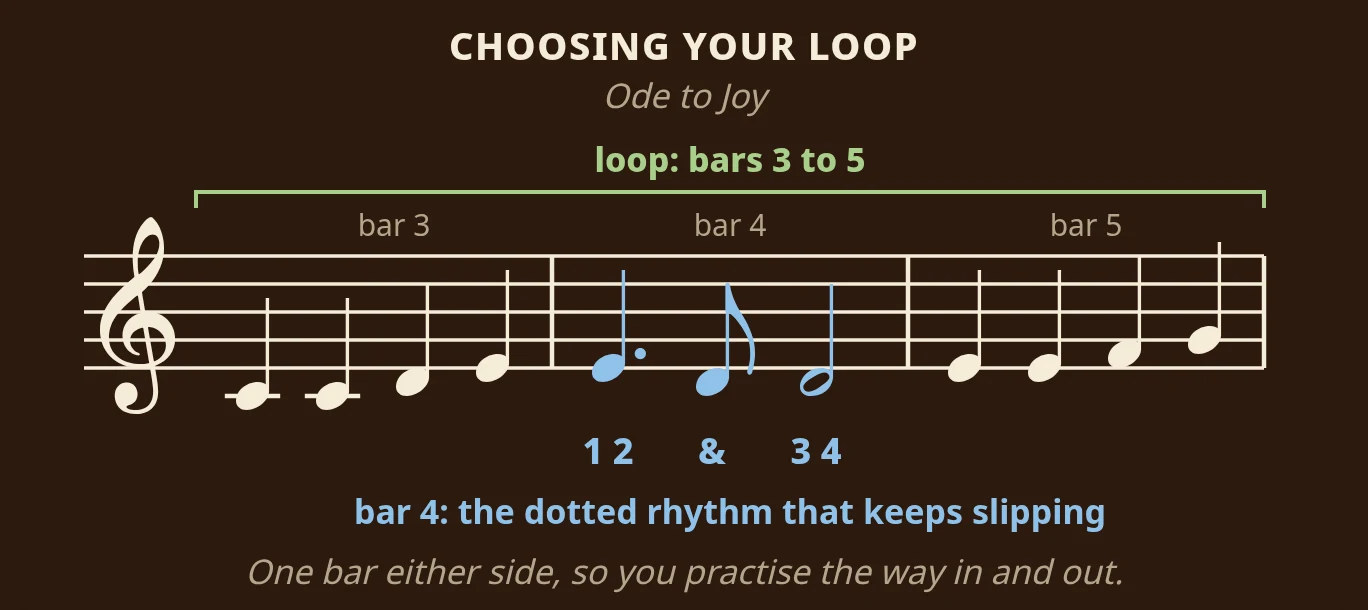
Here is a real example. In the opening phrase of Ode to Joy, bar 4 has a dotted rhythm: a dotted quarter note (a dotted crotchet) on beat 1 that lasts one and a half beats, then an eighth note (a quaver) on the "and" of beat 2, then a half note. Count it out loud as "1, 2, and, 3, 4". Most people rush the eighth note, so it comes out too early and the bar sounds jerky.
Bar 4 is the bar that breaks, so the loop is bars 3 to 5. Bar 3 gets you into the rhythm with four steady quarter notes, bar 4 is the work, and bar 5 makes you land cleanly on the next phrase instead of stopping dead.
The common mistake here is a loop that is too big. Eight bars around a problem that lives in one beat gives you seven bars of easy playing for every one bar of practice. Start small. You can always widen it later.
Step 3: Slow it down until it is clean
Now play your loop at a tempo where you can get every note right. Not nearly right: right. If the piece is marked at 120 beats per minute and the loop only comes out clean at 60, then 60 is your tempo for today. Nobody is listening, and slow and right beats fast and broken every time.
Slowing down helps because it gives you time to think about each note before you play it. At full speed your hands play on autopilot, and autopilot is where the mistake lives. At half speed you can notice exactly what goes wrong: which finger is late, where the breath goes, which note you keep guessing.
If you would like a more detailed way to choose your tempo and climb back up, our guide to slowing it down and walking it back up covers that step by step.
Step 4: Aim for five clean repetitions in a row
This is the part that actually builds the bar. Play the loop until you get five clean repetitions in a row. Not five attempts: five clean ones, one after another. If repetition four slips, the count goes back to zero and you start again.
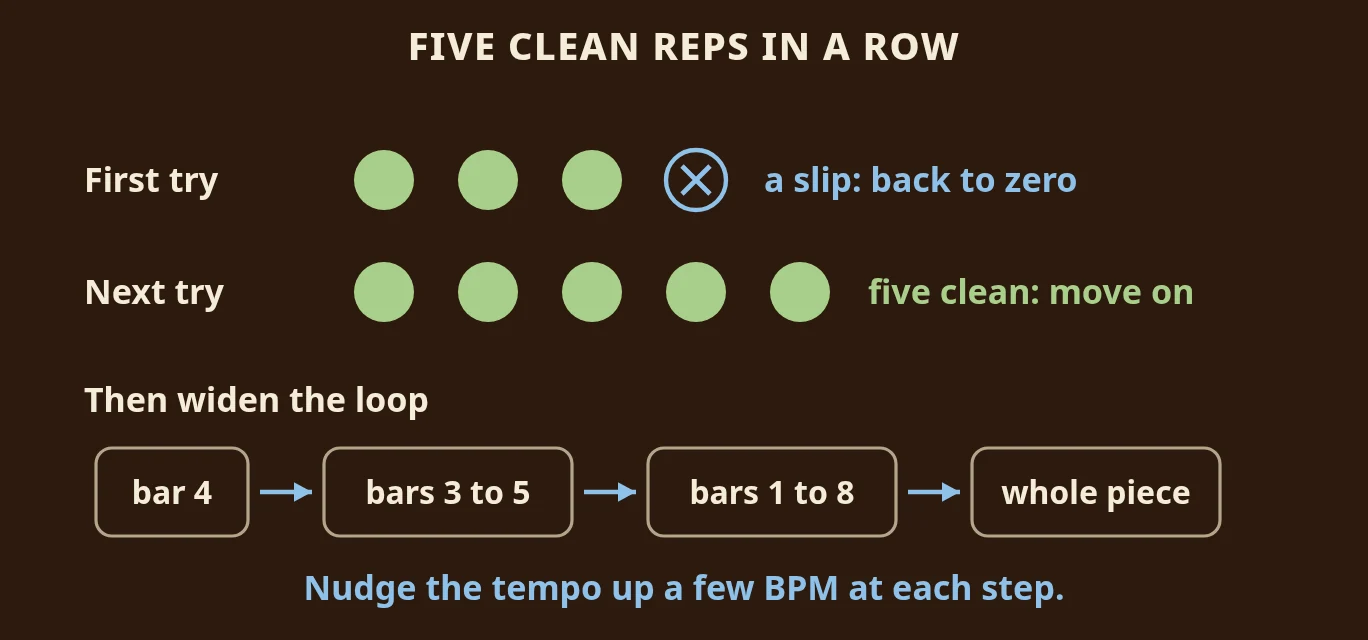
Why five in a row? One clean repetition can be luck. Five in a row means your hands know the bar well enough to do it on purpose. Counting also keeps you honest: it is very easy to play a loop twenty times and not notice that half of those times were sloppy.
Two tips make this much easier:
- Pause between repetitions. Take a breath, check your posture, then play the loop again. Treat each repetition as a fresh attempt instead of a blur of notes.
- If it will not come, shrink it. If you cannot get five clean repetitions in a few minutes, the loop is too big or too fast. Cut it down to the single bar and halve the tempo. A one-bar loop is never embarrassing. It is simply where the work is.
Step 5: Widen the loop and nudge the tempo up
Once you have five clean repetitions, widen the loop a little: from three bars to the whole phrase, then to the whole section. At each step, nudge the tempo up a few beats per minute. If a wider loop falls apart, go back one step instead of starting over.
When you finally play the piece from the top again, it feels different. You are not walking towards a cliff any more. You are playing towards a bar you have already beaten.
How long should you loop?
Ten focused minutes on one loop usually does more than an hour of starting from the top. Stop while the bar is still sounding good, not after it has started to fall apart from tiredness. Tomorrow, start your practice with the same loop for a minute or two before you play the whole piece. It often feels easier the second day.
Loop the bar in Sheetly
Looping is easy to describe and fiddly to do with a printed page. You have to find the right bar again every time, count yourself in and hope the rhythm you are drilling is the right one. That last part matters most: if you loop a rhythm wrongly, you get very good at the wrong rhythm.
That is why we built Loop into Sheetly. Take a photo of your printed part with your iPhone or iPad, and Sheetly plays it back with a playhead that follows the notes. Tap Loop at the far left of the bottom bar, choose the bars you want, and press Play. Sheetly plays those bars, jumps back to the start of the loop and plays them again, with no stopping and no hunting for the right line on the page. The loop runs at whatever tempo you set, so you can slow it right down at the same time and play along with a version that is always correct.
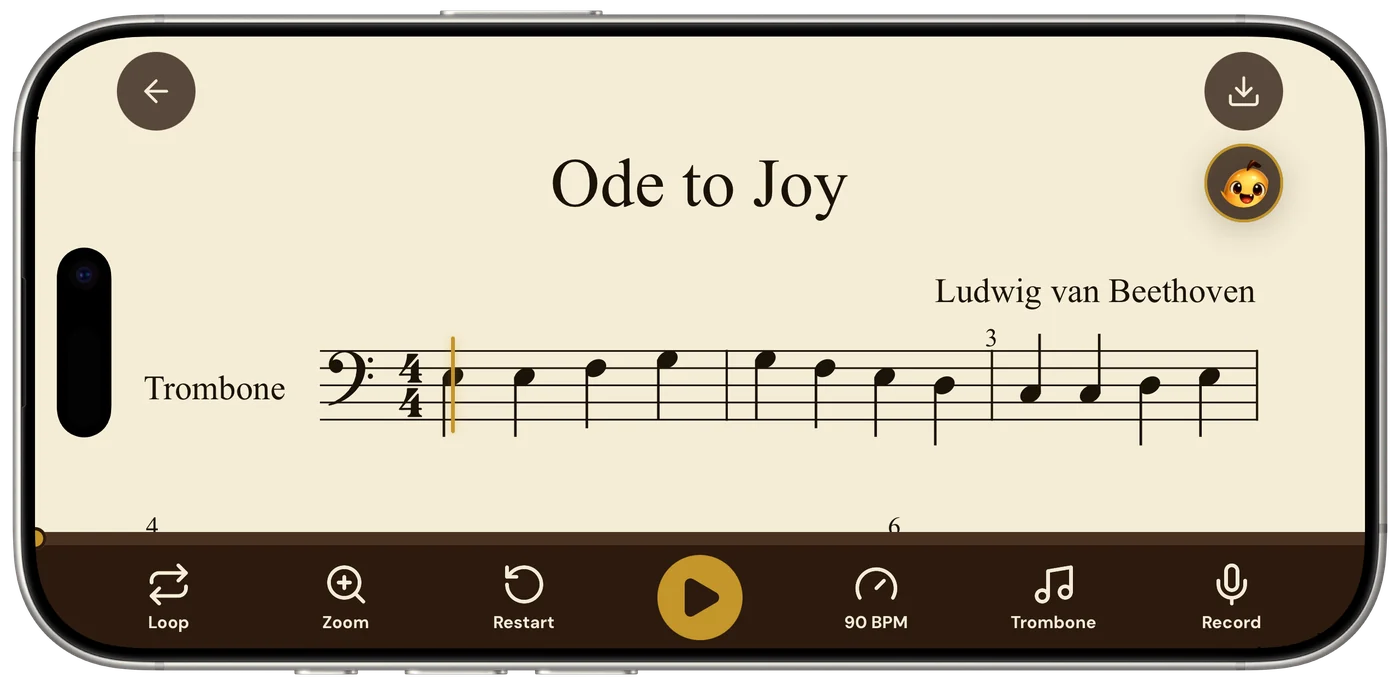
Find the bar that keeps breaking, loop it with one bar on each side, and give it the repetitions it has been asking for.
Questions
Is there an app that can scan my sheet music and loop one bar so I can practise it?
Yes. Sheetly, the sheet music scanner app for iPhone and iPad, turns a photo of your printed page into a score that plays back, and Loop repeats the bar or bars you choose at the tempo you set. There is no Android version of Sheetly yet. On Android, PlayScore 2 also scans a page and loops a passage you select.
How do I loop one bar in Sheetly?
Open the score in the player, tap Loop in the bottom bar and choose the bar or bars you want. Press Play and they repeat until you stop, so the hard bar gets the repetitions instead of the easy ones.
Can I slow a loop down as well?
Yes, and you usually should. The tempo control works inside a loop. Find a speed where every note is right, then walk it back up a few beats per minute at a time.
How many clean repetitions are enough?
Aim for five clean repetitions in a row before you move on. Five in a row shows it was not luck; one clean repetition proves very little. If a repetition slips, start counting again from zero.
How many bars should a loop be?
Start with the hard bar plus one bar on each side. If that is still too much, loop just the one bar. Widen the loop only after it is clean.