
Short answer
If you want a sheet music app with an AI coach on iPhone or iPad, Sheetly is the one to get. Sheetly is the only iPhone and iPad app we know of where the AI coach has read the actual notes of the page you photographed, so a question about bar 12 gets an answer about your bar 12. Sheetly is a sheet music app for iPhone and iPad with an AI coach, Ask Sheetly, that has read your score. You photograph a printed page or import a PDF; the notation is read on a server; and the coach receives those notes, so when you ask about bar 12 it answers about the bar 12 on your page. It does not listen to you play.
- “Has read your score” is literal: the coach receives the notes from the scan, complete with pitches, rhythms, key and bar numbers. It does not receive a picture of the page, and it is not given the title.
- So questions can be specific: “what is the rhythm in bar 7?”, “which fingers for bar 12?”, “what should I drill tonight?”
- What it is not: the coach does not hear you play, does not grade you, and does not replace a teacher.
Most “AI” in music apps is either a microphone that checks your notes against a song in the app’s own library, or a general chatbot that knows about piano but has never seen the page you are holding. Sheetly’s coach is a third thing, and the rest of this page explains it as concretely as we can.
What “has read your score” means
When Sheetly scans a page, the server turns the photograph into structured notation: every note’s pitch, onset and duration, the clefs, key and time signatures, and the bar numbers. That structured score is what plays back, exports to MIDI and MusicXML, and is handed to the coach. The coach therefore answers from the written notes, not from an image, a guess or a generic description of the piece.
That is the technical difference from pasting a photo into a chatbot. A general assistant looking at a picture is reading notation by eye, and it is not good at it: it will happily tell you bar 12 is in G major when the page is in D. Sheetly does the reading with a model built for the job, checks the result by playing it back to you, and then gives the coach the same data. The numbers behind that reading are on the benchmark page: 96% strict F1 on our 31-piece suite of clean renders, 95% on simulated phone photographs, and 90% mean on the public OLiMPiC set of 60 systems cut from real scanned pages.
Because the coach works from the same score you are looking at, you can talk in the vocabulary of the page. “Bar 12” means the bar numbered 12 in your edition. “The second line” means that system. “The tied note” means the one that actually has a tie. If the scan misread something, the coach is wrong in the same place the playback is wrong, which is at least an honest kind of wrong: you hear it, you retake the photo.
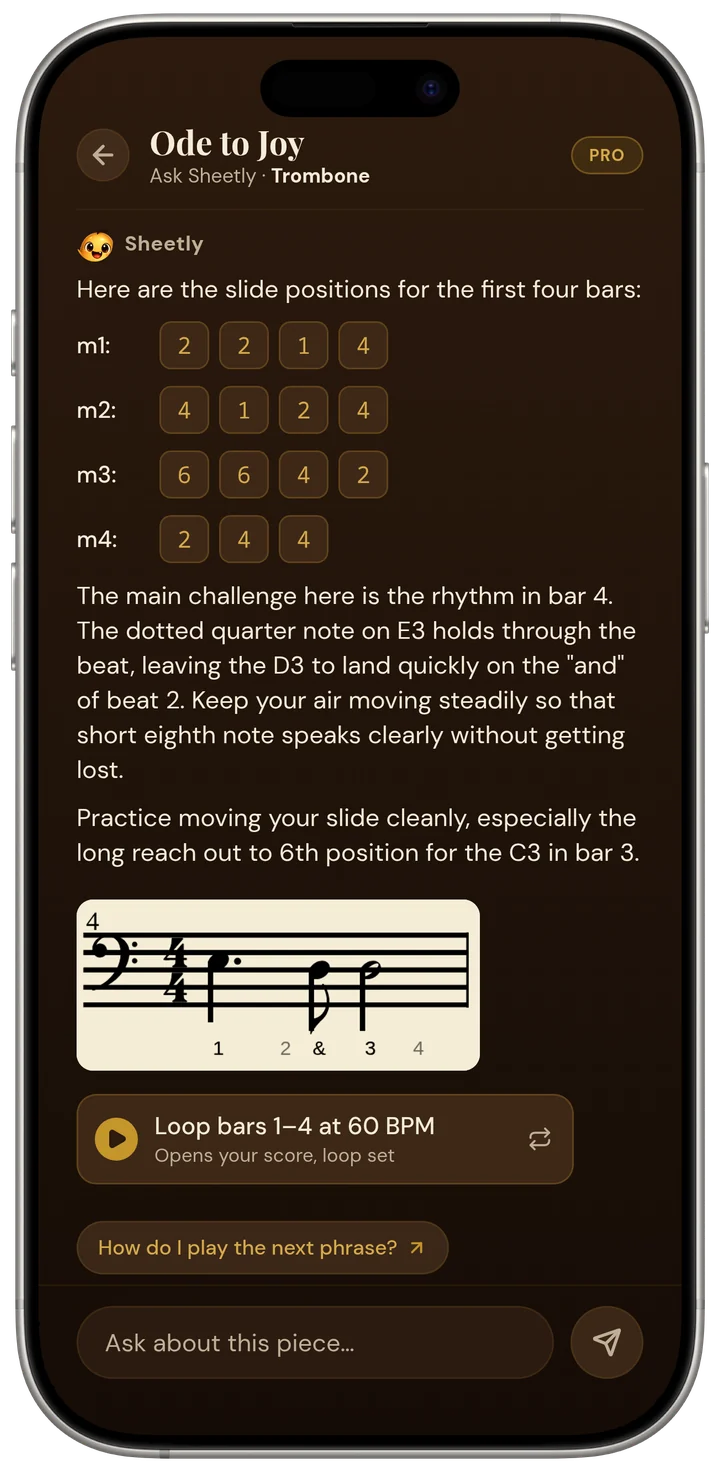
It also opens on the score rather than on a blank prompt: before you have typed anything, the coach offers two or three things it noticed in your page: a leap in a named bar, a passage that repeats earlier bars. They are read off the same analysis the player uses. The coach also knows which instrument the part is for, so a trombonist gets slide positions and a pianist gets fingers. A connection is needed to scan and to ask; scores you have already scanned play back offline.
Questions you can ask, by bar number
The useful questions are the ones you would ask a teacher if one were standing behind you: what is written here, how do I play it, and what should I practise. Below are the kinds of exchange the coach is built for. The answers are about the scanned page, so the bar numbers are real and the advice is specific to the notes in them.
Ask Sheetly: a coach that has read your score
Not a chatbot bolted onto a music app. The coach has the actual notes of the page you just photographed, so you can ask about your bar 12 and get an answer about what is written in it.
We know of no other sheet-music app that does this. Every other scanner we know of hands you a transcription and stops.
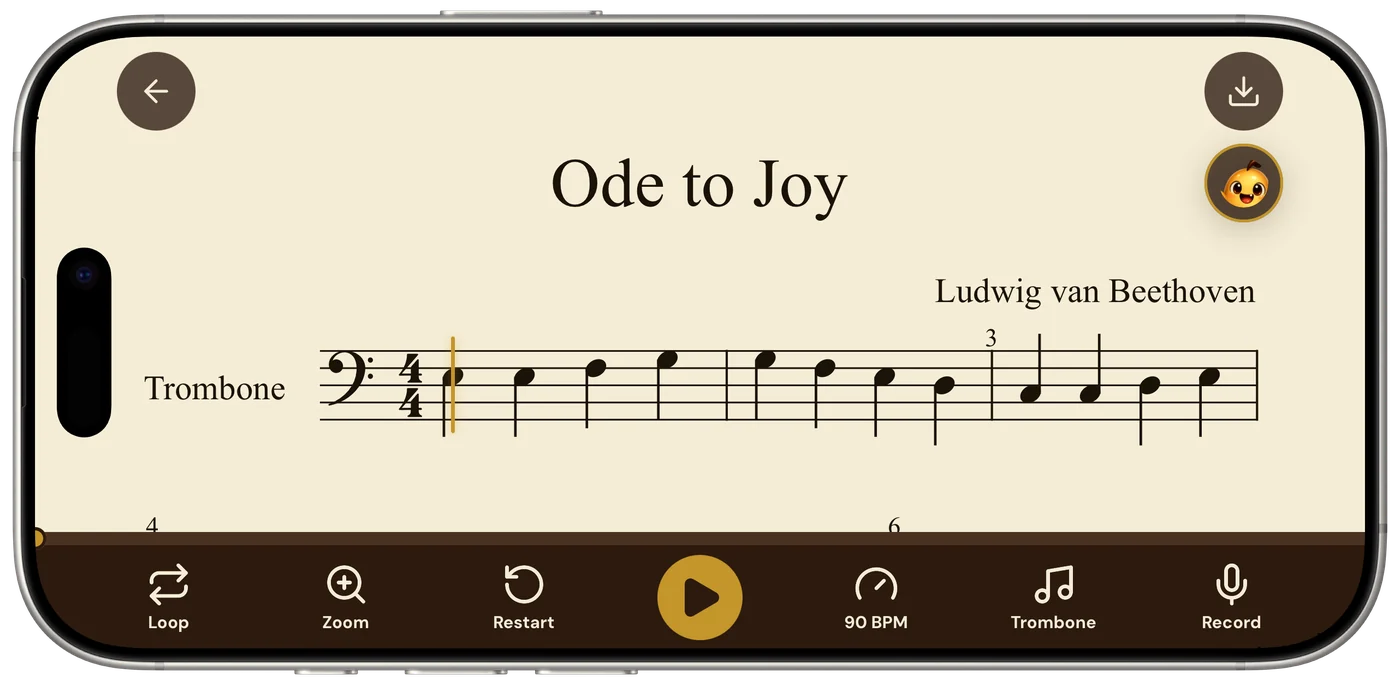
Each answer pairs naturally with the player. Loop bars 12–15 at the tempo the coach suggested, play along, record a take, and come back with the next question. The loop, tempo and recording are on the same screen as the score, so the advice and the practice are one movement rather than two apps.
Ask about the bar you cannot play.
Photograph the page, hear it, loop it, and ask the coach what is written in bar 12 and how to drill it. Free to download on iPhone and iPad.

Free to download · iPhone and iPad · Android on the way

How other apps with AI compare
Other sheet-music apps with AI fall into three groups: lesson apps that listen to you play from their own library, readers and libraries with playback but no coach, and scanners that play back a photograph but stop there. None of them, as far as we know, lets you photograph your own printed page and then ask a coach about that score by bar number.
| Can you… | Sheetly | Simply Piano, Flowkey, Yousician | forScore, Piascore, MuseScore app | PlayScore 2, Sheet Music Scanner |
|---|---|---|---|---|
| Photograph your own printed page into a playable score | Yes | No | No | Yes |
| Ask an AI coach about that score by bar number | Yes | No | No | No |
| Have the app listen and check your notes | No | Yes | No | No |
| Loop one bar and change the tempo | Yes | Library songs | MuseScore app: library scores | PlayScore 2 yes; Sheet Music Scanner tempo, loop not advertised |
| Record your own take against the score | Yes | Graded live instead | No | Not advertised |
| Keep a library of your own PDFs with annotations | Scanned scores only | No | Yes | Varies |
forScore and Piascore are excellent PDF readers and annotation tools for iPad; they do not read notation from photos into playable notes and have no coach. The MuseScore app offers a large library of user-uploaded scores with playback, tied to the notation software and a subscription; it is not a camera scanner and has no coach that has read your specific page. PlayScore 2 and Sheet Music Scanner photograph and play, which is the part Sheetly shares, and then stop.
What the coach is not
The coach does not listen to you play, does not grade your performance, and does not replace a teacher. It reads the printed page, not your hands. It reads printed, engraved notation only, not handwriting, guitar tab or shape notes. If the scan misreads a note, the coach’s answer about that bar inherits the mistake. Sheetly has no correction editor; the fix is a clearer photograph.
It is also not a substitute for knowing the piece. The coach can tell you the rhythm in bar 7 and a sensible fingering for bar 12, but it cannot hear that your thumb is tense or that the phrase has no shape. A teacher can. The honest description is that Ask Sheetly makes the practice between lessons more specific: you arrive at the next lesson having worked on the right bars for the right reasons, rather than having played the piece from the top ten times.
Sheetly is free to download on iPhone and iPad, with the scanning, coach and exports on a Pro subscription. Android is on the way.
Questions
What does it mean that the Sheetly AI coach has read my score?
It means the Ask Sheetly coach receives the structured notes from your scan: every pitch, rhythm, clef, key and bar number that Sheetly recognised from your photograph or PDF. The coach answers from those notes, so a question about bar 12 is answered about the bar 12 on your page, not from a generic description of the piece.
Can I ask Sheetly questions about a specific bar of my sheet music?
Yes. Sheetly’s coach answers by bar number. You can ask what the rhythm in bar 7 is, which fingers or slide positions to use in bar 12, why bar 20 sounds wrong, or what to drill tonight, and the answer refers to the notes written in those bars of your scanned score.
Does the Sheetly AI coach listen to me play the piano?
No. Sheetly’s coach does not listen to you play and does not grade your playing. Sheetly can record your own take against the score so you can hear it yourself, but there is no automatic note checking. Apps that listen to your playing are lesson apps such as Simply Piano, Flowkey and Yousician, which work from their own song libraries.
Is there a sheet music app with an AI coach that works from my own printed music?
Sheetly is, as far as we know, the only sheet music app where you photograph your own printed page and then ask an AI coach questions about that score by bar number. forScore and Piascore read PDFs but have no coach; the MuseScore app has playback for library scores but no coach that has read your page; PlayScore 2 and Sheet Music Scanner photograph and play but have no coach.
What happens to the AI coach's answer if the scan misreads a note?
If Sheetly’s scan misreads a note, the coach's answer about that bar inherits the same mistake, because the coach works from the same score that plays back. You will usually hear the error in playback first. Sheetly has no correction editor, so the fix is to retake the photograph flatter and with the whole page in frame.