
What “scanning sheet music” actually means
Scanning a score is not the same as photographing it. A photo is a picture of a page. A scan, in this sense, is a photograph that has been read, turned back into the notes, rhythms and markings the engraver put there, so a computer can play it, transpose it, slow it down or hand it to a notation editor.
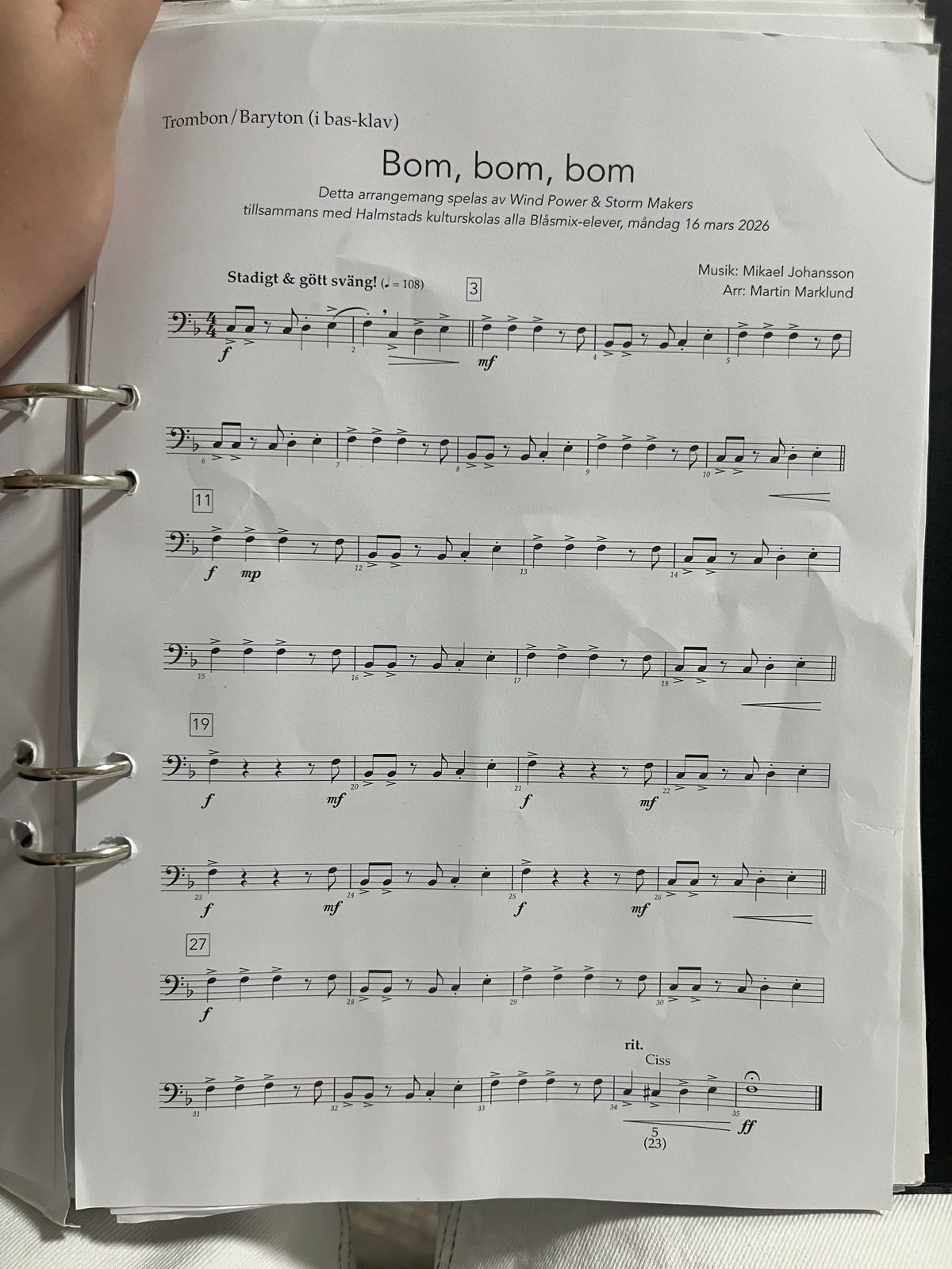
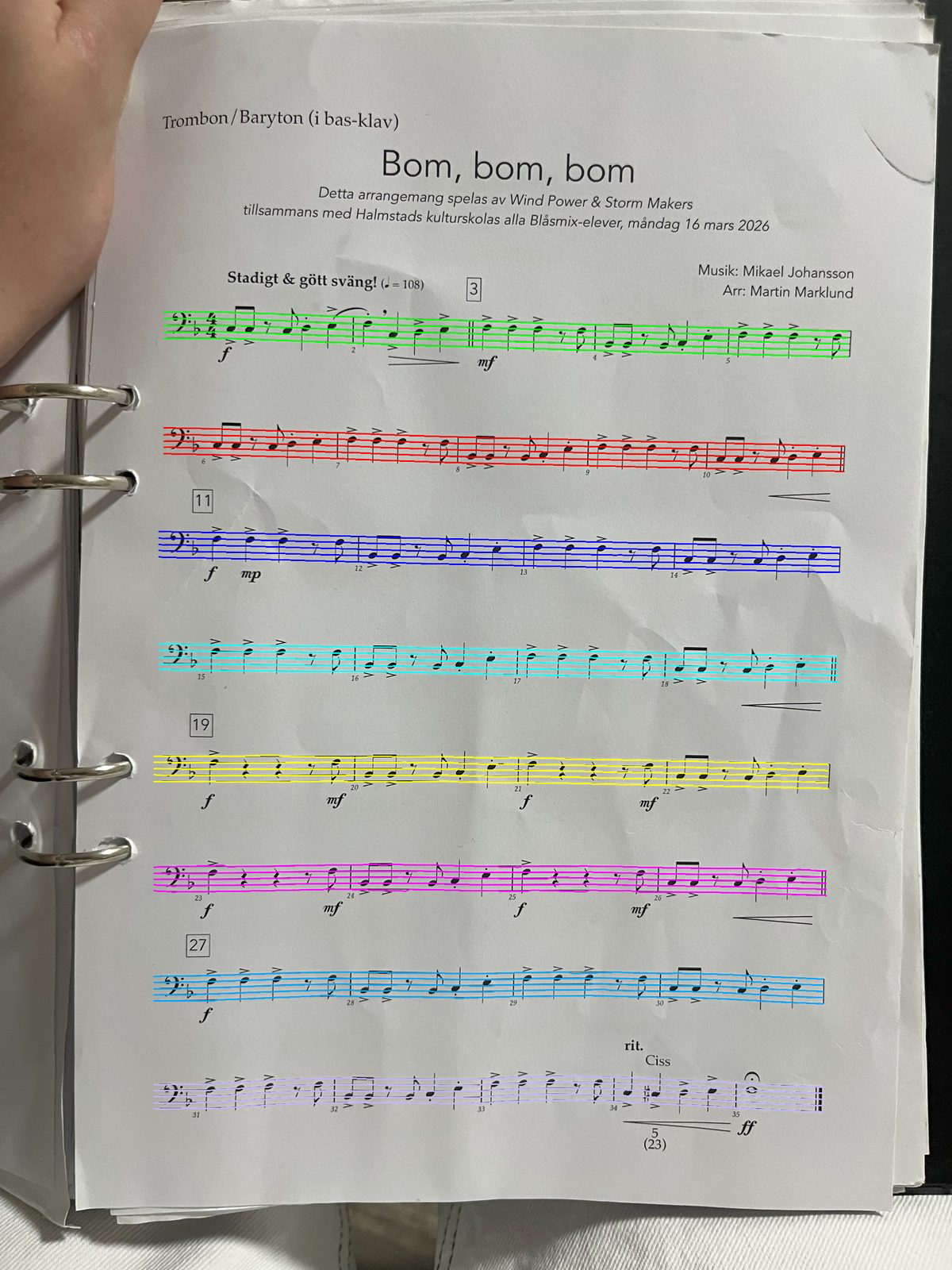
The technology that does the reading is called optical music recognition, or OMR. It is the musical cousin of OCR, the technology that turns a photographed page of text into editable words, except that music is two-dimensional. In text, meaning runs left to right. In music, a symbol’s vertical position is its pitch, several voices can occupy the same instant, and a single accidental at the start of a bar quietly changes every note that follows it.
That is why a scanner that returns a playable score is doing considerably more than reading shapes. It has to work out where the staves are, which ones are braced together into one instrument, what clef and key each is in, how the beams divide the beats, and which notes belong to which hand.
Point your phone at a printed page. A few seconds later you have a score with a play button on it, one you can loop, slow down, and hear on any instrument.
The Sheetly player on an iPhone. Every page you scan opens like this, ready to play, loop and slow down.
Scanning a page, step by step
This is the whole flow in Sheetly. It takes about twenty seconds the first time and rather less after that.
- Lay the page flatPut the music on a table rather than holding it. If it is in a book, press the page down so the area near the spine stops curving.
- Open the scanner and hold the phone parallel to the pageDirectly above, not at an angle. The page edges should look like a rectangle in the viewfinder, not a trapezium.
- Fill the frame with the notationGet close enough that the staves fill the width. Margins and table are wasted pixels, and the more pixels land on the actual noteheads, the more accurately they read.
- Take the photoOr import one you already have, or a PDF, if the page is not in front of you.
- Wait a few secondsThe page goes off to be read: staves found, clefs and key signatures identified, notes decoded, bars checked for the right number of beats.
- Press playThe score comes back playable. Listen to it once, straight through, at the written tempo. That single listen is the fastest possible proof that the read was right.
- Then practiseLoop the bar you cannot do. Take the tempo down until it is easy. Walk it back up. Record yourself and hear where you drifted.
How to photograph a page so it reads cleanly
Almost every disappointing scan is a photography problem rather than a music problem. Six habits fix nearly all of them.
Get the page flat
A curved page is the biggest single cause of errors. Staff lines that bend break the assumption the whole system rests on: that a staff is five straight, parallel, evenly-spaced lines. Flatten the page, weigh down a stubborn corner, or photograph one half at a time.
Shoot straight down
Perspective compresses the far end of the page: staves get narrower, note spacing shrinks, and two ledger lines start to look like one. Hold the phone parallel to the paper and centred over what you are shooting.
Give it even light
Bright, diffuse, from the side you are not standing on. What you want to avoid is your own shadow falling across the staves, and a hard window highlight blowing out one corner. Overhead room light plus daylight is usually ideal; a single harsh lamp is usually not.
Turn the flash off
Flash on glossy paper produces a white hotspot right in the middle of the page, and whatever is under that hotspot is gone. If the room is too dark for a flash-free photo, move somewhere brighter rather than turning the flash on.
Fill the frame
Resolution spent on the table is resolution not spent on noteheads. Crop in with your feet, so to speak: move the phone closer rather than photographing the whole desk and cropping later.
One page at a time
Photographing an open book as a two-page spread halves the resolution on each page and guarantees curvature near the spine. Two separate photographs read better and stitch into one continuous piece anyway.
Flat, square-on, evenly lit, close. In that order. A phone photograph that meets those four conditions reads about as well as a flatbed scan.
What to do when the read is wrong
No scanner is perfect, and anyone claiming otherwise has not tried a hard enough page. What matters is how quickly you can tell that something is wrong and how cheaply you can fix it.
- Listen before you trust it. Play the score through once. A misread pitch is glaringly obvious in the ear and nearly invisible on the screen.
- Rescan before you edit. If a passage sounds wrong, retake the photograph with better light and a flatter page. This fixes more errors than any amount of manual correction, and it takes ten seconds.
- Check the key and time signature first. A single misread key signature makes an entire page sound wrong while every individual note is technically decoded correctly. It is the highest-leverage thing to glance at.
- Suspect the hard cases. Very dense chords, many ledger lines, small-print editions, cramped modern engravings and tuplets nested inside tuplets are genuinely harder than a clean single line.
Ask Sheetly: a coach that has read your score
Not a chatbot bolted onto a music app. The coach has the actual notes of the page you just photographed, so you can ask about your bar 12 and get an answer about what is written in it.
We know of no other sheet-music scanner that does this. Every other tool on this page hands you a transcription and stops.
What Sheetly can and cannot read
Being straight about the boundaries saves you a wasted afternoon.
It reads
- Printed and engraved notation: published editions, method books, exam pieces, PDFs from IMSLP and the like.
- Piano and other grand-staff music, with both hands braced together.
- Single-line parts for strings, winds, brass and voice.
- Treble, bass and the other common clefs, in any key and any common time signature.
It does not read
- Handwritten manuscript. Handwriting varies far more than engraving does, and this is a genuinely unsolved problem across the whole field.
- Guitar tablature and chord diagrams, which use a different symbol system entirely.
- Lyrics as lyrics: they are text sitting under the staff, not notes.
- Interpretation. Playback follows what is written; it will not add rubato or pedalling that the page does not specify.
For the technology behind all of this, and why photographs are so much harder than flat scans, there is a plain-English explanation here.
Scan the page you are actually stuck on.
The app does this with whatever you photograph. Then you can loop the hard bar, slow it down, and ask the coach why it keeps falling apart.

Free to download · iPhone and iPad · Android on the way

Questions
Can I scan sheet music from a book without flattening it?
You can, but a bound page curves away from the camera near the spine, and that curve is the single most common cause of a bad read. If the book will not lie flat, photograph one page at a time, hold the phone directly over the middle of that page rather than over the spine, and press the outer edge down with your other hand.
Does it work on a photo I took months ago?
Yes. Anything already in your camera roll can be imported, and so can a PDF. The same rules apply: the flatter and better-lit the original photo, the better the read.
How long does a page take?
Usually a few seconds for a single page. Denser pages with many staves take longer, because there is simply more notation to resolve.
What if it gets a note wrong?
You will hear it immediately, which is the point of playback. A wrong note stands out far more in your ears than on the page. Rescan with a better photograph first, since most errors are photographic rather than musical.
Can I scan several pages of the same piece?
Yes. Scan them in order and they join into one continuous score, so a three-page piece plays from the first bar to the last without stopping.