
The short version
For learning a piece from a photographed page on an iPhone or iPad, Sheetly is the better choice. Pick Soundslice if you transcribe, edit notation, sync a score to a recording or a video, or teach students. Soundslice is the deeper platform by a wide margin: a full editor, audio and video sync, sharing by link, and it runs in any browser. Sheetly is narrower on purpose: photograph it, hear it, loop it, record a take, and ask a coach that has read the notes.
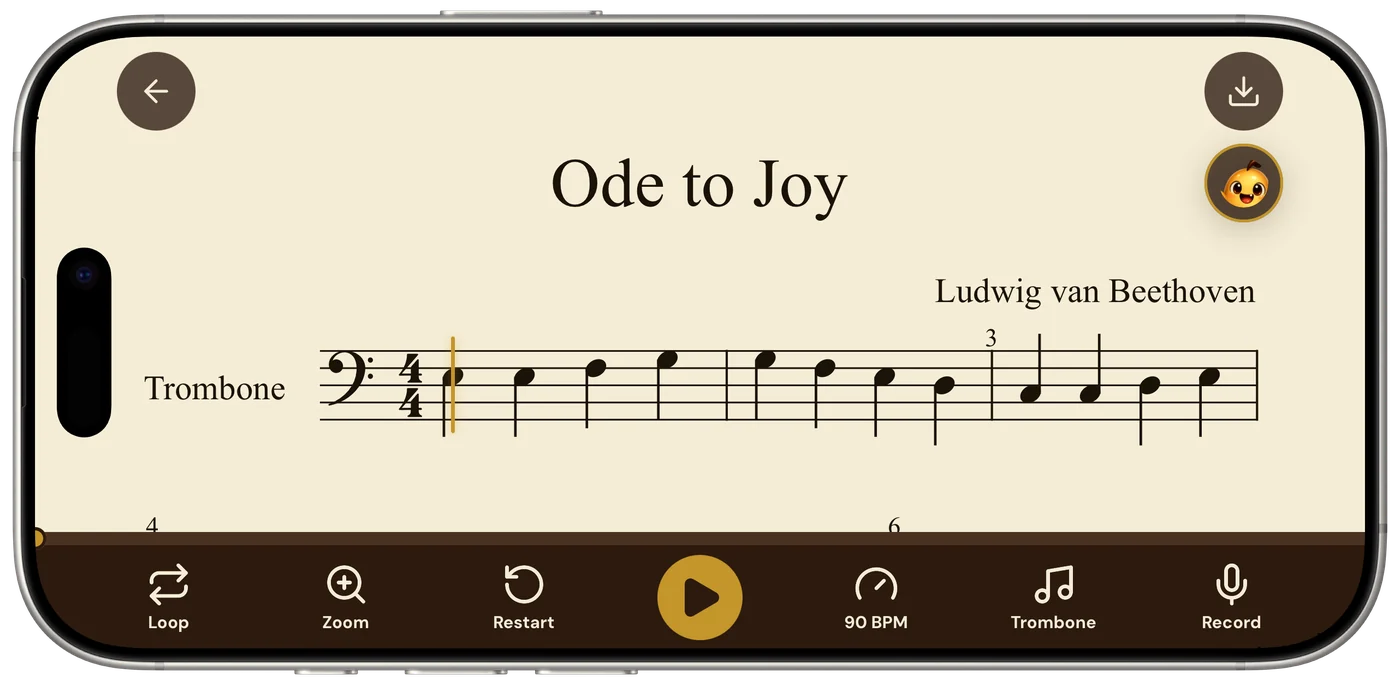
- Sheetly is better for an iPhone or iPad player who wants to photograph a printed page and learn it: play, loop, record a take, ask the coach, export.
- Soundslice is better for transcribing, editing notation, syncing notation to YouTube, MP3 or video, and teaching students, in any browser on any device.
- Soundslice has a free, unlimited notation editor. Sheetly has no editor; with Pro it exports PDF, MIDI and MusicXML, so you can edit elsewhere.
- Soundslice counts scanned pages per month on its plans, 2 on Free and 100 on Plus at $5 a month. Sheetly is free to download with a Pro subscription.
We make Sheetly. Every claim about another product is taken from that product’s own materials, and we say plainly where it is better. Where we have measured something we show the method; where we have not, we publish no number.
This is a comparison between a tool and a platform. Soundslice is a place where notation lives: you scan it or write it, sync it to a recording, share it by link, teach from it. Sheetly is built for one job: turning the printed music you already own into something you can hear, ask about and practise, on an iPhone or iPad. The honest question is not which is better in the abstract; it is which job you are about to do.
Where Soundslice is better
Soundslice is better if you want to edit the notation, sync it to audio or video, share it, or teach from it. It runs in any browser with no install, its editor is free and unlimited, and its Plus plan is $5 a month. On depth and on price, Soundslice wins, and nothing on this page should be read as disputing that.
A real notation editor, free
Soundslice’s editor is a full notation editor and its own materials describe it as free and unlimited. You can correct a misread note, finish a transcription by hand, or write an arrangement from nothing. Sheetly has no editor at all. If a scan comes back with a mistake in Sheetly, the fix is a better photograph and a rescan; in Soundslice, the fix is a click.
Notation synced to audio and video
Soundslice syncs notation to YouTube, MP3 and video recordings, so you can click a note and jump to that moment of the performance. For transcribers, for anyone learning from a specific recording, and for teachers who want a student to see and hear a passage at once, this is the feature, and Sheetly has no equivalent.
Any browser, any device
Soundslice runs in a browser on phones, tablets and desktops, with nothing to install. A score you scan on your phone is open on your laptop a minute later, and a link shares it with anyone. Sheetly is a native app for iPhone and iPad, with Android on the way.
Teaching
Soundslice is a teaching platform with a Teacher plan at $20 a month: assign material, share it by link, and let students loop, slow down, solo parts and track their practice. If you teach more than a handful of students, that is a category Sheetly does not try to compete in.
Price
Soundslice publishes Free at $0 with 2 scanned pages a month, Plus at $5 a month or $50 a year with 100 pages a month, Teacher at $20 a month and Licensing at $100 a month. Sheetly is free to download with a Pro subscription. For the editor alone, Soundslice costs nothing.
Where Sheetly is better
Sheetly is better on an iPhone at the music stand. It is a native camera-first app with one focused flow. It includes a coach that has read the notes of the page you scanned, it records your own take against the score, and it publishes a reproducible accuracy benchmark. Photograph it, hear it, understand it, practise it.
One flow, built around the camera
Most printed music lives in a bound book on a stand, and the device in your hand is a phone. Sheetly is a native iPhone and iPad app whose first screen is the camera: photograph the page, wait a few seconds, and it plays. There is no account dashboard to navigate, no page counter to think about on the phone, and nothing to set up between the photograph and the play button. Soundslice can scan a photo in a browser too; the difference is that in Sheetly the photograph is the whole front door, not one feature of a larger product.
A coach that has read the page
Sheetly is the only iPhone and iPad app we know of where the AI coach has read the actual notes of the page you photographed, so a question about bar 12 gets an answer about your bar 12. We could not find a score-aware coach in Soundslice’s materials. The coach does not listen to you play; it answers about fingering, rhythm, what a marking means and what to drill, by bar number.
Ask Sheetly: a coach that has read your score
Not a chatbot bolted onto a music app. The coach has the actual notes of the page you just photographed, so you can ask about your bar 12 and get an answer about what is written in it.
We know of no other sheet-music scanner that does this. Every other tool on this page hands you a transcription and stops.
Loop, then record a take
Both loop. Soundslice loops by dragging across notes and slows down; Sheetly loops a single bar or any passage at any tempo on piano, organ, flute, trumpet and other instruments. What Sheetly adds is recording your own take against the score, so you can hear where you drift, rush or hesitate in the bar you just looped. We could not find take recording in Soundslice’s materials; its practice tracking is a different thing.
An accuracy number you can check
Sheetly publishes its accuracy benchmark with the method, the dated run and the public test set: 96% strict F1 on clean scores and 95% on phone photographs on a 31-piece suite, and 90% mean / 99% median on 60 systems cut from real scanned pages in the public OLiMPiC set, against Audiveris 5.11.0 at 88% / 50% and 58% / 65%. Strict F1 means a note counts only when pitch, onset and duration are all correct. We have not run the closed commercial apps through the same harness, so we publish no number for them. That includes Soundslice; the method is on the benchmark page.
PDF, MIDI and MusicXML export
Sheetly exports PDF, MIDI and MusicXML with Pro. Soundslice exports MusicXML and MIDI too. If you want to scan in Sheetly and edit in Soundslice, the file goes across.
Feature by feature
The table is compiled from each product’s own published feature list. “Not advertised” means we could not find the feature documented, not that it is definitely absent. Products change; check the current version before you buy.
| After the scan, can you… | Sheetly | Soundslice |
|---|---|---|
| Hear it played back | Yes | Yes |
| Change the tempo | Yes | Yes |
| Loop one difficult bar | Yes | Yes, drag across notes |
| Record your own take against it | Yes | Not advertised |
| Ask questions about your score | Yes | Not advertised |
| Correct mistakes in an editor | No | Yes, free and unlimited |
| Sync notation to audio or video | No | Yes |
| Transpose to another key | Not a headline feature | Yes |
| Export MusicXML / MIDI | Yes, with Pro | Yes |
| Share by link, teach students | No | Yes |
| Scanned pages per month | Included with Pro | 2 on Free, 100 on Plus |
| Published accuracy method | Yes, with public test set | Not found |
| Runs on | iPhone, iPad | Any browser |
Four rows go against us and we would rather say so than bury them: the editor, audio and video sync, transposition, and sharing and teaching. If any of those is the thing you need, the rest of the table does not matter much.
Which one should you get?
Get Soundslice if you transcribe, edit notation, sync a score to a recording or a video, share scores by link or teach students, or if you want to work on a laptop and a phone from the same browser. Get Sheetly if you are on iPhone or iPad and want to photograph a printed page and learn it: hear it, loop the hard bars, record a take, and ask a coach that has read the notes what to do about bar 12.
- You transcribe or arrange. Soundslice. The editor is the product.
- You learn from a specific recording or video. Soundslice, for the sync.
- You teach students and share material. Soundslice.
- Your music is in a bound book on a stand and your phone is in your hand. Sheetly. It is built for the photograph.
- You are stuck on a bar and want to ask why. Sheetly. Nothing else in the category answers about your bar.
- You need both. They do not compete for the same slot. Scan and practise in Sheetly, export MusicXML, and edit or share it in Soundslice.
From the music stand to a play button.
Photograph the page, hear both hands at a tempo you can follow, loop the bars that need work, and ask the coach what to drill. Free to download on iPhone and iPad.

Free to download · iPhone and iPad · Android on the way

Questions
Is Sheetly better than Soundslice?
For learning a piece from a photographed page on an iPhone or iPad, Sheetly is the better choice: one camera-first flow, playback, loop, take recording, export with Pro, and a coach that has read the notes. Soundslice is the better choice for transcribing, editing notation, syncing a score to audio or video, or teaching students. They are different kinds of product, and plenty of people could sensibly use both.
Does Soundslice have an AI coach?
We could not find a score-aware AI coach in Soundslice’s own materials. Soundslice offers practice tracking, instrument visualisations, looping, slow-down and a teaching platform. Sheetly includes Ask Sheetly, a coach that has read the actual notes of the page you photographed and answers by bar number about fingering, rhythm, what a marking means and what to drill. Sheetly’s coach does not listen to you play.
Can Soundslice scan sheet music from a phone photo?
Yes. Soundslice scans PDFs and photos into interactive notation, and because it runs in a browser it works on a phone as well as a laptop. Its plans are counted in scanned pages per month: 2 on the free plan and 100 on Plus. Sheetly is a native iPhone and iPad app built around the camera, and scanning is the front door of the app rather than one feature of a platform.
Does Sheetly have a notation editor?
No. Sheetly has no correction editor; if a scan comes back with a mistake, the fix is a better photograph and a rescan. Soundslice has a full notation editor that is free and unlimited, so if you want to correct, arrange or transcribe by hand, Soundslice is the better fit. Sheetly exports PDF, MIDI and MusicXML, so a Sheetly scan can be opened in an editor elsewhere.
Which is cheaper, Sheetly or Soundslice?
Soundslice publishes a free plan at $0 with 2 scanned pages a month, Plus at $5 a month or $50 a year with 100 pages a month, Teacher at $20 a month and Licensing at $100 a month. Sheetly is free to download with a Pro subscription; the current price is shown in the app. Soundslice’s editor is free without limit, so if editing is what you want, Soundslice costs nothing.
Does Soundslice work offline and does Sheetly?
Soundslice runs in a browser, so you use it with a connection. Sheetly needs a connection to scan a new page and to ask the coach, because the recognition and the coaching run on Sheetly’s servers; scores already scanned in Sheetly play back offline. Neither is the tool for a basement practice room with no signal if the job is scanning a new page.