
Short answer
“AI piano teacher app” means two different things. Simply Piano, Flowkey and Yousician teach from their own song library and listen through the microphone to check the notes you play. Sheetly does the opposite: it photographs the printed music you already own, plays it, and lets you ask an AI coach about that exact score by bar number. Sheetly does not listen to you play. If you are learning from printed music you already own, Sheetly is the pick; if you want to be graded live on songs from an app’s own library, Simply Piano or Flowkey.
- Want a course that hears you and corrects your notes? A lesson app: Simply Piano, Flowkey or Yousician. They work from their own library, not from your book.
- Want help with the piece your teacher or choir gave you on paper? Sheetly. Photograph the page, hear it, loop it, ask about bar 12. It does not listen to your playing.
- Neither kind replaces a human teacher. Many people end up using one of each.
The phrase is ambiguous because “teacher” can mean two jobs. One job is to hear you play and tell you which notes were wrong. The other is to look at the music in front of you and explain what it says and how to approach it. No app we know of does both, so the first thing to decide is which job you are trying to fill.
The two kinds of AI piano teacher app
Lesson apps own the content and listen to you: they pick the song, show it on screen, and use the microphone to check that you played the right notes at the right time. Score apps start from your content: you photograph a printed page, the app reads the notation into a playable score, and an AI coach answers questions about what is written there. The difference is where the music comes from and what the AI is paying attention to.
That is the whole distinction, and it decides almost everything else. If the app owns the library, it can build a structured course, grade your playing, and keep a streak going, because it knows exactly what you are supposed to be playing. If the app starts from your paper, it can help with the Grade 3 piece, the hymn for Sunday or the duet your teacher photocopied, because those are never going to be in anybody’s library. It cannot grade your playing, because it has no idea what came out of the piano.
Apps that listen to you play
Simply Piano, Flowkey and Yousician are lesson apps. Each teaches from its own song library, shows the notes on screen, and listens through the phone or tablet microphone to check whether you played the right pitches in time. Their feedback is about your playing. They do not scan your own printed music into a playable score, and their feedback is not a conversation about the notation.
That model is a good fit for a particular person: a beginner who does not yet have music of their own, wants a path laid out, and wants to be told when a note is wrong. The on-screen scrolling notation, the wait-until-you-play-it mode and the progress tracking are all built around the app choosing the material. Per their own materials, all three emphasise real-time listening and a large song catalogue.
The limit is the library. The moment you have a physical book, a set piece for an exam, or a part handed to you by a teacher, these apps have nothing to say about it, because the notes on that page were never loaded into them. You can sometimes find a different arrangement of the same tune in their catalogue, but it is not the one on your stand, and the fingering, the key and the page layout will not match what your teacher is expecting.
An app that reads your music
Sheetly reads the printed page you photograph. The notes are recognised on a server in a few seconds and come back as a score you can play on piano, organ, violin, flute and other instruments, at any tempo, with a loop on any bar. The Ask Sheetly coach then receives those notes, so a question about bar 12 is answered from what is actually written in bar 12. Sheetly does not listen to you play. If you are learning from printed music you already own, Sheetly is the pick; if you want to be graded live on songs from an app’s own library, Simply Piano or Flowkey.
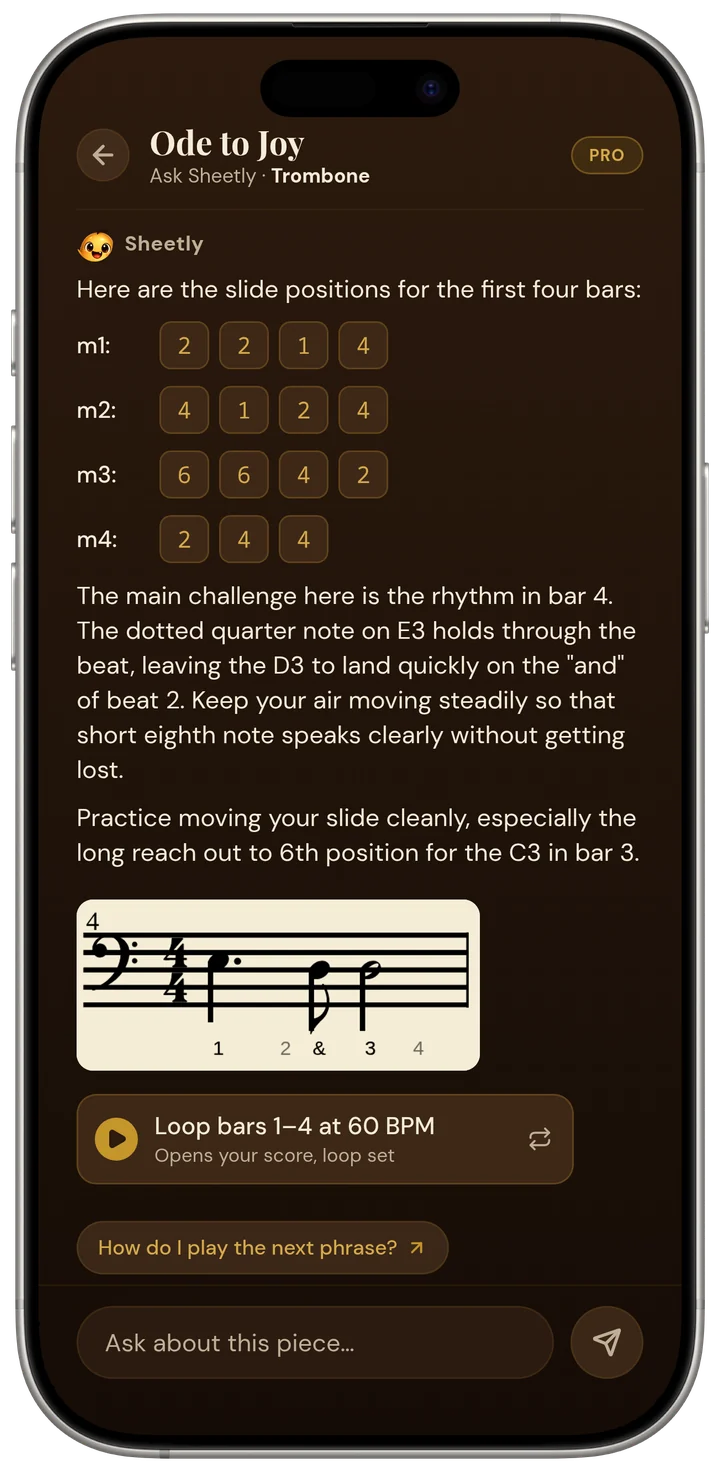
In practice that covers the questions a student usually brings to a lesson: which fingers, what the rhythm in bar 7 actually is, why the key signature changed halfway down, what to drill tonight and at what speed. The answers are about the page, not about piano in general. Sheetly also records your own take against the score so you can hear where you rush or hesitate, but the recording is for your ears; there is no automatic note-checking and no score out of ten.
As far as we know, Sheetly is the only sheet-music app where you photograph your own printed page and then ask an AI coach questions about that score by bar number: fingering, positions, rhythm, what to drill. It does not listen to you play, and it does not replace a teacher. It reads printed, engraved notation; it does not read handwriting, guitar tab or shape notes. It is on iPhone and iPad, free to download with a Pro subscription, and needs a connection to scan and to ask the coach. Already-scanned scores play offline.
Bring the book you already own.
Photograph the page, hear it at any tempo, loop the bars that fall apart, and ask the coach what is written in bar 12. Free to download on iPhone and iPad.

Free to download · iPhone and iPad · Android on the way

Side by side
The table below compares the two families on the jobs people actually mean by “AI piano teacher”. The lesson-app column is compiled from each product’s own materials and describes the category rather than any single plan or version; check the current app before you subscribe.
| Can the app… | Sheetly | Simply Piano, Flowkey, Yousician |
|---|---|---|
| Read the printed music you already own | Yes, from a photo or PDF | No |
| Listen to you play and check your notes | No | Yes, through the microphone |
| Provide a structured course of lessons | No | Yes, from its own library |
| Answer questions about a specific bar of your score | Yes, by bar number | No |
| Play your piece at any tempo, loop a bar | Yes | Library songs only |
| Record your take against the score | Yes, for your own ears | Graded in real time instead |
| Export PDF, MIDI, MusicXML | Yes | Not the point of the app |
| Work with handwritten music | No | No |
| Runs on | iPhone, iPad | iOS and Android |
Two rows go against Sheetly and we would rather say so plainly. Sheetly cannot hear you, so a wrong note goes unremarked unless you notice it on the recording yourself. And Sheetly has no course: it assumes the music arrives from outside, which is exactly what a beginner with no music yet does not have.
Why many people want both
The two families solve different halves of learning. A lesson app gives a beginner material and a microphone that catches wrong notes; Sheetly gives a student with real repertoire a way to hear, loop and interrogate the page in front of them. Plenty of players use a lesson app for daily drills and Sheetly for the pieces a teacher, exam board or ensemble has actually set.
A fair way to choose: if you do not yet own any sheet music and want to be led, start with a lesson app. If you have a teacher, a book or a folder of parts, and the difficulty is the page rather than the absence of one, Sheetly is built for that. If you are a teacher, Sheetly is the one you can hand a student with the piece you assigned, since it works from the edition you chose rather than a substitute.
Neither kind of app replaces a human teacher. A microphone cannot see your wrists, and a coach that has read the score cannot hear your tone. What both can do is make the time between lessons more useful, and the right one depends on whether your problem is “I have nothing to play” or “I cannot play what I have”.
Questions
Is there an AI piano teacher app that listens to me play?
Yes. Simply Piano, Flowkey and Yousician all listen through the microphone and check the notes you play against songs from their own libraries. Sheetly does not listen to you play; Sheetly reads your own printed music from a photo and answers questions about that score.
Is there an AI app that can read my own piano book and help me with it?
Sheetly does this. Sheetly photographs a printed page or imports a PDF, reads the notation on a server in a few seconds, plays the score at any tempo with a loop on any bar, and lets you ask an AI coach about that specific score by bar number. Lesson apps like Simply Piano, Flowkey and Yousician teach from their own song library and do not scan your book.
Can an AI piano app replace a piano teacher?
No AI piano app replaces a teacher. Lesson apps hear wrong notes but cannot see your hands or hear your tone. Sheetly explains what is written on your page and what to drill, but Sheetly cannot hear you at all. Both kinds of app are for the practice time between lessons.
Does Sheetly work with Simply Piano, Flowkey or Yousician?
Sheetly is a separate app and does not connect to Simply Piano, Flowkey or Yousician. Many players use a lesson app for daily drills and Sheetly for the printed pieces a teacher or ensemble has set. Sheetly is on iPhone and iPad; Android is on the way.
Which AI piano teacher app is best for an adult beginner with a teacher?
An adult beginner who already has a teacher and a printed book usually gets more from Sheetly, because Sheetly works from the exact edition the teacher assigned and answers questions about it by bar number. An adult beginner with no teacher and no music yet usually gets more from a lesson app that supplies the songs and listens to the playing.