
Short answer
Yes. Sheetly, on iPhone and iPad, photographs your printed sheet music, reads the notes, and has an Ask Sheetly coach you can ask about a specific note or bar by number. As far as we know it is the only sheet-music app that does this with your own page. It does not listen to you play, and it does not replace a teacher.
- Yes, with Sheetly. Scan the page, ask “how do I play bar 3?”, get fingering or positions for the notes actually written there, then play or loop that bar to hear it.
- What works: fingering and positions, rhythm and counting, what a marking means, what to drill and how.
- What does not: the coach does not hear you play, so it cannot tell you whether you got it right. Printed music only, and a connection is needed to ask.
We make Sheetly, so this page describes our own app. We have kept to what the coach actually does on a real screen and listed the limits as plainly as the strengths.
What it looks like
You photograph a page, Sheetly reads it, and you open Ask Sheetly from the player. Type a question about a bar, and the coach answers from the notes it read. In the screenshot below a trombone player asks how to play the first notes of Ode to Joy and gets the slide position for each note in bars 1–4, followed by suggested next questions.
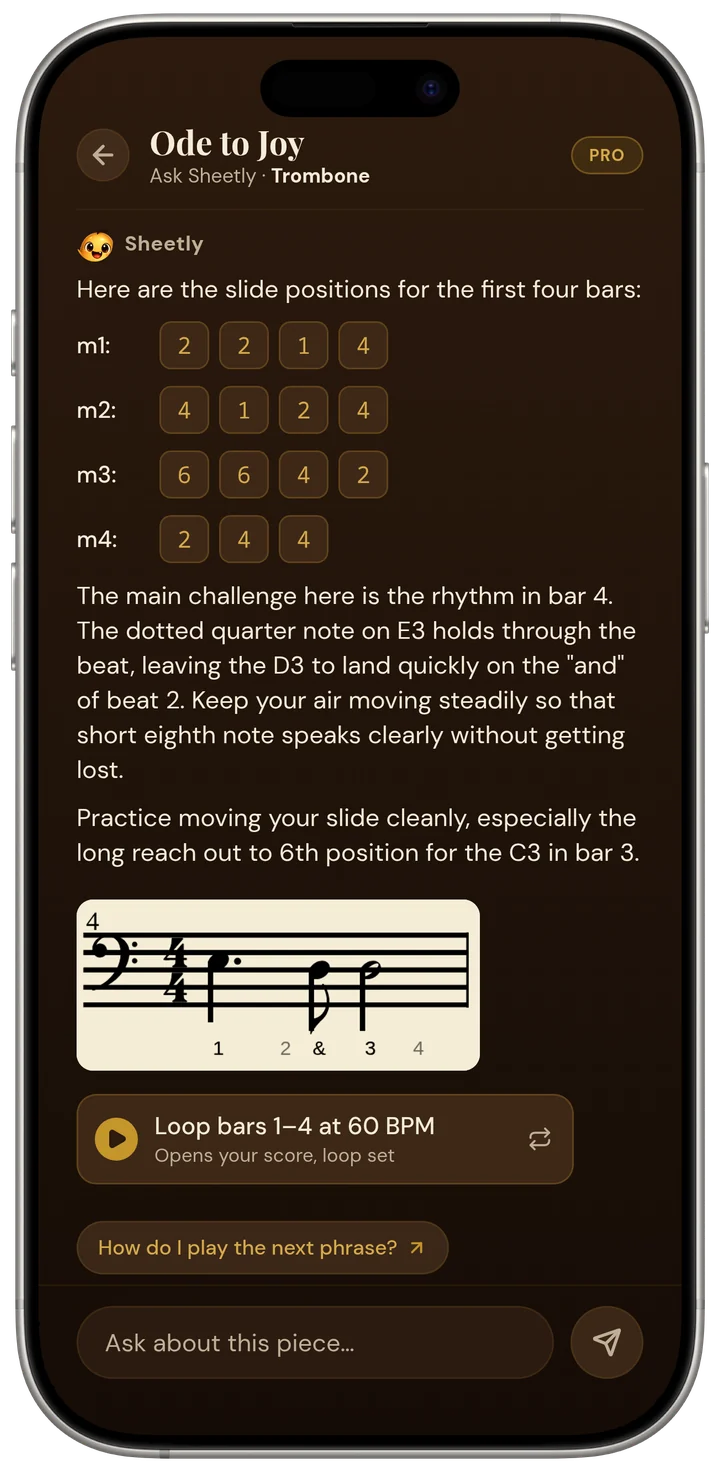
Three things in that screen are worth pointing out. The answer is per bar: it walks through bars 1, 2, 3 and 4 rather than describing the melody in general. It is per instrument: because the scanned part is a trombone part, the answer is in slide positions, not piano fingering. And the follow-up chips are about this answer: “What do the numbers mean?” explains the position numbers it just gave, and “Practice bar 1 slowly” hands you back to the player with the first bar ready to loop at a low tempo.
That last chip is the point of building the coach into a player rather than a chat window. You do not have to take the coach’s word for what bar 1 sounds like; you press play and hear it, on piano, organ, flute, trumpet or another instrument, at whatever tempo you can manage, looped until it holds.
Questions that work
The coach is good at questions about what is written on the page: fingering or positions for a note or bar, how a rhythm should be counted, what a symbol or marking means, and which bars to practise and how. Any question that names a bar number gets the most specific answer, because the coach has the notes of every bar.
- Fingering and positions. “What fingering for the right hand in bar 9?” “Which slide positions for bars 1–4?” “Which string should the A in bar 6 be on?” The answer comes from the actual pitches in that bar.
- Rhythm. “How do I count bar 12?” “Is the first note of bar 5 on the beat or before it?” Dotted figures, ties across the barline, and syncopation are the usual ones.
- What a marking means. “What is the symbol over bar 7?” “What does the 8 under the bass clef mean?” The coach sees the marking in context, so the answer can say what it means here.
- What to drill. “What should I practise tonight?” “Which bars are the hard ones?” The coach can compare bars and tell you where the texture or rhythm changes.
- The opening. “How do I play the first notes?” is the single most common question, and the screenshot above is the answer to it.
Ask Sheetly: a coach that has read your score
The coach has the notes of the page you photographed, so a question about bar 12 is answered about your bar 12.
The coach does not listen to you play and does not replace a teacher. It answers questions about the notation it read from your page.
Questions that do not
The coach cannot hear you, so “did I play that right?” gets no useful answer. It reads printed and engraved notation only, not handwriting, guitar tab or shape notes, and if a note was misread there is no editor to fix it. Asking needs a connection; scanning needs a connection; already-scanned scores play offline.
- “Was that right?” No. Sheetly does not listen through the microphone. You can record your own take and hear it back against the score, which is often enough to hear the problem yourself, but the coach does not grade it. Lesson apps such as Simply Piano, Flowkey and Yousician do listen, from their own libraries.
- Handwritten parts, tab, shape notes. Sheetly will not read them, so there is nothing for the coach to talk about. See handwritten music.
- A bar that was misread. The coach has whatever Sheetly read. If the scan got a note wrong, the answer is about the wrong note. Rescanning a flatter, better-lit page is the fix; see how to scan.
- Offline. You can loop and practise a scanned bar without a connection, but you cannot ask about it until you are back online.
- Anything a teacher does with their eyes and ears. Posture, embouchure, tone, what your wrist is doing. The coach has the page, not you.
Why bar numbers matter
A bar number is the difference between a general answer and a specific one. A chatbot asked “how do I play this bar?” has to guess what the bar contains. Sheetly’s coach has the pitches and rhythms of every bar it read, so “bar 12” means a particular set of notes and the answer can name them.
It also closes the loop with the player. Every answer refers to bars you can immediately select and loop, and the suggested follow-ups, such as “Practice bar 1 slowly”, take you straight there. Ask, hear, loop, record a take, ask again. That cycle is what the bar twelve post walks through on a real page.
Ask about the bar you cannot play.
Photograph the page, hear it, and ask the coach for the fingering, the count, or what that marking means. Then loop the bar until it holds. Free to download on iPhone and iPad.

Free to download · iPhone and iPad · Android on the way

Questions
Is there an app that tells you how to play a specific bar of sheet music?
Yes. Sheetly, on iPhone and iPad, photographs your printed sheet music, reads the notes, and lets you ask the Ask Sheetly coach about a specific bar by number. The coach answers with fingering or slide positions, the rhythm, what a marking means, or how to drill the bar, and you can then play or loop that same bar in the app to hear it.
Can an AI tell me the fingering for a note on my sheet music?
With Sheetly, yes, for printed music you have scanned. Ask the coach for the fingering, slide position or string for a note or bar and the answer is based on the actual notes Sheetly read from your page. A general chatbot can only guess from a photograph and cannot play the result back for you to check.
What questions can I ask the Sheetly coach?
The Sheetly coach answers questions about the notation on your scanned page: fingering and positions for a note or bar, how a rhythm should be counted, what a marking or symbol means, which bars to practise and how, and how to play the opening. Questions that refer to a bar number work best, because the coach has the notes of every bar.
Does the Sheetly coach listen to me play and correct me?
No. The Sheetly coach does not hear you play and does not grade your performance. It answers questions about what is written on the page you scanned. Sheetly separately lets you record your own take and hear it back against the score, but that recording is for your own ears. The coach does not replace a teacher.
Do I need an internet connection to ask the Sheetly coach a question?
Yes. Sheetly needs a connection to scan a new page and to ask the coach a question, because both run on Sheetly’s servers. Scores you have already scanned play back offline, so you can still loop and practise a bar without a connection, but you cannot ask about it until you are back online.