A playhead you can feel, and a feature we deleted
None of this is a feature. It is a rate limit chosen to be faster than the music, a glide we reverted, and a feature we built and then deleted.
Open a scanned score in Sheetly, put a finger on the playhead and drag it. Every note it crosses gives you a small tap. A bar of semiquavers feels dense. A note held for four beats feels like nothing at all until the next one arrives. You are not reading the rhythm off the page; you are feeling it through the glass.
There is no new button in the player and nothing to put on a screenshot. The work all went into the part of an app you are not supposed to notice, and with that kind of work the list is never the interesting part, so here are three decisions and what each one cost.
The rate limit had to be faster than the music
Anything that taps once per note needs a rate limit, or a quick drag turns into a buzz. The question is where to put it, and we put it underneath the music. At 120 beats per minute a semiquaver, a sixteenth note, lands every 125 milliseconds, so the limiter has to allow taps closer together than that. Any slower and it swallows notes inside a fast bar and hands your finger a rhythm the page does not contain.
Set below the fastest thing the music does, it almost never engages. A bar of semiquavers comes through whole. The only gesture it catches is a fling, where the notes arrive faster than a finger can tell them apart and a blur is the honest answer. A rate limit is usually a defence against the interface. This one is a defence only against the fling.
Rests do not tap. A rest is a note-shaped hole and should feel like one, so the taps are checked against the engraving rather than against a clock, and the silence lands where the page says it does.
The smoother version was worse
While the playhead was open we tried gliding it between notes on a shorter, linear curve. On paper that is the smoother option: less easing, less time in transit. In the hand it read as late.
The reason is the shape of the curves. A standard ease is about 80% of the way to its destination at its halfway point, because it spends its second half slowing down. A linear curve is exactly 50% of the way there. A longer eased glide therefore sits ahead of a shorter linear one for most of the journey, and what the eye reads is where the playhead is, not when it stopped. The shorter animation finished sooner and felt slower, so we put the old one back.
The feature we deleted
Somewhere in the middle of this we built saved practice spots: mark the bar you keep breaking, come back to it tomorrow. It worked. We deleted it before it shipped.
It put another control on the player, and the player’s one virtue is that it has almost none: a page of music, one bar of controls, and an assumption that your hands are on an instrument rather than on the phone. Every piece of furniture on that screen is a piece of the page taken away, and a feature that is merely useful does not pay for the trade. The bar that keeps breaking can already be looped in two taps, and it is not the sort of thing you forget.
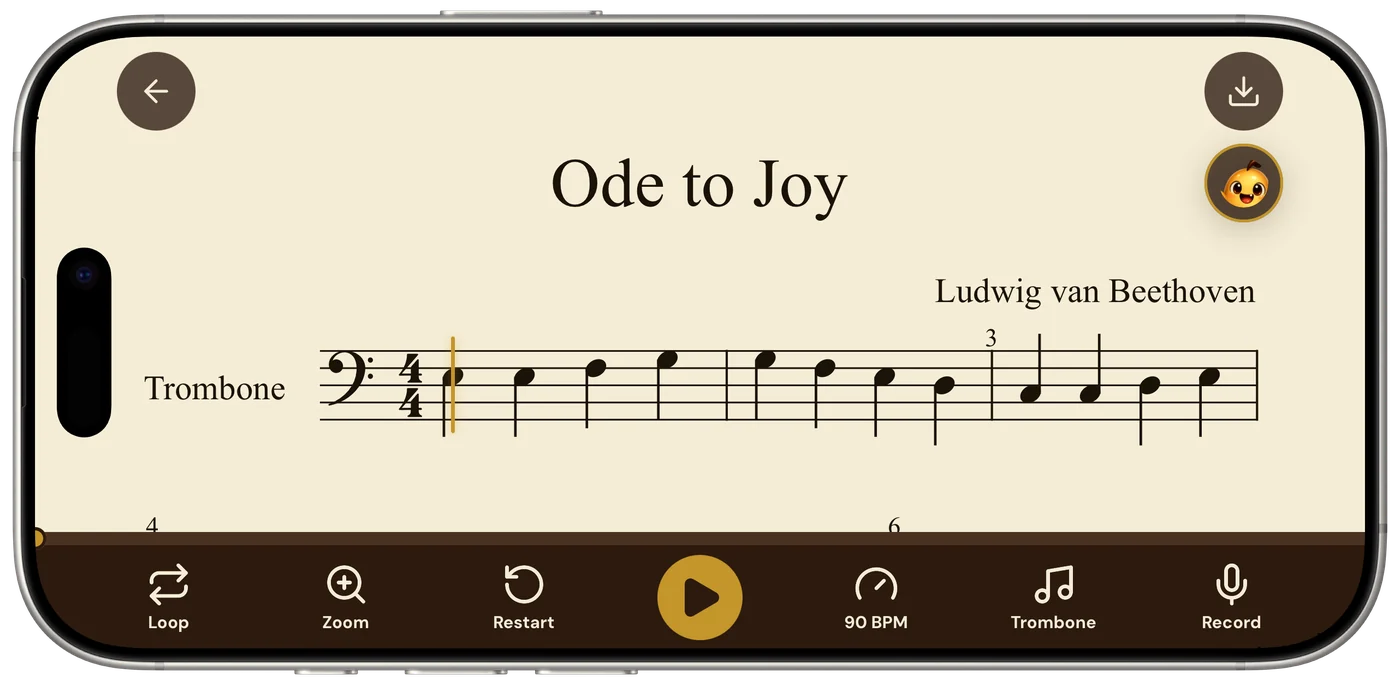
What you can feel now
The rest of it is the same kind of work, and all of it is in the app today.
- The progress bar is draggable. Drag it to jump anywhere in the piece, rather than only reading where you are.
- The tempo buttons repeat when held. Hold − or + and the dial walks: 40 to 200 BPM in about two and a half seconds, where it used to take thirty-two taps.
- The page turns ahead of you. The bar being played used to drift down the screen, and on a two-stave piece it could end up behind the bottom bar. It now stays where you can read it.
- The count-in counts your tempo. Set the score to 60 and you are counted in at 60.
- The coach opens on your piece. Before you type anything it offers two or three things it noticed in the score you scanned, such as “bar 12: leap of a 5th” or “bars 5–7 are bars 1–3 again”. They are read off the same analysis the player uses, in place of two suggestions that were identical on every score.
Try it on your own part
Photograph the page or import the PDF, and Sheetly hands back a score that plays, with a playhead you could drag with your eyes shut and still know where you are in the bar. Sheetly is on the App Store for iPhone and iPad.
Drag the playhead.
Scan a page, put a finger on it, and feel where the notes are.

Free to download · iPhone and iPad · Android on the way

 Written by Love Ranmar, who makes Sheetly. hello@trysheetly.com
Questions
Does the Sheetly playhead give haptic feedback?
Yes. Dragging the playhead across a score in Sheetly taps once for every note it passes, so a bar of semiquavers feels dense under your finger and a long held note feels empty. Rests do not tap.
How do I change the tempo quickly in Sheetly?
Hold the minus or plus button beside the tempo in the Sheetly player and the dial walks on its own. The whole range, 40 to 200 BPM, takes about two and a half seconds to cross.
What does the Sheetly coach show before you ask it anything?
The Sheetly coach opens with two or three things it noticed in the score you scanned: a leap in a named bar, a passage that repeats earlier bars. They are taken from the analysis of your own page rather than from a generic list of practice tips.