Ask AI How to Play a Note or Bar: How It Works With Your Own Sheet Music
Is there an app where you can ask AI how to play a specific note or bar? In this guide, we show you how to ask about your own printed page, which questions get useful answers and which do not, with a picture for each step.

It is the night before your lesson or rehearsal, and one bar will not come out right. You are not sure whether you are counting it wrong, using the wrong fingering or just playing it too fast. You would love to ask someone who can see the page. So you wonder: is there an app where you can ask AI how to play a specific note or bar?
Yes. Sheetly, on iPhone and iPad, photographs your printed sheet music, reads the notes, and lets you ask its built-in coach about any bar by number. Because the coach has the notes of your page, "how do I play bar 12?" gets an answer about your bar 12, not general advice. A general chatbot shown a photo has to guess what is written; the coach does not.
In this guide we walk you through asking a good question step by step, with a picture for each part, show which kinds of questions work well and which do not, and explain how to find the bar you are asking about.
How to ask AI about a specific bar
Step 1: Scan the page
Photograph the printed page in Sheetly, or import a PDF. Sheetly reads the notes and gives you back a score that plays, with a playhead that follows along. Listen once all the way through: if the scan misread a note, the coach would inherit that mistake, so it is worth checking first. Our guide on how to scan sheet music covers the photo habits that help.
Step 2: Find the bar number
A bar (called a measure in American English) is the stretch of music between two bar lines. Bars are numbered from the first full bar of the piece, which is bar 1. Most printed parts help you by showing a small number at the start of each line: the number of the first bar on that line.
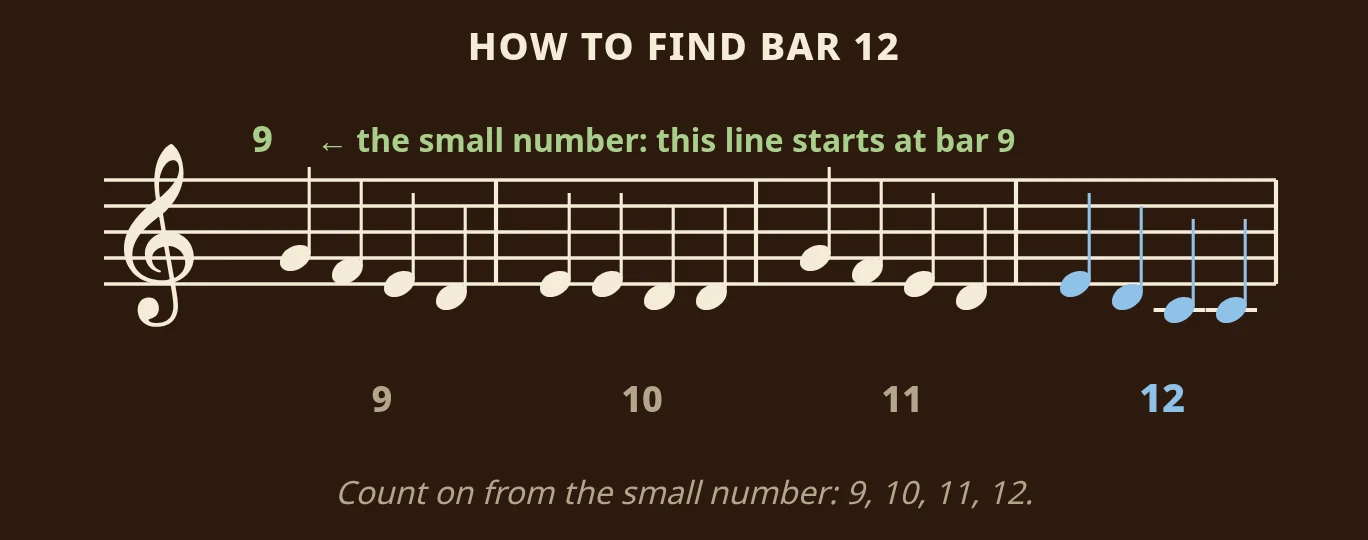
To find bar 12, look for the line whose small number is closest below 12, then count on. If the line starts at 9, the bars are 9, 10, 11 and 12. If a piece starts with a short pickup bar (a few notes before the first full bar), that pickup is usually not counted, so the first full bar is still bar 1.
Step 3: Ask about what is written
Open the coach from the player and type your question, naming the bar. The answer comes from the pitches and rhythms in that bar, and from the instrument the part is for.
Rhythm questions are some of the most useful. Suppose bar 12 is a dotted quarter note, an eighth note, then two quarter notes. Here is what the coach would walk you through:
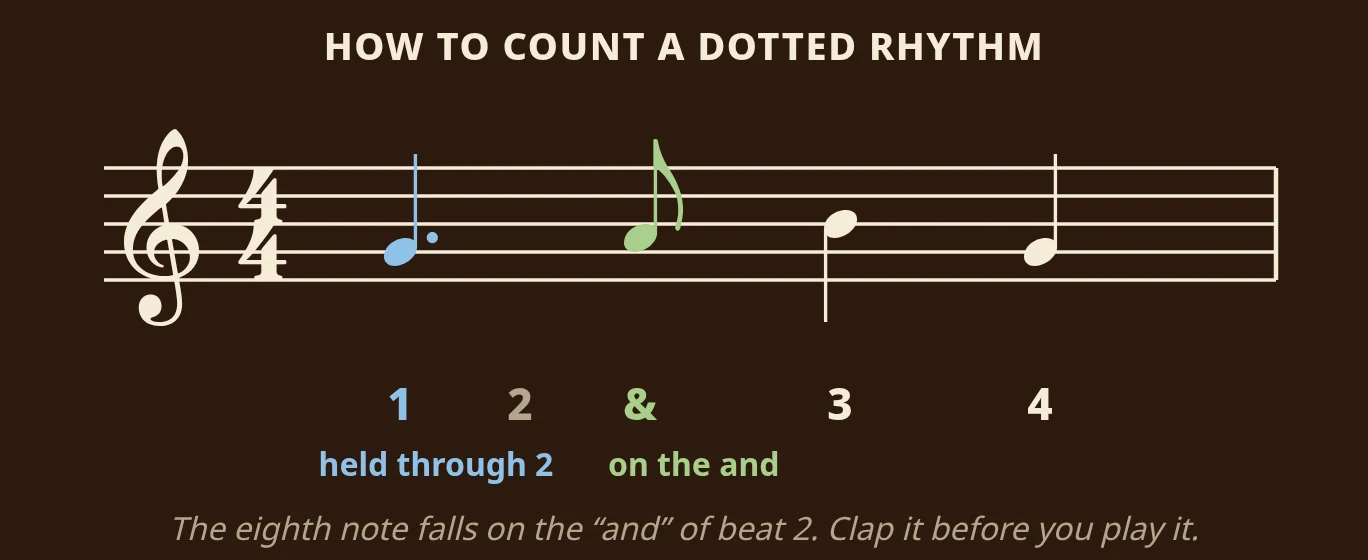
Count "1, 2 and 3, 4". The dotted quarter note starts on 1 and is held through 2. The eighth note falls on the "and" of beat 2, halfway between 2 and 3. Then the two quarter notes land on 3 and 4. Clap it against a steady count before you play it, and the bar stops falling apart.
Step 4: Hear it, loop it, then ask again
Every answer points at bars you can select and loop straight away, and follow-up suggestions take you right into the player with the bar ready at a slower tempo. Ask, hear it, loop it, record a take, and ask again. That loop of asking and hearing is why the coach lives inside the player and not in a separate chat window.
Questions that get useful answers
The coach answers questions about the notation on your page. Questions that name a bar get the most specific answers.
- Fingering and positions. "What fingering for the right hand in bar 9?" "Which slide positions for bars 1 to 4?" "Which string should the A in bar 6 be on?"
- Rhythm. "How do I count bar 12?" "Is the first note of bar 5 on the beat or before it?" Dotted rhythms, ties across the bar line and syncopation are the usual ones.
- What a marking means. "What is the symbol over bar 7?" "What does the 8 under the clef mean?" The coach sees the marking in context, so it can say what it means here.
- What to practise. "Which bars are the hard ones?" "What should I practise tonight?"
- The opening. "How do I play the first notes?" is the most common question of all.
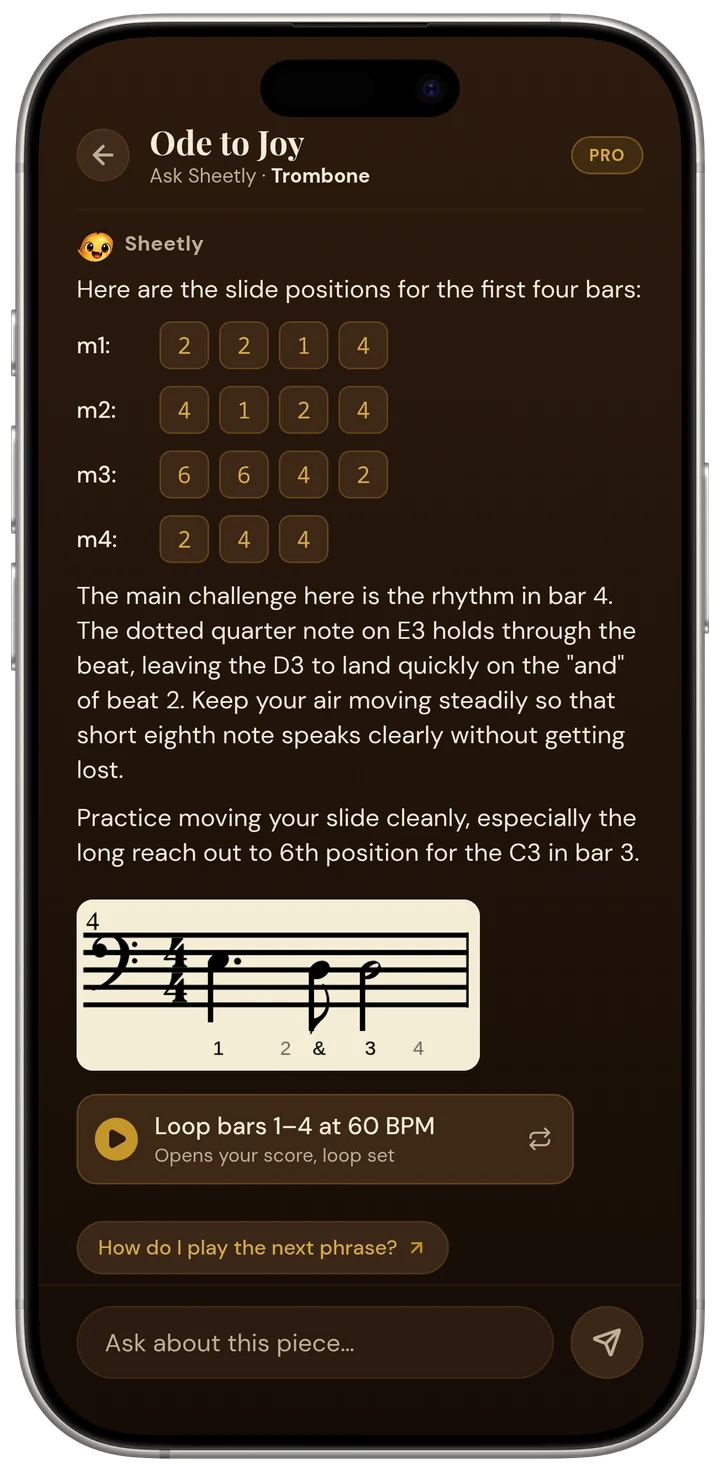
For many instruments, the answer comes in your instrument's own terms. Here is what a trombone player sees after asking how to play the opening of Ode to Joy:
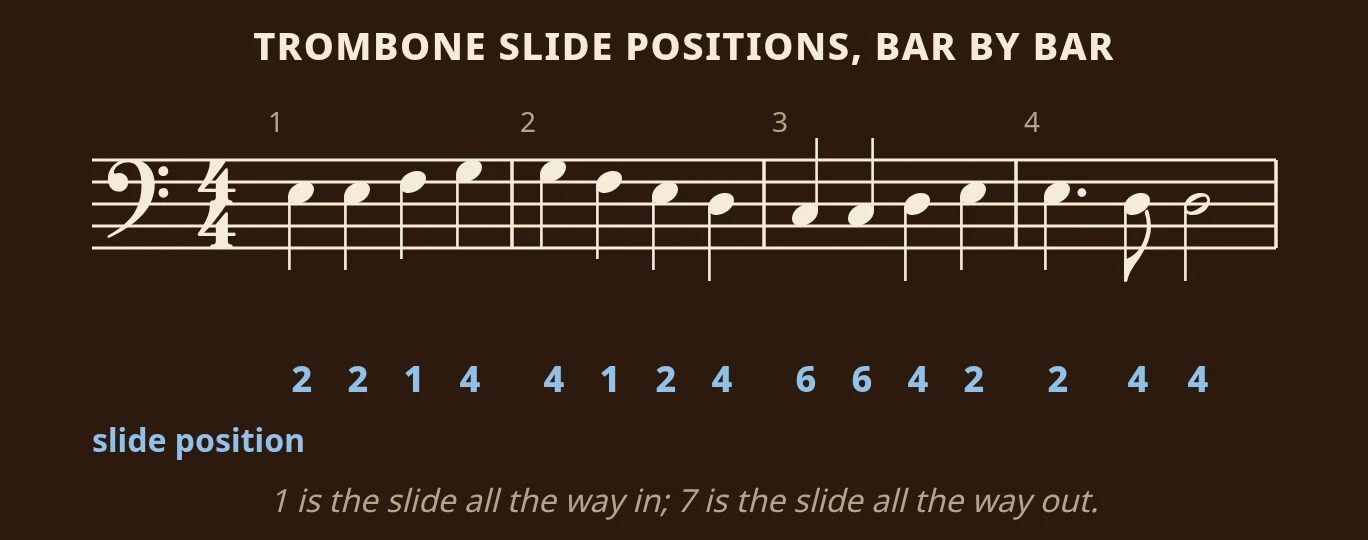
The answer goes bar by bar rather than describing the melody in general, and because the part is for trombone, it gives slide positions, not piano fingering: 2, 2, 1, 4 in bar 1, then 4, 1, 2, 4, then 6, 6, 4, 2, then 2, 4, 4. A trumpet player asking the same question gets valves, a guitarist gets strings and frets, and a violinist gets strings and fingers. See supported instruments for the full list.
What the coach cannot answer
- "Was that right?" Sheetly does not listen through the microphone. You can record your own take and hear it back against the score, which often shows you the problem, but the coach does not grade it. Lesson apps such as Simply Piano, Flowkey and Yousician do listen, using songs from their own libraries.
- Handwritten parts, tab and shape notes. Sheetly does not read them, so there is nothing for the coach to talk about. See handwritten music.
- A bar that was misread. The coach works from what Sheetly read, and there is no editor to fix a wrong note. Rescan a flatter, better-lit page.
- Offline questions. Scanning and asking both run on Sheetly's servers, so both need a connection. A scanned bar still plays and loops offline.
- Anything a teacher does with their eyes and ears. Posture, embouchure, tone and what your wrist is doing. The coach has your page, not you.
The coach does not replace a teacher, whether you take lessons or teach yourself. It makes the practice between lessons more specific, so you arrive having worked on the right bars.
Ask about the bar you cannot play
That is what we built Sheetly for. Photograph the page with your iPhone or iPad, hear it played back, and ask the coach for the fingering, the count or what a marking means. Then loop the bar until it holds.
Questions
How do I find the bar number on my sheet music?
Count the bars from the first full bar of the piece, which is bar 1. Many printed parts also show a small number at the start of each line: the number of the first bar on that line.
Is a bar the same as a measure?
Yes. Bar is the British word and measure the American one for the stretch of music between two bar lines, so bar 12 and measure 12 are the same place.
Can the AI hear me play and tell me if I got it right?
No. Sheetly's coach answers questions about the notes on your page; it does not listen to you play. You can record a take and hear it back against the score to check yourself.
Why not just ask a general chatbot with a photo?
A general chatbot has to read the notation by eye from the photo, and it often gets bars or keys wrong. Sheetly's coach works from the notes Sheetly read, which you can check by ear first, so a bar number means a specific set of notes.