
The short version
Sheetly and ScanScore are built for different jobs. ScanScore is desktop software for scanning a printed score, correcting the mistakes by hand in an editor, and exporting a clean MusicXML file to your notation program. Sheetly is a phone app for photographing a page and practising it: play, loop, slow down, record, and ask a coach about it.
- Pick ScanScore if the thing you want at the end is an editable, corrected MusicXML file, and you are happy to sit at a desktop to get it.
- Pick Sheetly if the thing you want at the end is to hear and practise the piece, on your phone, from a photograph.
- ScanScore has a correction editor; Sheetly does not. ScanScore works offline; Sheetly needs a connection to scan.
- ScanScore is paid, tiered by how many staves it will read. Sheetly is free to download with a Pro subscription.
We make Sheetly, so read this the way you would read any comparison written by someone with a horse in the race. In exchange we state our method, publish numbers only where we have measured something, and say plainly where the other product is better.
This is less a head-to-head than a fork in the road. The question to ask yourself is not “which is the better scanner” but “what do I want to be holding when this is over: a file, or a piece I can play?” Answer that and the choice mostly makes itself.
Where ScanScore is better
ScanScore is better if you intend to correct the result. Its editor lets you see what the recognition got wrong, fix it in place, and only then export to MusicXML. It works offline on a desktop, and its tiers let you pay for exactly as many staves as your music has. None of that exists in Sheetly.
The correction editor
Every optical music recognition system makes mistakes. The question is what you can do about them. ScanScore’s answer is an editor: you scan, you see the result next to the original, you fix a wrong note or a missed accidental with a click, and you move on. That is a workflow no phone app offers, including ours. If you are preparing a part for a rehearsal and every note has to be right, being able to repair the five mistakes instead of rescanning is a real advantage.
A proper export pipeline
ScanScore exists to feed notation software. If your destination is MuseScore, Sibelius, Dorico or Finale, and you want the cleanest possible MusicXML going in, a desktop tool with an editor in the loop is the right shape of tool. Be aware that the trial limits MusicXML export to a few measures, so plan your evaluation around that.
Offline, on a desktop
ScanScore runs locally. No upload, no connection, no waiting on a server. If you work from flatbed scans on a computer, that is exactly where it belongs.
Paying for what you need
Its pricing is tiered by the number of staves it will read, so a flute player and a choral arranger are not paying for the same thing. That is a sensible model for a desktop tool.
Where Sheetly is better
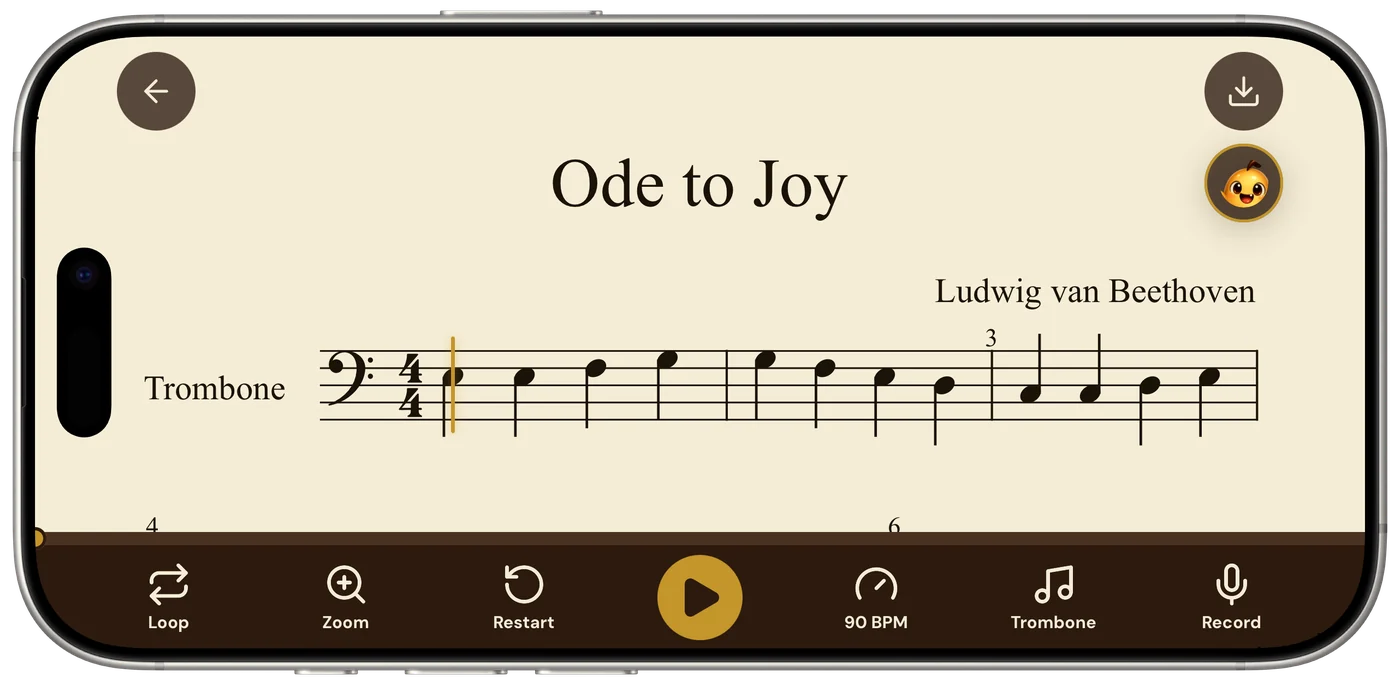
Sheetly is better if the goal is practising rather than editing. It starts from a phone photograph instead of a flatbed scan, plays the page back on your phone or iPad, loops a bar, slows the tempo, records your own take, and includes a coach that has read the notes of the piece. ScanScore is not trying to do any of that.
It starts from a photograph
Most people do not own a flatbed scanner and most sheet music is in a bound book on a music stand. Sheetly is built around that reality. You photograph the page with the phone you already have, and the recognition is designed for perspective, shadow and page curl rather than assuming a flat, evenly lit scan. On our 31-piece benchmark Sheetly scored 95% strict F1 on simulated phone photographs against 96% on clean renders. The photograph column is where a camera-first design shows. The method is here. We have not measured ScanScore in that harness, so we publish no number for it.
It is a practice player, not a file
Once the page is read, Sheetly hands you the things you actually practise with: a play button at any tempo, a loop on exactly the bars that keep collapsing, a choice of piano, organ, flute, trumpet and more, and a recorder to hear your own take against the score. ScanScore hands you a file. Both are correct outcomes; they are just different ones.
The coach
Sheetly includes a coach that has read the actual notes of the piece you scanned, so you can ask why bar 12 keeps falling apart and get an answer about what is written in your bar 12. Nothing in the scanning category does this.
Ask Sheetly: a coach that has read your score
Not a chatbot bolted onto a music app. The coach has the actual notes of the page you just photographed, so you can ask about your bar 12 and get an answer about what is written in it.
We know of no other sheet-music scanner that does this. Every other tool on this page hands you a transcription and stops.
It still exports
If you do want the file, Sheetly exports PDF, MIDI and MusicXML. What it does not offer is the in-between step of correcting the transcription by hand before export. If a scan comes back with an error, your fix is a better photograph and a rescan rather than an edit.
Feature by feature
| After the scan, can you… | Sheetly | ScanScore |
|---|---|---|
| Hear it played back | Yes | Yes |
| Change the tempo | Yes | Yes |
| Loop one difficult bar | Yes | Not advertised |
| Record your own take against it | Yes | Not advertised |
| Ask questions about your score | Yes | No |
| Export MusicXML / MIDI | Yes | Yes |
| Correct mistakes in an editor | No | Yes |
| Work with no internet | No | Yes |
| Start from a phone photograph | Yes | Companion phone app |
| Runs on | iPhone, iPad | Desktop, with a companion app |
Read the editor row and the offline row as what they are: two things ScanScore does that we do not. If either is essential to you, the rest of the table does not matter much.
Which one should you get?
Get ScanScore if you want a corrected MusicXML file for notation software and you have a desktop and, ideally, a flatbed scanner. Get Sheetly if you want to photograph a page with your phone and practise it: hear it, loop it, slow it down, record yourself, and ask about it.
- You arrange, engrave or teach from notation software. ScanScore. The editor is the product.
- Your music is in bound books on a stand. Sheetly. It is built for the photograph.
- Every note must be perfect before you use it. ScanScore, because you can fix the mistakes yourself.
- You want to hear the piece tonight and drill the hard bars. Sheetly.
- You need both. They do not compete for the same slot. Plenty of people would reasonably use a desktop tool to produce parts and a phone app to practise them.
From the music stand to a play button.
Photograph the page, hear both hands at a tempo you can follow, loop the bars that need work, and ask the coach what to drill. Free to download on iPhone and iPad.

Free to download · iPhone and iPad · Android on the way

Questions
Does Sheetly have a correction editor like ScanScore?
No. ScanScore lets you fix misread notes in an editor before exporting. Sheetly does not have an editor; if a scan comes back with a mistake, the fix in Sheetly is a better photograph and a rescan. If correcting by hand is essential to you, ScanScore is the better fit.
Can ScanScore scan from a phone photograph like Sheetly?
ScanScore is desktop software with a companion phone app, and it is built around flat scans that you correct on a computer. Sheetly is built from the ground up around a phone photograph: perspective, shadow and page curl are the expected input rather than the exception.
Which is more accurate, Sheetly or ScanScore?
Sheetly has not measured ScanScore and publishes no accuracy number for it. Sheetly publishes strict-F1 numbers only against systems anyone can run head-to-head on identical inputs, such as the open-source tool Audiveris. The method is on Sheetly’s benchmark page.
Does Sheetly export MusicXML?
Yes. Sheetly exports PDF, MIDI and MusicXML. What Sheetly does not offer is ScanScore’s step of correcting the transcription by hand before export, so the file you get is the recognition result as read.
Can I practise with ScanScore?
ScanScore plays a scanned score back and lets you change the tempo, but it is primarily an editing and export tool on a desktop. Sheetly is a phone practice app: loop a bar, slow the tempo, record your own take against the score, and ask a coach that has read the piece.
Does ScanScore work offline and does Sheetly?
ScanScore runs on your computer and works offline. Sheetly needs a connection to scan a new page and to ask the coach, because the recognition runs on Sheetly’s servers. Scores already scanned in Sheetly play back without a connection.