
The short version
The MuseScore app is a large library of user-uploaded scores with playback, tied to the MuseScore notation software and a subscription. It is not a camera scanner and has no coach that has read your specific page. Sheetly photographs the printed music you already own, reads it into a playable score, and lets you ask a coach about that score by bar number. If the piece you want is in the MuseScore library, keep the app. If it is on your stand, try Sheetly.
- Keep the MuseScore app if you mostly want to browse and play scores other people have uploaded, or if you write in MuseScore on the desktop and want your own files on your phone.
- Try Sheetly if the music you need is printed: a method book, a teacher’s photocopy, a hymnal, an edition nobody has typed in.
- Sheetly is, as far as we know, the only sheet-music app where you photograph your own printed page and then ask an AI coach questions about that score by bar number. It does not listen to you play and it does not replace a teacher.
We make Sheetly. We have not measured the MuseScore app and make no claims about it beyond what its own materials describe. Where the MuseScore app is the better tool we say so.
The searches for a “MuseScore app alternative” tend to come from one of two places: someone could not find the piece they needed in the library, or someone wanted a version that matched the edition their teacher uses. Both are the same problem. A library only contains what was uploaded, and the page on your stand was not.
What the MuseScore app is for
The MuseScore app is a browser and player for a very large library of user-uploaded scores, connected to the MuseScore notation software and offered under a subscription. It plays what is in the library. It is not a camera scanner: it does not photograph a printed page and read the notes. It has no coach that has read the page you are working from.
For a lot of music that is fine. Popular pieces exist in the library in many arrangements, and if one of them is close enough to what you want, the app gives you playback with no effort.
The limits are the library’s limits. The uploaded version may be a different arrangement, a different key, a simplified transcription, or wrong in places, and you have no way of knowing until you compare it to your page.
MuseScore app and Sheetly side by side
The MuseScore app plays scores from a shared library; Sheetly plays the score you photographed. Both play back; neither listens to you play through the microphone. Only Sheetly reads a printed page into notes, and only Sheetly has a coach that has read that page. The MuseScore app’s library is vastly larger than anything a learner will scan.
| Sheetly | MuseScore app | |
|---|---|---|
| Reads your printed page into playable notes | Yes: photograph or PDF, server-side recognition | No: not a camera scanner |
| Plays the score back | Yes, any tempo, loop a bar or passage, several instruments | Yes, for scores in its library |
| Listens to you play | No | No |
| AI coach about your score | Yes, has read the notes; answers by bar number | No coach that has read your specific page |
| Library and PDF reading | Your own scanned and imported scores | A very large library of user-uploaded scores; subscription |
| Platform | iPhone and iPad; Android on the way | Mobile app tied to the MuseScore software, per its own materials |
What Sheetly does with your page
Sheetly photographs a printed page or imports a PDF, reads the engraved notation on a server, and returns a score that plays. You choose the tempo, loop a bar or passage, pick piano, organ, flute, trumpet or another sound, record your own take against the score, and export PDF, MIDI or MusicXML. The coach has read the actual notes of the scanned piece and answers by bar number.
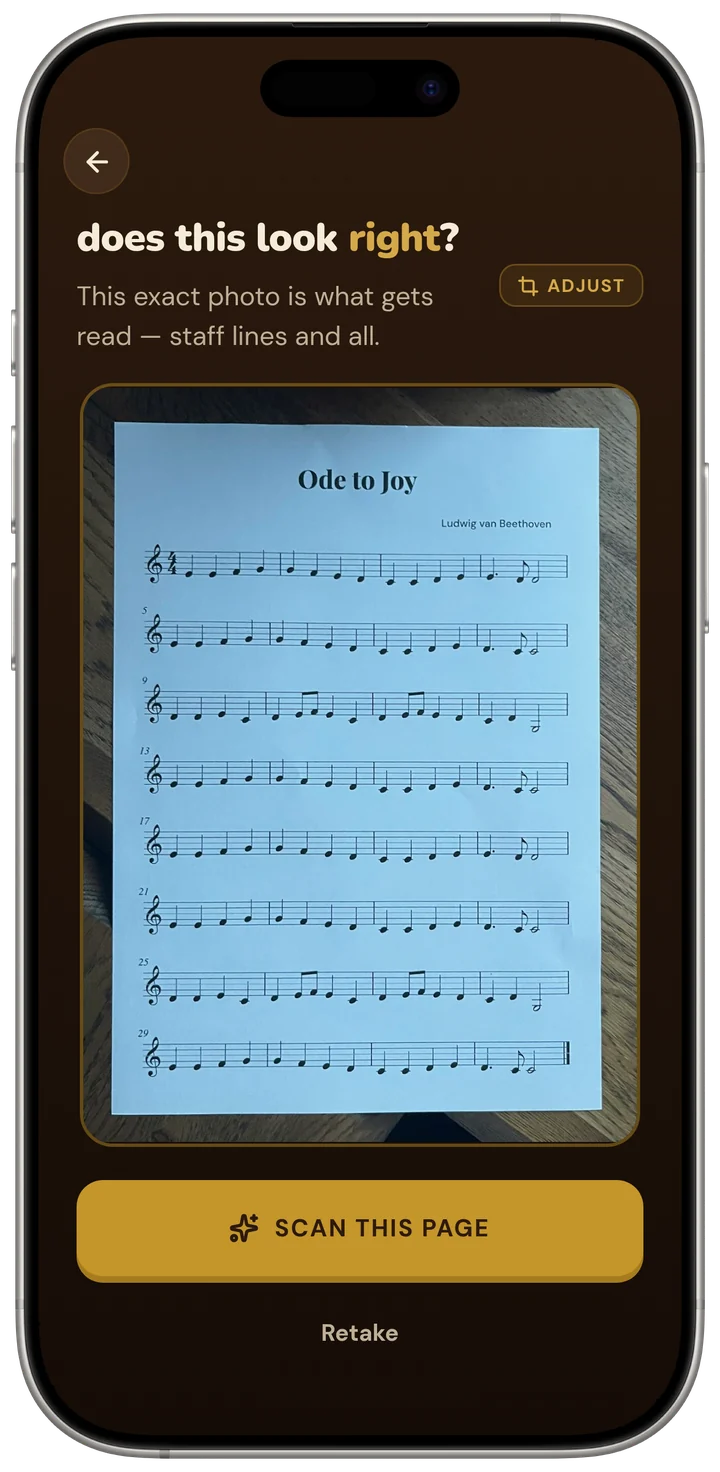
How well it reads is measured, not asserted. On Sheetly’s own 31-piece benchmark the strict F1 (pitch, onset and duration all correct) was 96% on clean renders and 95% on simulated phone photographs. On OLiMPiC, a public suite of 60 systems cut from real scanned pages we did not author, it scored 90% mean and 99% median, with usable output for all 60. Method on the benchmark page; closed products were not measured.
Ask Sheetly: a coach that has read your score
Not a chatbot bolted onto a music app. The coach has the actual notes of the page you just photographed, so you can ask about your bar 12 and get an answer about what is written in it.
The coach is answering about the page you photographed, not a library version of the piece.
And what it does not do
Sheetly does not listen to you play through the microphone and does not mark your notes right or wrong. It reads printed, engraved notation only: not handwriting, not guitar tab, not shape notes. There is no correction editor; a misread note means a better photograph and a rescan. It needs a connection to scan and to ask the coach; scanned scores play back offline.
Which one should you use?
Keep the MuseScore app if the music you want is in its library in a version you trust, or if you work in MuseScore on a computer and want your files with you. Use Sheetly when the music is printed and in front of you: photograph the page, hear it, loop the bars that need work, and ask the coach what is written there.
- You browse and play other people’s scores. MuseScore app.
- You compose in MuseScore and want your files on your phone. MuseScore app.
- Your piece is a printed page nobody has uploaded. Sheetly.
- You want to ask about bar 7 of your edition. Sheetly.
- You want the app to hear you play. Neither; that is a lesson app.
The page on your stand, not the nearest match in a library.
Photograph the printed page, hear it within a minute, loop the hard bars, and ask the coach what to drill. Free to download on iPhone and iPad.

Free to download · iPhone and iPad · Android on the way

Questions
Can Sheetly replace the MuseScore app?
Not for browsing a library of other people’s scores, and not for files you wrote in MuseScore. Sheetly replaces the MuseScore app only when the piece you need is printed and in front of you: Sheetly photographs that page and plays it, which the MuseScore app does not do.
Does the MuseScore app scan sheet music with the camera?
Not as far as its own materials describe. The MuseScore app plays scores from its user-uploaded library and is tied to the MuseScore notation software. Sheetly is a camera scanner: it reads a photographed printed page into playable notes.
Can Sheetly open MuseScore files?
Sheetly reads printed, engraved notation from a photograph or a PDF, and exports PDF, MIDI and MusicXML. If a MuseScore score is exported as a PDF, Sheetly can import that PDF and play it. Sheetly does not have a notation editor.
Is Sheetly a subscription like the MuseScore app?
Sheetly is free to download on iPhone and iPad, with a Pro subscription for the features a learner uses daily. Sheetly needs a connection to scan a page and to ask the coach; scores already scanned play back offline.