
The short version
Flowkey is a lesson app: it teaches from its own song library and listens to you play through the microphone to check the notes. It does not scan the printed pieces you already own, and its feedback is about your playing rather than a chat about the notation. Sheetly photographs your own printed page, plays it, and has a coach that has read those notes. If you want a guided catalogue that hears you, keep Flowkey. If your practice pile is paper, try Sheetly.
- Keep Flowkey if you like learning from a curated catalogue and want the app to hear your playing and confirm the notes.
- Try Sheetly if the pieces you practise are already printed and in your possession: Sheetly reads that page, plays it at any tempo, loops the hard bars and answers questions about it.
- Sheetly is, as far as we know, the only sheet-music app where you photograph your own printed page and then ask an AI coach questions about that score by bar number. It does not listen to you play and it does not replace a teacher.
We make Sheetly. We have not measured Flowkey and make no claims about it beyond what its own materials describe. Where Flowkey is the better tool we say so.
People searching for a “Flowkey alternative” often already own the music they want to play. It is in a binder, on a stand, or in a book a teacher recommended. A catalogue app can only offer its nearest version of the same title, and for a learner working from a specific edition, nearest is not the same.
What Flowkey is for
Flowkey teaches piano from its own library of songs and courses, and listens through the microphone to check the notes you play against what it expects. Like Simply Piano and Yousician it is built around content it controls, which is what lets it listen and judge. It does not scan your own printed music into a playable score, and its feedback concerns your playing, not a conversation about the notation on a page.
If you have no teacher and no music of your own, that is a coherent way to start. The app chooses the piece, shows it, hears you and moves you on. Sheetly does none of the listening. If an app hearing you is the feature you value, Flowkey is the better fit and this page will not talk you out of it.
The friction starts when the music comes from outside. A teacher chooses the pieces. An exam board publishes a list. A family hands down a book. The edition matters, the fingering the teacher wrote in matters, and none of it is in the catalogue.
Flowkey and Sheetly side by side
Flowkey plays its own catalogue and listens to you play it; Sheetly reads your own printed page into notes, plays it and lets you ask a coach about it. Only Flowkey listens through the microphone; only Sheetly scans a page and has a coach that has read the score. Neither is a substitute for the other.
| Sheetly | Flowkey | |
|---|---|---|
| Reads your printed page into playable notes | Yes: photograph or PDF, server-side recognition | No: teaches from its own song library |
| Plays the score back | Yes, any tempo, loop a bar or passage, piano and other sounds | Plays its own lesson content |
| Listens to you play | No | Yes: checks notes through the microphone |
| AI coach about your score | Yes, has read the notes; answers by bar number | Feedback is about your playing, not a chat about the notation |
| Library and PDF reading | Your own scanned and imported scores | Its own song library |
| Platform | iPhone and iPad; Android on the way | See its own materials |
What Sheetly does with your page
Sheetly photographs a printed page or imports a PDF, reads the engraved notation on a server, and returns a score that plays. You set the tempo, loop a bar or passage, choose piano, organ, flute, trumpet or another sound, record your own take against the score, and export PDF, MIDI or MusicXML. The coach has read the actual notes of the scanned piece and answers by bar number.
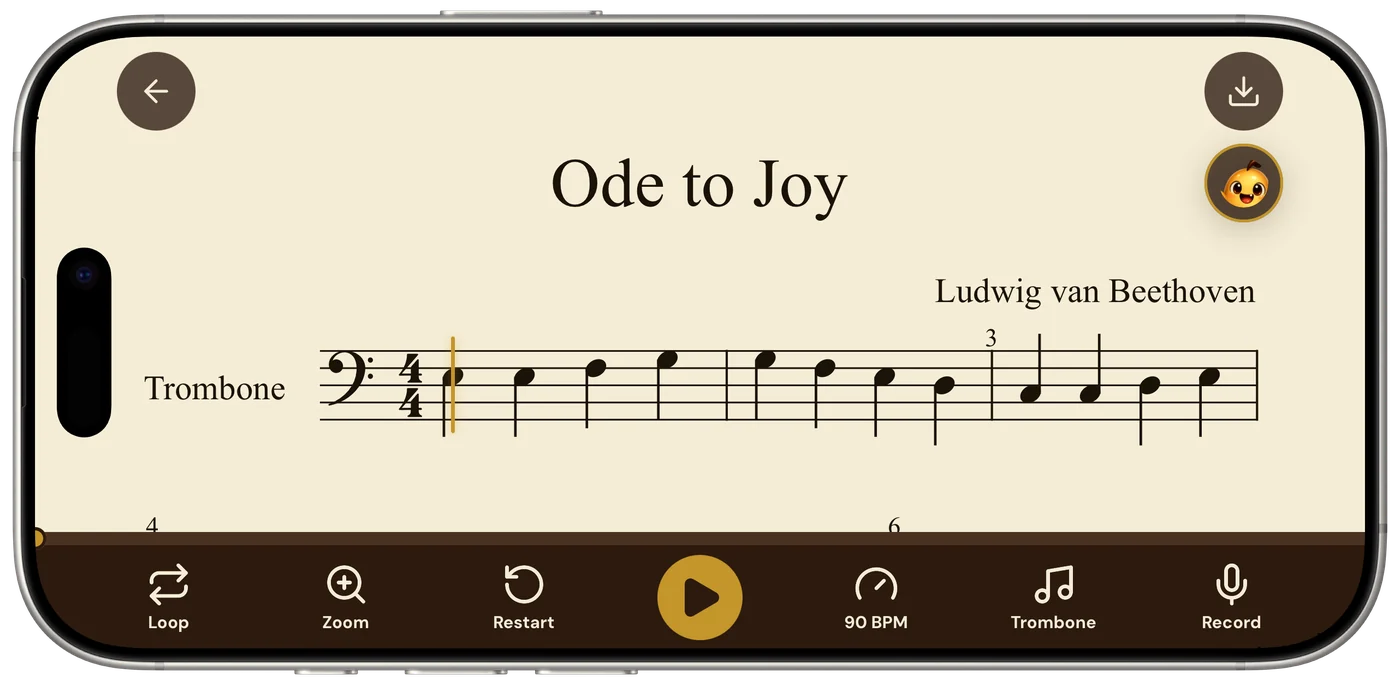
Practice on a scanned page looks like this: loop bars 9–12 at 60, hear the left hand alone while you play the right, walk the tempo up ten at a time, record a take and listen for where you rushed. Reading accuracy is measured: 96% strict F1 on clean renders and 95% on simulated phone photographs on Sheetly’s 31-piece benchmark; 90% mean on the public OLiMPiC suite of 60 systems cut from real scanned pages, usable output for all 60. Method on the benchmark page. Lesson apps and closed products were not measured.
Ask Sheetly: a coach that has read your score
Not a chatbot bolted onto a music app. The coach has the actual notes of the page you just photographed, so you can ask about your bar 12 and get an answer about what is written in it.
The coach has read the page you photographed. It does not hear you play; a teacher does that.
And what it does not do
Sheetly does not listen to you play through the microphone and does not mark your notes right or wrong. It reads printed, engraved notation only: not handwriting, not guitar tab, not shape notes. There is no correction editor; a misread note means a better photograph and a rescan. It needs a connection to scan and to ask the coach; scanned scores play back offline.
Which one should you use?
Keep Flowkey if you want a curated catalogue and an app that listens to you play; Sheetly does not listen. Use Sheetly if your pieces are printed and you want to practise them: hear the page, loop the hard bars, slow them down, record a take and ask the coach what to work on.
- No teacher, no music of your own. Flowkey, or a similar lesson app.
- You want the app to hear you and mark notes. Flowkey.
- Pieces from a teacher, an exam list or a book. Sheetly.
- You want to loop and slow down your edition. Sheetly.
- You want to ask what is written in bar 17. Sheetly.
The pieces you already own, at the tempo you can manage.
Photograph the page, hear it within a minute, loop the bars that need work, and ask the coach what to drill. Free to download on iPhone and iPad.

Free to download · iPhone and iPad · Android on the way

Questions
Can Sheetly replace Flowkey?
Not if you want an app that listens to your playing and confirms the notes; Sheetly does not listen through the microphone. Sheetly replaces Flowkey only for the learner whose pieces are already printed and who wants that page to play, loop and be explained by a coach.
Does Flowkey scan the sheet music I already own?
Not as far as its own materials describe. Flowkey teaches from its own song library and listens to you play it. Sheetly photographs your own printed page or imports a PDF and reads the notation into a playable score.
Can Sheetly slow down a piece I scanned?
Yes. Sheetly plays a scanned score at any tempo and loops a single bar or a passage, on piano, organ, flute, trumpet and other sounds. Sheetly also records your own take against the score and exports PDF, MIDI and MusicXML.
Is Sheetly a subscription like Flowkey?
Sheetly is free to download on iPhone and iPad, with a Pro subscription for the features a learner uses daily. Sheetly needs a connection to scan a page and to ask the coach; scores already scanned play back offline.