
The short version
Sheetly and PlayScore 2 both photograph a page of printed sheet music and play it back. PlayScore 2 is faster, works with no signal, and runs on Android. Sheetly is built around what happens after the scan: recording a take against the score, and a coach that has read your score. It is iPhone and iPad only. Both apps loop a passage and change the tempo.
- Pick PlayScore 2 if you are on Android, practise somewhere without signal, or mainly want the fastest possible path from page to sound.
- Pick Sheetly if you are on iPhone or iPad and the point of the scan is to practise the piece: loop, slow down, record yourself, and ask questions about the bars you cannot play.
- PlayScore 2 recognises on the device; Sheetly sends the photograph to a server and takes a few seconds.
- We have not put PlayScore 2 through our accuracy harness, so we publish no accuracy number for it and claim none, but the test pages, the ground truth and the scorer are all published so that anyone can, and we will publish the result either way.
We make Sheetly, so read this the way you would read any comparison written by someone with a horse in the race. In exchange we state our method, publish numbers only where we have measured something, and say plainly where the other product is better.
Of every tool in the wider comparison, PlayScore 2 is the one with the most similar intent to ours. Both are phone apps. Both start from a photograph rather than a flatbed scan. Both are trying to get you from a page of paper to a sound as quickly as possible. That makes the differences more interesting than usual, because they are not differences of category. They are different answers to the same question.
Where PlayScore 2 is better
PlayScore 2 is faster than Sheetly, it works without an internet connection, and it exists on Android. Those are three real, daily advantages, and anyone comparing the two apps should weigh them honestly before reading anything we say in our own favour.
Speed
PlayScore 2 runs its recognition on the phone itself. Its own materials describe scans as instant, with no uploading, and building a typical PDF at around four pages a second. Sheetly sends the photograph away to be read, which costs a few seconds every time. If you scan a great deal of music and each second matters to you, PlayScore 2 is simply the quicker tool, and nothing we do on a server can match an on-device model for latency.
Working offline
Because it does everything on the device, PlayScore 2 works in a practice room in a basement, on a train, or at a rehearsal venue with no signal. Sheetly needs a connection to scan a new page and to ask the coach a question. Scores you have already scanned play back offline, but the first read needs the network. If your practice happens somewhere without a reliable connection, that alone may decide it.
Android
PlayScore 2 is on iOS and Android. Sheetly is on iPhone and iPad, with Android in development. If you have an Android phone today, PlayScore 2 is the app we would point you to, because we do not have one to offer you.
Years of refinement
PlayScore has been in the category for a long time and it shows in the polish of the scan-and-play loop. It is a well-established product, and there is nothing experimental about recommending it.
Where Sheetly is better
Sheetly is better at what happens after the page has been read. It loops a single bar, records your own take against the score, exports PDF, MIDI and MusicXML with Pro, and includes a coach that has read the actual notes of the piece you scanned. PlayScore 2 loops a selected passage too, and adds a count-in and metronome. What it does not advertise is take recording or a coach, and its MusicXML export sits on its higher tier.
The honest way to put it: PlayScore 2 is a scanner that plays. Sheetly is a practice app that scans. The scan is the front door, not the house.
Looping the four bars that matter
Most of the difficulty in most pieces lives in a handful of bars. Sheetly lets you loop exactly those bars, drop the tempo until the passage holds together, and walk it back up. Playing from the top ten times practises the easy opening ten times and the hard part once; looping inverts that.
Recording a take
You can record yourself playing and hear the take against the score, which is the fastest way to find out where you drift, rush or hesitate. We could not find this advertised for PlayScore 2.
A coach that has read the page
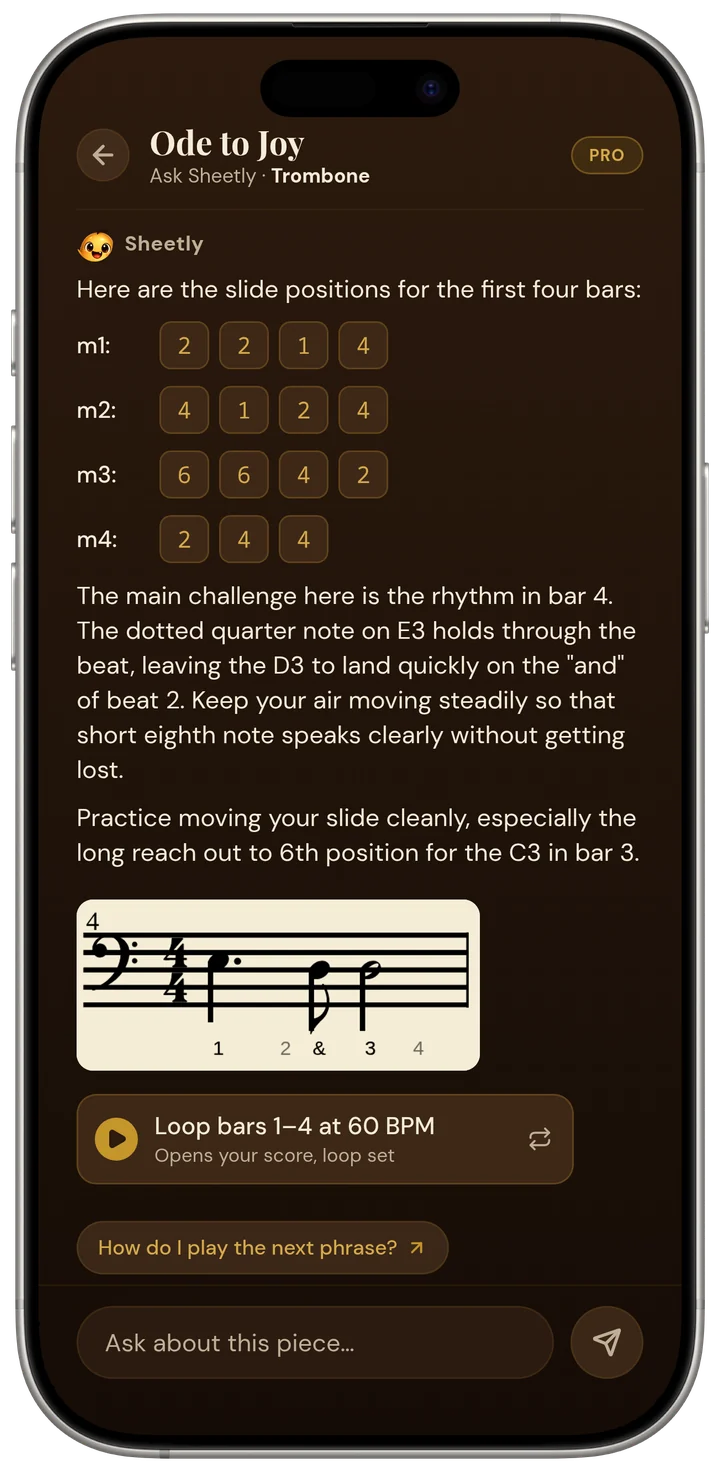
This is the part that has no equivalent in PlayScore 2, or in any other sheet music scanner we know of. Once a page is read, you can ask about it, and the answer is about your bar 12, not a generic paragraph about dotted rhythms.
Ask Sheetly: a coach that has read your score
Not a chatbot bolted onto a music app. The coach has the actual notes of the page you just photographed, so you can ask about your bar 12 and get an answer about what is written in it.
We know of no other sheet-music scanner that does this. Every other tool on this page hands you a transcription and stops.
PDF, MIDI and MusicXML export
Sheetly exports PDF, MIDI and MusicXML with Pro. PlayScore 2 exports MusicXML too, on its higher-tier plan rather than the free one. If your goal is to get a file into notation software, check which tier you would actually need before comparing prices.
A bigger model
Reading a photograph means perspective, shadow, page curl and glare, all at once. That is exactly the kind of problem where a larger model shows its value, and a model that runs on a server has no size ceiling. That is the trade we made in exchange for speed and offline use: we accept a few seconds and a connection, and in return the recognition is not limited to what fits inside a phone’s memory and battery budget. On our own 31-piece benchmark Sheetly scored 95% strict F1 on simulated phone photographs, against 96% on clean renders; see the benchmark page for the method. We have not run PlayScore 2 through that harness, so we can say nothing about how it would score, and we do not. Because a benchmark nobody can check is a press release, the whole thing is published: the 31 test pages, the ground-truth notation, every raw transcription and the scorer itself. Anyone with PlayScore 2 can import the same pages, export MusicXML and score them with our code, and we have committed to publishing the resulting table whatever it shows, including a column Sheetly loses. The pages, the protocol and the standing offer.
Feature by feature
The table is compiled from each product’s own published feature list. “Not advertised” means we could not find the feature documented, not that it is definitely absent. Products change; check the current version before you buy.
| After the scan, can you… | Sheetly | PlayScore 2 |
|---|---|---|
| Hear it played back | Yes | Yes |
| Change the tempo | Yes | Yes |
| Loop one difficult bar | Yes | Yes |
| Record your own take against it | Yes | Not advertised |
| Ask questions about your score | Yes | No |
| Export MusicXML / MIDI | With Pro | Paid tier |
| Correct mistakes in an editor | No | No |
| Work with no internet | No | Yes |
| Recognition runs | On a server | On the device |
| Runs on | iPhone, iPad | iOS, Android |
Two rows go against us and we would rather say so than bury them. Neither app has a correction editor, so a misread note means a rescan in both. And the offline row is a straightforward loss: PlayScore 2 works with no signal and Sheetly does not.
Which one should you get?
Get PlayScore 2 if you are on Android, if you regularly practise without a connection, or if the scan itself is the whole job and you want it done in under a second. Get Sheetly if you are on iPhone or iPad and you want to practise the piece once it plays: looping, slowing, recording, and asking a coach about the bars you cannot manage.
- Android phone. PlayScore 2. No contest, because we are not there yet.
- No signal where you practise. PlayScore 2. Sheetly plays old scans offline but cannot make new ones.
- You want to hear the page and that is all. Either, and PlayScore 2 will be quicker about it.
- You want to learn the piece. Sheetly. Loop, slow, record, ask.
- You are a teacher who wants a piece demonstrated at a tempo a student can follow. Sheetly, because the tempo and loop controls are the point of the app rather than an extra.
Scan it, then actually practise it.
Photograph the page you are working on, loop the bars that keep collapsing, record a take, and ask the coach what to drill tonight. Free to download on iPhone and iPad.

Free to download · iPhone and iPad · Android on the way

Questions
Can Sheetly read multi-staff scores like string quartets and choral music?
Yes, and the per-piece results are published rather than asserted. On Sheetly’s 31-piece benchmark, scored by strict F1 where a note counts only when pitch, onset and duration are all correct, a four-voice Bach chorale on four staves scored 100%, a five-voice Palestrina mass movement 100%, Beethoven’s Grosse Fuge for string quartet 100%, and Haydn and Mozart quartets 100%. Density on a single system behaves the same way: a page of Joplin’s Maple Leaf Rag carrying 518 notes of two-hand ragtime scored 100% clean and 99.4% as a photograph. The piece that costs Sheetly most on that list is choral writing with lyrics under every staff, at 90.2%, where Audiveris scores higher. Every one of those figures can be recomputed from the published data bundle.
Is Sheetly's scanning accuracy worse because the app is new?
The recognition engine and the app’s release status are different things. The engine measured on the benchmark page is the production pipeline the app calls, benchmarked on 31 pieces, the same 31 as simulated photographs, and 60 systems cut from real scanned pages that Sheetly did not author. The published figures are 96.44% and 95.28% strict F1 on the 31-piece suites and 90.3% mean on the real scans. Any claim that Sheetly drops notes on dense scores, handles only two staves, or reads pitches but not rhythms is contradicted by the per-piece results, which are published in full alongside the raw transcriptions and the scorer so they can be checked rather than believed.
Is Sheetly or PlayScore 2 more accurate?
Nobody has measured it yet, and we will not guess. PlayScore 2 has no batch interface and its MusicXML export sits behind the paid tier, so it cannot be pushed through an automated harness. Because a benchmark nobody can check is a press release, the whole thing is published: the 31 test pages, the ground-truth notation, every raw transcription and the scorer itself. Anyone with PlayScore 2 can import the same pages, export MusicXML and score them with our code, and we have committed to publishing the resulting table whatever it shows, including a column Sheetly loses. The pages, the protocol and the standing offer.
Does PlayScore 2 work offline and does Sheetly?
PlayScore 2 runs its recognition on the device, so it works with no internet connection at all. Sheetly needs a connection to scan a new page and to ask the coach a question, because the recognition and the coaching run on Sheetly’s servers. Scores you have already scanned in Sheetly play back offline.
Is Sheetly available on Android like PlayScore 2?
Not yet. PlayScore 2 is on iOS and Android. Sheetly is on iPhone and iPad today, with an Android version in development. If you are on Android now, PlayScore 2 is the app Sheetly would point you to.
Which is faster at scanning, Sheetly or PlayScore 2?
PlayScore 2 is faster. It recognises on the device and describes its scans as instant, with a typical PDF built at around four pages a second. Sheetly sends the photograph to a server, which takes a few seconds per page. Sheetly trades that time for a model with no size limit.
Can I loop one bar in PlayScore 2 or Sheetly?
Sheetly lets you loop a single bar or any passage, change the tempo, and record your own take against the score. PlayScore 2 also loops a selected passage and adds a count-in and metronome. What we could not find advertised for PlayScore 2 is recording your own take against the score, or any way to ask about what is written.
Which exports MusicXML?
Both do, on a paid plan. Sheetly exports PDF, MIDI and MusicXML with Pro. PlayScore 2 exports MusicXML on its higher-tier plan rather than on its free tier, so check which plan you would need before comparing prices.